Income Sources are how RentalBux knows what kinds of income you earn and how to handle each one correctly for MTD. Get this right and your quarterly submissions will be generated automatically with the right figures in the right place. This guide explains what each income source is, when to use it, and how to set it up.
The three income sources RentalBux supports
Income source | What it covers | MTD submission type |
|---|---|---|
UK Property | Residential and commercial rental income from properties in the UK. Includes furnished holiday lets. | Quarterly updates for UK property income business |
Foreign Property | Rental income from properties outside the UK. One of the very few HMRC-recognised platforms for foreign property MTD. | Quarterly updates for overseas property income |
Sole Trader | Self-employment income from any trade, profession, or freelance work. Includes tradespeople, consultants, contractors, and anyone running a self-employed business. | Quarterly updates for self-employment income |
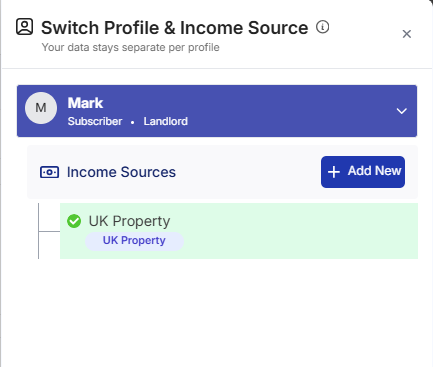
How to add an income source
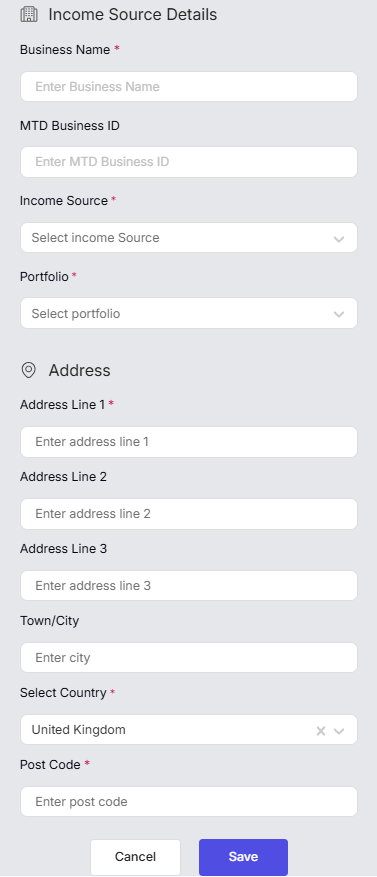
Setting up UK Property income
Once you've added the UK Property income source, RentalBux creates a pre-built chart of accounts aligned with the profile categories you selected for property income. This includes income accounts for rent, service charges, and sundry income, and expense accounts for repairs, insurance, letting agent fees, mortgage interest (adjusted for Section 24), and all other allowable deductions.
You don't need to set up the chart of accounts manually — it's ready to use. Your job is simply to record transactions and let RentalBux map them to the right categories.
Setting up Foreign Property income
Foreign property income is treated separately from UK property income for MTD purposes — HMRC requires separate quarterly updates for each. When you add a Foreign Property income source:
Quick Tip: RentalBux is one of the very few HMRC-recognised platforms that supports Making Tax Digital for foreign property income. If you have overseas rentals and your current software doesn't cover this, RentalBux can handle it.
Setting up Sole Trader income
When adding a Sole Trader income source, you'll be asked to specify your trade type. RentalBux has pre-built charts of accounts for the most common trades:
Construction and trades (plumbers, electricians, builders, decorators)
Professional services (consultants, accountants, solicitors, architects)
Freelance and creative (designers, writers, photographers, developers)
Delivery and transport (couriers, drivers, logistics)
Healthcare and personal services
General business (catch-all for trades not listed above)
Selecting the right trade type means RentalBux pre-populates your expense categories with the allowable deductions most relevant to your business.
If you have more than one income source
This is very common — a landlord-contractor who rents out a flat and also works self-employed as a builder, for example. Simply add both UK Property and Sole Trader as income sources. RentalBux keeps them completely separate:
Separate charts of accounts for each income source
Separate income and expense tracking
Separate quarterly MTD updates generated for each
One dashboard showing everything side by side
This is exactly what HMRC requires — and exactly why generic accounting software falls short. Most tools lump everything together. RentalBux is built to keep rental income and self-employment income correctly separated for MTD.
Can I add income sources later?
Yes, at any time. If you start self-employed work after setting up your rental income, go to Switch Profile > Income Sources > Add Income Source and add Sole Trader. Your existing rental records are unaffected. The new income source will be included in your MTD submissions from the next quarterly period.
Related Guides: |