.jpg&w=64&q=75)
.jpg)
The Tenancies page is your home screen for tenancies. Go to Property > Tenancies to open it. It lists every tenancy you have, active or ended, and is where you start creating a new one.
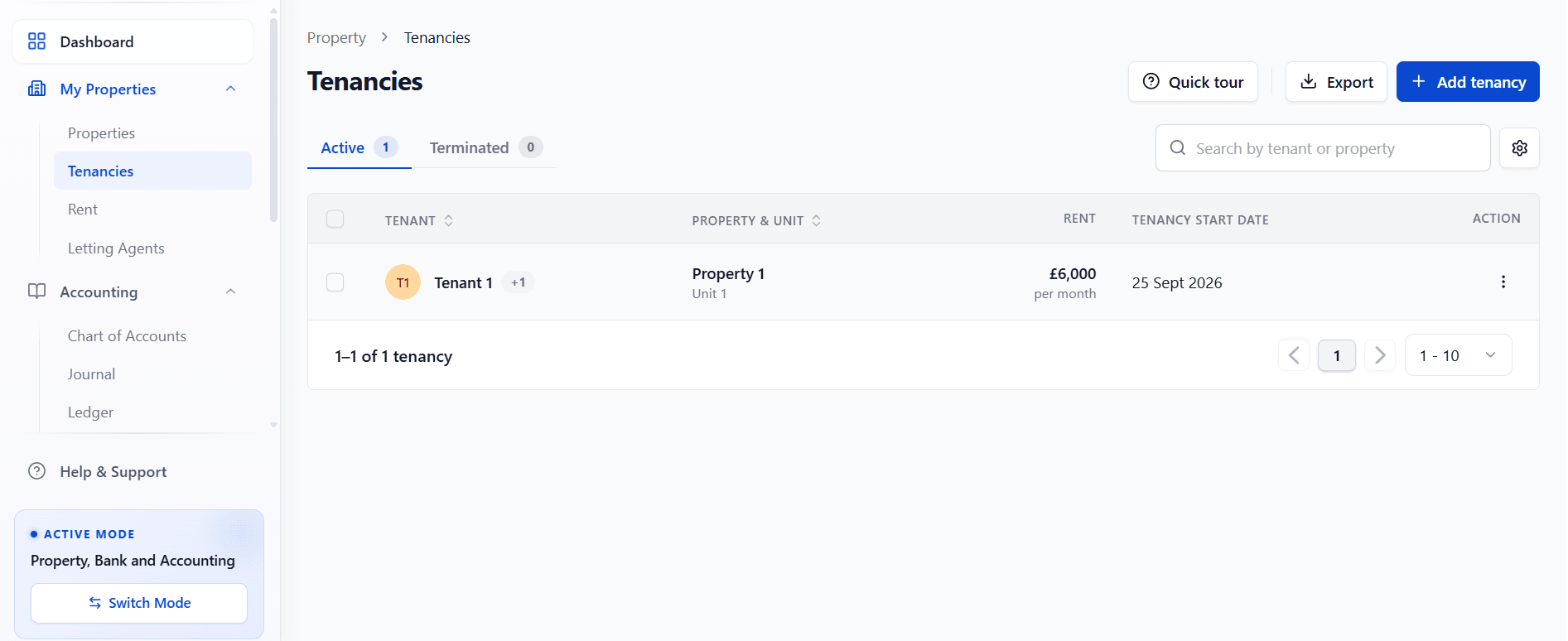
What's On The Page
Active and Terminated tabs, each with a live count of tenancies
A table listing, for each tenancy: the tenant, the property and unit, the rent, and the tenancy start date (or, on the Terminated tab, the date it ended and the reason)
A Search box to find a tenancy by tenant or property
An Export button
An Add tenancy button
Select a row to open that tenancy's full record. Use the action menu (the three dots at the end of a row) to jump straight to increasing the rent or ending that tenancy, without opening the full record first.
Choosing Which Columns Show
Select the settings icon (the gear, next to Search) to show or hide extra columns:
Column | What it shows |
|---|---|
Tenancy type | The tenancy type RentalBux has worked out, e.g. Assured Periodic Tenancy |
Agreement | Whether the tenancy agreement has been signed |
Deposit | The deposit amount and/or its protection status |
Right to Rent | The Right to Rent status for the tenancy, where it applies |
If you manage several tenancies, turn on the Right to Rent column so you can see at a glance which tenancies still need a check.