Free for your first official MTD submission: Register Now!Excellent113 reviews onTrustpilot
All support

On this page

0%

Stuck on MTD?

Talk to a UK MTD expert — 15 min, no sales pitch.

Book a free call

Documents Guide

Written byKarishma 1 (1)Karishma Thapa MagarKarishma 1 (1)Karishma Thapa MagarWritten byKarishma Thapa Magar is an ACCA Affiliate with experience providing UK accountancy and taxation solutions to clients. She brings strong analytical and problem-solving skills to the table and is able to advise landlord and sole trader clients on the upcoming MTD requirements.View profile
Published on: 26 Sept 2026Updated on: 26 Sept 20261 min read
Documents Guide

The Documents tab holds every file relating to the tenancy, organised into folders rather than one long list.

What's there
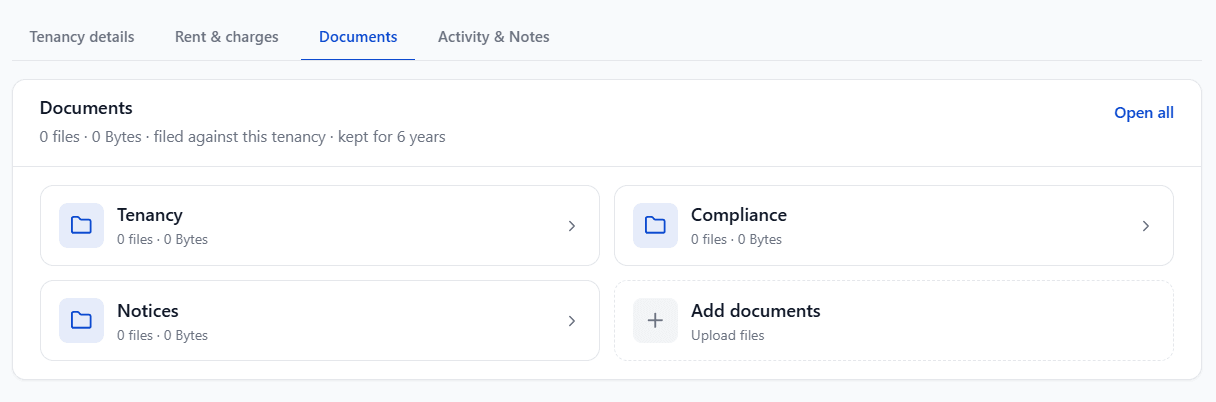
  • A summary line showing the total number of files and their size

  • Folder tiles: Tenancy, Compliance, and Notices, each showing a file count and size

  • An Add documents tile for uploading a new file directly

Select a folder tile to see what's inside it. Select Open all to see everything across every folder at once.

Auto-filing

RentalBux automatically files documents it generates for you agreements, served notices, certificates, the Prescribed Information, Right to Rent evidence into the right folder the moment they're produced or served. You don't need to file these yourself.

Documents are kept for at least six years, in line with normal record-keeping requirements.

Liked this article?

Leave a 30-second Trustpilot review — it keeps us writing.

Found this useful?

Share or cite this article

Copy a ready-made link or markdown snippet to share this article with others.

HTML
<a href="">Documents Guide — RentalBux</a>
Markdown
[Documents Guide — RentalBux]()

See how RentalBux handles your MTD filing end-to-end

Property, self-employment and foreign lets in one submission. No per-filing fees.

About the author