RentalBux supports three types of income for Making Tax Digital. Here's what each one is, why the distinction matters, and how to set them up correctly.
Why HMRC Cares About Income Types
Under Making Tax Digital, HMRC doesn't just want to know how much you earn — they want to know what type of income it is. Different income types have different tax rules, different reporting requirements, and different deadlines.
RentalBux supports the three income types that most landlords and self-employed people need:
UK Property Income
Foreign Property Income
Self-Employment Income
Each one is set up as a separate "income source" in your RentalBux profile, and each generates its own line items in your MTD submissions.
UK Property Income
What counts: Rent from properties you own in the United Kingdom — England, Scotland, Wales, and Northern Ireland.
This includes:
Monthly residential rent
Commercial property rent
HMO room rents
Holiday let income (subject to specific rules)
Income from land rentals (e.g., parking spaces)
How to set it up: When you add a UK property to your portfolio, RentalBux automatically assigns its income to your UK Property income source. You don't need to do anything extra.
MTD treatment: Your quarterly submissions to HMRC include a summary of UK property income and expenses. All UK properties are combined into one submission total.
Foreign Property Income
What counts: Rent from properties you own outside the United Kingdom.
This includes rental income from properties in Europe, the Americas, Asia, Africa, Australasia — anywhere that isn't the UK.
How to set it up: When you add an overseas property to your portfolio and select "Foreign Property" as the income type, RentalBux assigns its income to your Foreign Property income source.
MTD treatment: Foreign property income and expenses are reported separately from UK property in your MTD submissions. They appear as a distinct category so HMRC can see which income comes from where. This matters because foreign income may be subject to double taxation relief, and HMRC needs to distinguish it for their calculations.
Note: RentalBux is one of very few HMRC-recognised platforms that supports foreign property MTD filing. Most competitor platforms only handle UK property.
Self-Employment Income
What counts: Income from self-employment — running your own business, freelancing, consulting, or any trade you carry on as a sole trader.
This is NOT property income. It's the income from your business activities. However, if you're both self-employed and a landlord, you need to report both through MTD, and RentalBux can handle them together.
How to set it up: In your profile, add a Self-Employment income source. Enter your business name, and the type of trade. Income and expenses for your self-employment are tracked separately from your property finances.
MTD treatment: Self-employment income has its own quarterly summaries. Your MTD submissions include separate sections for property income and self-employment income.
How to Configure Income Sources in Your Profile
Go to Switch Profile on the top right corner of Dashboad> Income Sources (or follow the setup prompt in your profile)

Click Add New next to Income Sources
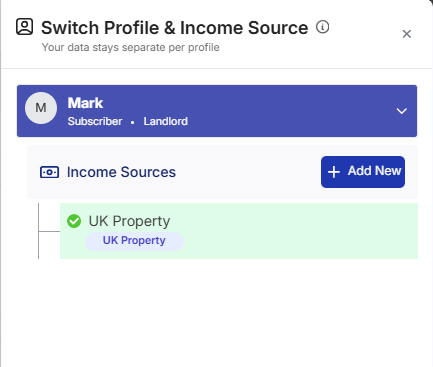
You'll see options to select:
UK Property Income
Foreign Property Income
Self-Employment Income
Fill in the required details (you'll be prompted for different information depending on the type)
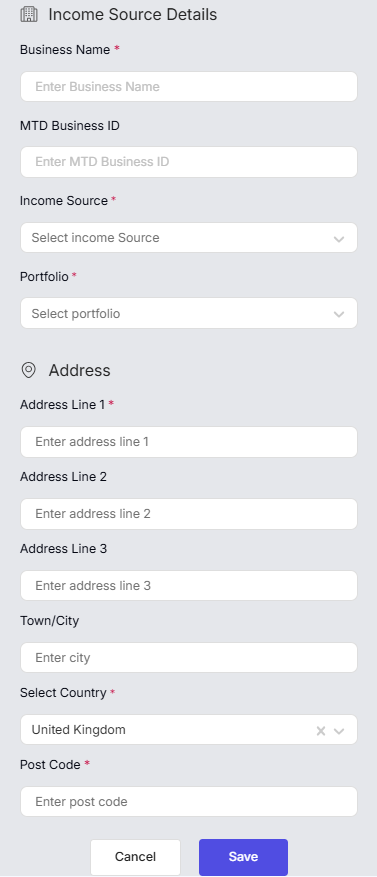
Click Save
Most landlords only need UK Property Income. Add the others only if they apply to you.
Which RentalBux Plan Do I Need?
Free plan — One UK/Foreign property unit income source
Landlord plan (£4.50/mo) — UK property and foreign property, multi-property units, joint ownership
Sole Trader plan (£5.75/mo) — Self-employment income
Hybrid plan (£9.75/mo) — All three income types combined
If you only have rental properties, the Free or Landlord plan is right for you. If you add self-employment or overseas properties, you'll need the Sole Trader or Hybrid plan.
FAQ Section
Related guides:
|