The General Ledger is the master record of every financial transaction in your RentalBux account. Everything you've ever invoiced, every bill you've recorded, every bank transaction you've reconciled — it's all here, organised by account, with every debit and credit visible. It sounds technical but it's actually one of the most useful tools in the platform.
What the General Ledger shows you
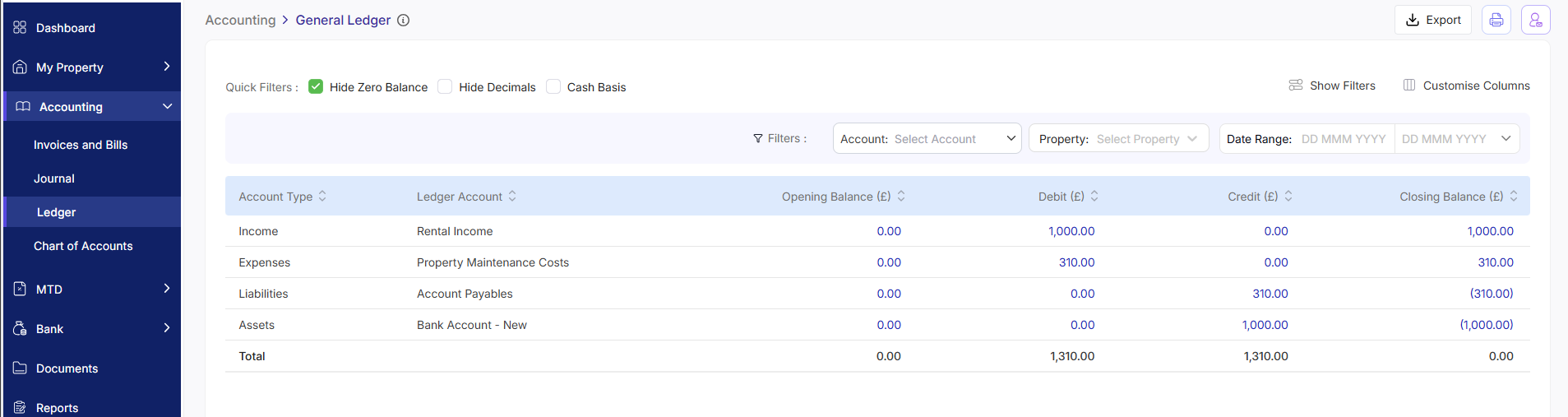
The General Ledger displays all transactions grouped by account. For each transaction, you can see:
Account Type
Opening Balance
Debit amount (money going out of that account)
Credit amount (money coming into that account)
The closing balance for that account after each transaction
When you'd use the General Ledger
Most landlords look at the General Ledger in three situations:
Investigating a discrepancy — if a report shows an unexpected figure, the ledger lets you trace it back to the exact transaction that caused it
Providing your accountant with transaction detail — the ledger export gives them every line behind your income statement
Reviewing a specific account — for example, checking all entries to your 'Repairs and Maintenance' account for the year
How to use the General Ledger in RentalBux
Quick Tip: The General Ledger export is the single most comprehensive document you can give your accountant at year-end. It contains everything they need to verify your income statement and prepare your Self Assessment or Final Declaration.
Understanding debits and credits
If you're not familiar with double-entry bookkeeping, the debit/credit columns can look confusing. Here's the simple version:
Account type | Debit means... | Credit means... |
|---|---|---|
Bank / Cash | Money coming in (receipt) | Money going out (payment) |
Income (e.g. Rent Received) | A reduction in income (unusual) | Income being recorded |
Expense (e.g. Repairs) | An expense being recorded | A reduction in expenses (refund or reversal) |
In practice, you never need to think about debits and credits directly — RentalBux handles all of that automatically when you create invoices, bills, and bank reconciliation entries. The ledger is simply there to show you the result.
Related Guides: |