

Compliance certificate tracking
Landlord Compliance Tracking
Every Certificate, Every Renewal Date, One Dashboard
RentalBux gives landlords one place to store property compliance certificates, see which are valid, expiring or expired, and manage the key certificates that relate to each tenancy. Property and tenancy compliance are kept separate, so you can see what belongs to the property, what needs attention and what needs to go to a tenant.
- Keep important compliance dates visible
- See what needs attention at a glance
- Keep certificates organised by property and tenancy
Four Areas, Each With Its Own Job
A rental property collects certificates that renew on different cycles, tenancy documents to provide, and records that have nothing to do with expiry dates. RentalBux doesn't lump them into one list. It combines document storage, compliance tracking, expiry visibility, tenancy-specific handling and sharing options.
Property
Track Certificates
Property certificates and their valid, expiring or expired status.
Store the Property Record
Organised folders for compliance, tenancy and purchase & finance files.
Tenancy
Manage Tenancy Certificates
EPC, Gas Safety Record (CP12) and EICR, tracked against the tenancy.
Keep Everything Else Filed
Other tenancy files and notices, stored against the right tenancy.
What Landlords Say About RentalBux
ExcellentTrustScore 4.7 out of 5 based on 131 reviews★TrustpilotExcellent Customer Support
Overall the product seems easy to use and support my requirements well as a landlord. I did have some initial issues and questions, but these were all addressed and resolved promptly by the support team
Simple to use product that was…
Simple to use product that was explained really well, with great follow up support.
Rentalbux MTD solution
The Rentalbux MTD solution works well and their technical support is excellent.
Showing selected 5-star reviews from Trustpilot. TrustScore and review count as of 17/11/2026. See all 131 reviews on Trustpilot
Keep Property Compliance in One Place
Every property in RentalBux has a dedicated Compliance tab. Add the certificates and records relevant to that property, record their dates and see the current status of each in one view.
Not every certificate type applies to every property. You add what's relevant, and the tab shows that property's compliance picture.
- Add compliance certificates and records to a property
- Record expiry and renewal dates
- See the current status of each item at a glance
- Identify certificates approaching expiry or already expired
See What Is Valid, Expiring or Already Expired
Each compliance item shows a visible status inside the platform, so you can see where things stand without opening every document and checking dates yourself.
Valid
The certificate is current. For example, an EICR that remains valid for years to come.
Expiring Soon
The renewal date is close, shown as the number of days remaining so you can act on it.
Expired
The expiry date has passed, so the item stands out rather than waiting to be found.
Status indicators appear in each property's Compliance tab and give you a current view whenever you log in.
Property Compliance and Property Documents Work Together
Each property has both a Compliance tab and a Documents tab because they do different jobs. Separating them keeps your tracking view uncluttered, while purchase paperwork, mortgage documents and older records stay safely filed against the property.
Track Compliance Against the Tenancy Too
Every tenancy has its own Compliance section. RentalBux's tenancy compliance workflow gives dedicated tracking to core property certificates such as the EPC, Gas Safety Record (CP12) and EICR that may need to be provided to tenants as part of the applicable compliance process.
For each one, you can see whether it has been uploaded and shared, and whether action is still required. You don't have to work out which certificate went to which tenant.
The section also includes items such as Right to Rent and the Written Statement of Terms. The EPC, CP12 and EICR are the focus of certificate tracking in the tenancy workflow, not an exhaustive list of what may apply to a tenancy.
Need to Store Something Else? Use Tenancy Documents
Not every tenancy file needs its own compliance workflow. Each tenancy has a Documents tab for everything else, such as supporting correspondence, notices and other paperwork, all filed against the right tenancy.
Dedicated compliance tracking stays intentionally focused, while Documents stays flexible.
- Tenancy Compliance
- Track a core certificate and whether it has been shared.
- Tenancy Documents
- Keep an important tenancy file safely organised.
See Every Property's Certificates in One Report
Alongside the Compliance tab on each property, the RentalBux Reports area includes a Compliance Certificate Expiry report. It brings the Gas Safety, EICR, EPC and HMO licence position for every property into one summary, with a colour-coded countdown to expiry.
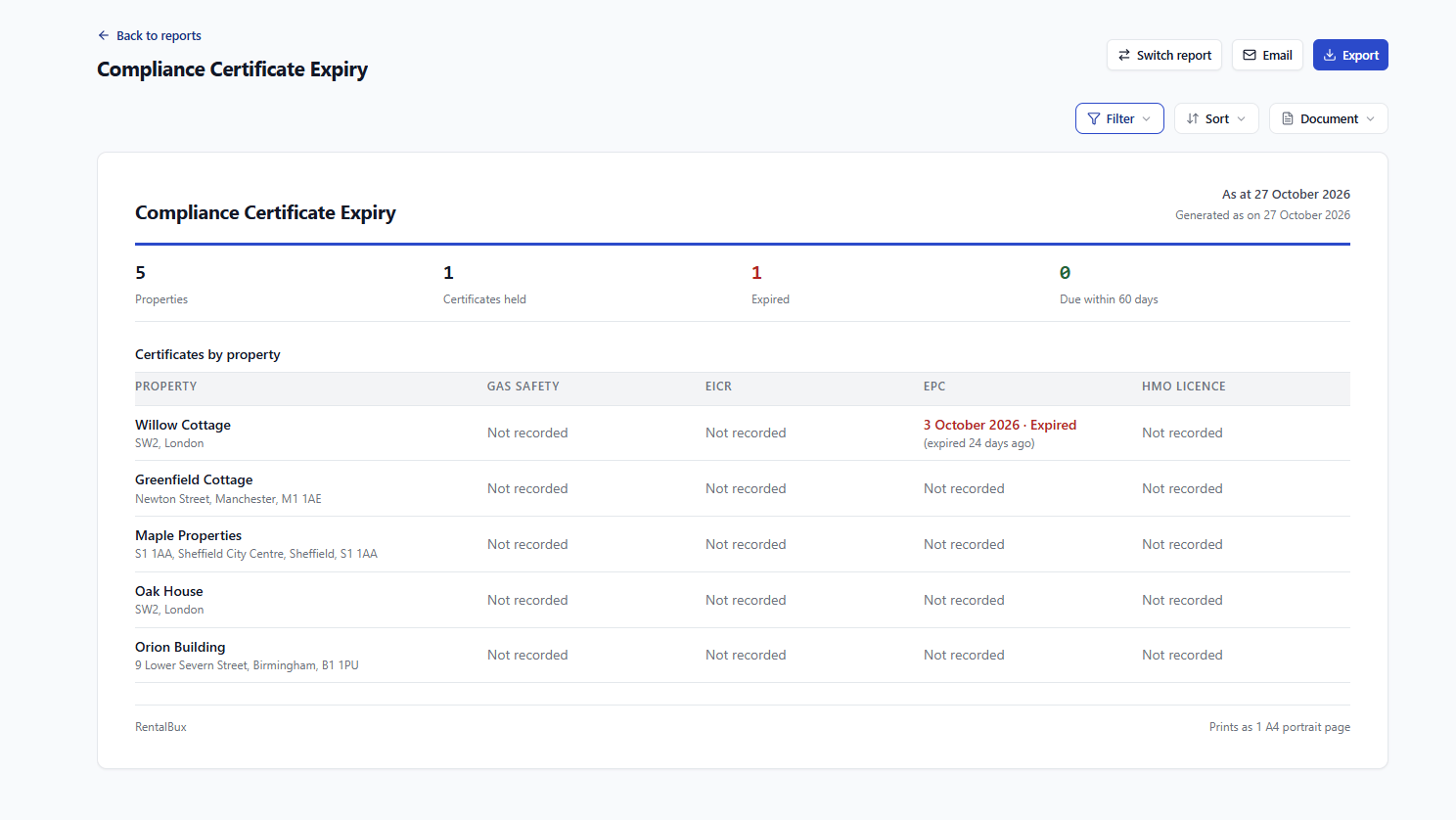
- Summary at a glanceA summary of properties, certificates held, expired and due within 60 days
- Gaps made visibleCertificates by property, with gaps shown as Not recorded
- Lapsed dates flaggedExpired certificates show how long ago they lapsed
- Filter, sort and shareFilter, sort, email or export the report, laid out to print on A4
Built for Landlords Managing More Than One Property
With one property, you might manage certificate dates from memory. With several, you have different expiry dates, different tenants and different sets of documents, and spreadsheets and scattered folders become hard to rely on.
RentalBux applies the same structure to every property and every tenancy, so you always know where to look and what you'll find.
- Every property
- Its own Compliance and Documents tabs.
- Every tenancy
- Its own Compliance and Documents sections.
- Every certificate
- Its own visible status: valid, expiring or expired.
Frequently Asked Questions
How compliance certificate tracking works in RentalBux.
You can track a range of property compliance certificates and records, including Gas Safety certificates (CP12), EICRs, EPCs, HMO and selective licences, fire risk assessments, Legionella assessments, PAT testing, asbestos surveys, and smoke and CO alarm records. Each is added to the property's Compliance tab, where its status is shown.
Yes. Each certificate in a property's Compliance tab shows a visible status: valid, expiring (for example, "expires in 2 days") or expired. You can see which certificates need attention without opening each document or checking dates manually.
The Compliance tab is for actively tracking certificates and their validity and expiry status. The Documents tab is broader organised storage, with folders such as Compliance, Tenancy and Purchase & finance. Keeping them separate keeps your tracking view focused while other records stay filed against the property.
Yes. Every property has its own Compliance tab, so certificates, expiry dates and statuses are tracked property by property. Landlords with several properties can see each one's compliance position without certificates from different addresses being mixed together.
Yes. Each tenancy has its own Compliance section, which gives dedicated tracking to the EPC, Gas Safety Record (CP12) and EICR. RentalBux shows whether each has been uploaded and shared, and whether action is still required, so you can see which certificates relate to which tenancy.
Once a certificate has been uploaded and managed against the tenancy, you can choose to provide it to the tenant by email, first-class post or hand delivery. The tenancy Compliance section then shows which documents have been shared and which still need action.
Yes. Each tenancy has a separate Documents tab with folders for Tenancy, Compliance and Notices, plus an Add documents option. You can store additional tenancy files there, even when they aren't among the certificates tracked in the tenancy Compliance workflow.
Bring Your Certificates, Tenancies and Documents Together
Stop managing certificate dates, tenancy compliance and property documents across disconnected folders and spreadsheets. RentalBux keeps them organised by property and by tenancy, and shows you at a glance what needs attention.