
Bank Reconciliation Software Built for UK Landlords
RentalBux brings your bank activity and rental bookkeeping together. Connect a bank feed or add accounts manually, match transactions to your bills and invoices, and see straight away what still needs your attention.
Reconcile multiple transactions, split payments across properties or expense categories, and manage overpayments and underpayments without unnecessary manual work. Keep personal spending separate from rental records, track bank, credit card and cash accounts in one place, and easily correct reconciliations when needed.
What Landlords Say About RentalBux
ExcellentTrustScore 4.7 out of 5 based on 131 reviews★TrustpilotExcellent Customer Support
Overall the product seems easy to use and support my requirements well as a landlord. I did have some initial issues and questions, but these were all addressed and resolved promptly by the support team
Simple to use product that was…
Simple to use product that was explained really well, with great follow up support.
Rentalbux MTD solution
The Rentalbux MTD solution works well and their technical support is excellent.
Showing selected 5-star reviews from Trustpilot. TrustScore and review count as of 17/11/2026. See all 131 reviews on Trustpilot
See All Your Bank Accounts in One Place
Rent accounts, credit cards, cash and personal accounts sit on one dashboard, so you never need a separate bookkeeping file for each account.
Every account gets its own card. Bank feed cards show balances, the difference and transactions to review, and manual accounts sit alongside, ready for statement imports.
- Business and Personal, Kept ApartRental accounts sit under Business and personal ones under Personal, so you only reconcile what belongs to your rental activity.
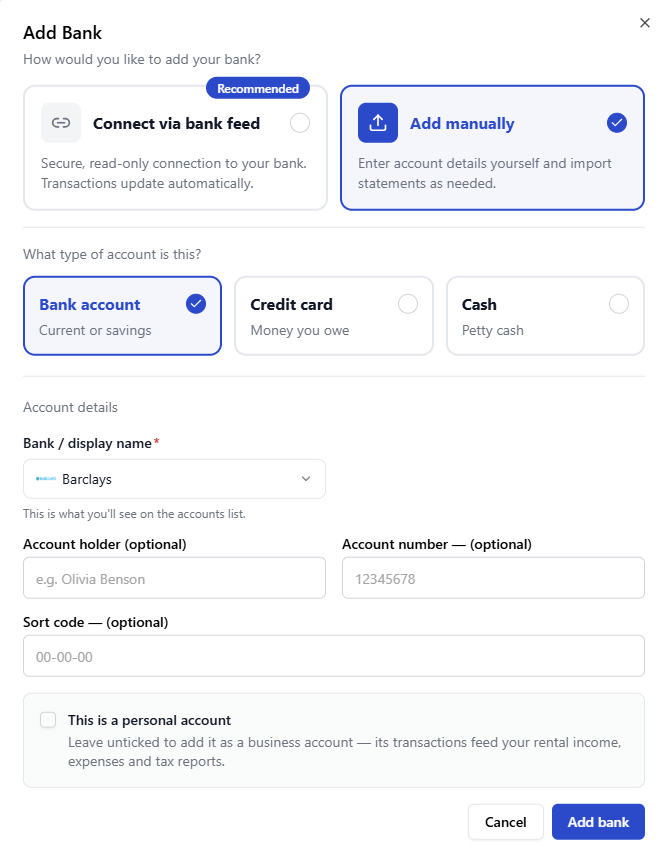
Connect Your Bank or Add It Manually
Two ways to add an account. They work differently, so you can choose the one that suits each account.
Can I connect my bank? RentalBux supports bank feed connections with more than 50 banking providers, giving landlords a broad range of connection options. Check the connection screen for your provider when you add the account.
Manage Bank, Credit Card and Cash Accounts
Property money does not always move through a current account. When you add an account manually, you choose what kind of account it is.
If a boiler repair goes on a credit card, it belongs to that card, not your rent account. Setting up each source as its own account keeps every transaction in the right place and easier to reconcile.
See Exactly What Still Needs Reconciling
Three figures on every bank feed account tell you whether your RentalBux records agree with your bank.
Each card also shows how many transactions need review and the sync status of the feed, so you know you are looking at current activity. Select Review & reconcile to work through those transactions in one place.
- Aim for a Difference of £0.00When the difference reads £0.00, the bank balance and the RentalBux balance being compared agree at that point. If there is a difference, the transactions waiting for review are usually the place to start.
A zero difference shows the balances agree. It does not confirm that every transaction is in the right category, that every expense is allowable for tax or that a tax return is correct.
Match Bank Transactions to Invoices and Bills
If you already record income and expenses in RentalBux, you should not have to enter them again when the money moves.
When you reconcile, RentalBux compares bank transactions with the invoices and bills you have already created. Create a £500 bill for a gas safety inspection, and when a £500 payment appears, RentalBux can match the two.
Transactions without an exact match stay in your review list for you to match, split or allocate.
What Automated Bank Reconciliation Means for a Landlord
Less searching
Find what a payment relates to without digging through records.
No double entry
Income and expenses you have already recorded are not keyed in again.
Faster matching
Banking activity lines up with your existing records quickly.
Clear next steps
See exactly which transactions still need your attention.
Reconcile Multiple Transactions Together
A busy month across several properties means a long list of transactions. Select the ones you want and deal with them as a group.
Tick the transactions you want in the To reconcile list. RentalBux shows how many are selected, their net total and the total spent and received, so you can check the group before you act. Then select Review & reconcile to work through them in one go.
Choose What to Do with the Selection
Handle Overpayments and Underpayments
A bank transaction does not have to match an invoice or bill exactly for you to carry on reconciling it.
Open Reconcile manually on a transaction, pick the records it settles and set how much goes to each. Split it equally, proportionally or in order.
If the payment is larger, RentalBux flags the surplus. Hold it as an advance on the contact’s account, post it as an adjustment, or raise a new bill for the difference.
- Bill in RentalBux
- £5,590.00
- Bank payment
- £9,600.00
- Surplus
- £4,010.00
If the payment is smaller, RentalBux flags the shortfall. Record it as a part payment, so the record stays partly paid until the rest is settled, or post the difference as an adjustment to close it.
- Rent record in RentalBux
- £12,477.00
- Bank payment
- £7,500.00
- Shortfall
- £4,977.00
Split One Transaction Across Properties or Categories
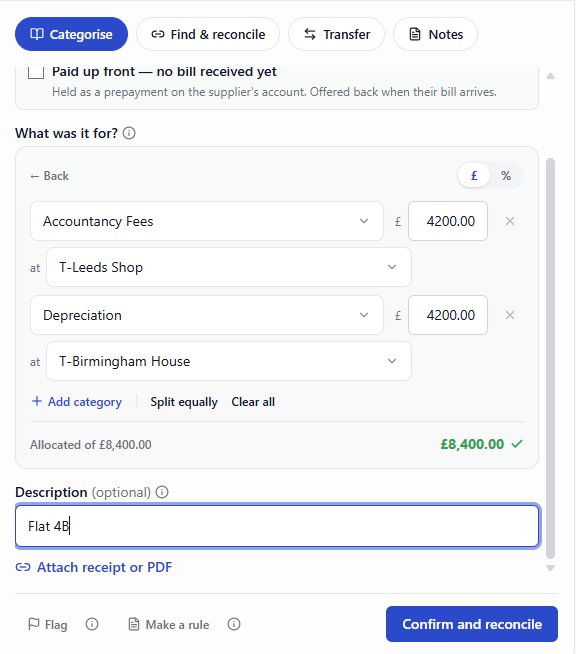
One bank payment often covers more than one thing. Split it during reconciliation so your records show what it was really for.
- Split by Accounting CategoryA single payment can relate to more than one type of income or expense. Use the Split option to divide the amount across the right categories, rather than putting the whole payment under one heading.
- Split by PropertyA transaction can also be allocated across more than one property. If you pay £8400 for costs shared equally by two properties, each property carries £4200.
Without a split, the full amount would sit against one property, making it look more expensive and the other look cheaper than they really are.
Keep Personal Spending Away from Rental Records
If you use the same account for rent and everyday spending, the weekly shop and the gas safety certificate arrive side by side. Move personal items out of the way.
Move personal transactions to a Personal account. They then stay out of your business records, the business account’s reconciliation and the MTD reporting in RentalBux, which can support the digital record keeping required for MTD for Income Tax.
- Record Transfers Between Your Own AccountsChoose Transfer, then Between my own accounts, and pick the destination. You can also pay a joint owner their share of the rent.
Marking something as personal is a bookkeeping choice, not a tax decision. If you are unsure, check with your accountant.
Correct a Reconciliation If Something Was Matched Incorrectly
You are not locked into a reconciliation once it is done.
You might match a payment to the wrong bill, or realise later that a cost should have been split between two properties.
Open the Reconciled tab, choose Revert reconciliation from the transaction’s menu and confirm. The transaction moves back to To reconcile and the journal it posted is reversed, so you can reconcile it again correctly.
What to Look for in Bank Reconciliation Software
If you are comparing options for the best bank reconciliation software for your portfolio, these practical questions help.
RentalBux is built to answer yes to each of these for UK landlords.
Frequently Asked Questions
Common questions from landlords about reconciling bank accounts in RentalBux.
Bring Your Bank Accounts and Rental Bookkeeping Together
Add your accounts to RentalBux, connect a bank feed or import your statements, and see what still needs reconciling from one dashboard.