Joint Ownership? Here's How to Split the Money Fairly: Complete Guide to Profit Sharing in RentalBux
When you own a rental property with other people, like your husband, wife, family members, or friends, you need a simple way to share the money you earn and the bills you pay. RentalBux does all the math for you, so everyone knows exactly what they are making, and you can all file your taxes correctly.
What Does Joint Ownership Mean?
It simply means more than one person owns the property together. When rent comes in or you pay for repairs, the money needs to be divided up based on who owns what percentage. For example, if you own 60% and your sister owns 40%, you get 60% of the rent and pay 60% of the bills. This ensures each co-owner can accurately report their share of rental profits to HMRC for tax purposes, meeting Making Tax Digital requirements.
Who Needs This?
This feature helps if you:
- Own a rental house with your spouse or partner
- Bought a property together with family members
- Went in on an investment property with friends
- Inherited a property with your brothers or sisters
- Share ownership with business partners
The Problem
Without this, you'd have to manually figure out everyone's share every month using spreadsheets or calculators. It's time-consuming, confusing, and easy to make mistakes. Plus, everyone needs to report their own portion to the tax office.
How to Set This Up in RentalBux
Create Your Owner Group
First, tell us who owns the property together:
- Go to the My Property section
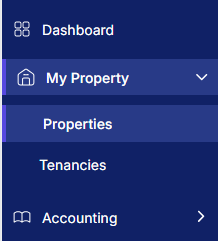
- Click Your Portfolio

- Click Add Portfolio

- Fill in these simple details:
- Portfolio Name: Give it an easy name like Me & John's Property or Smith Family House
- How Many Owners: 2 people? 3 people? Tell us how many.
- Everyone's Share: Who owns what? Like 50% each, or maybe 60% you and 40% them. Whatever the actual ownership is.
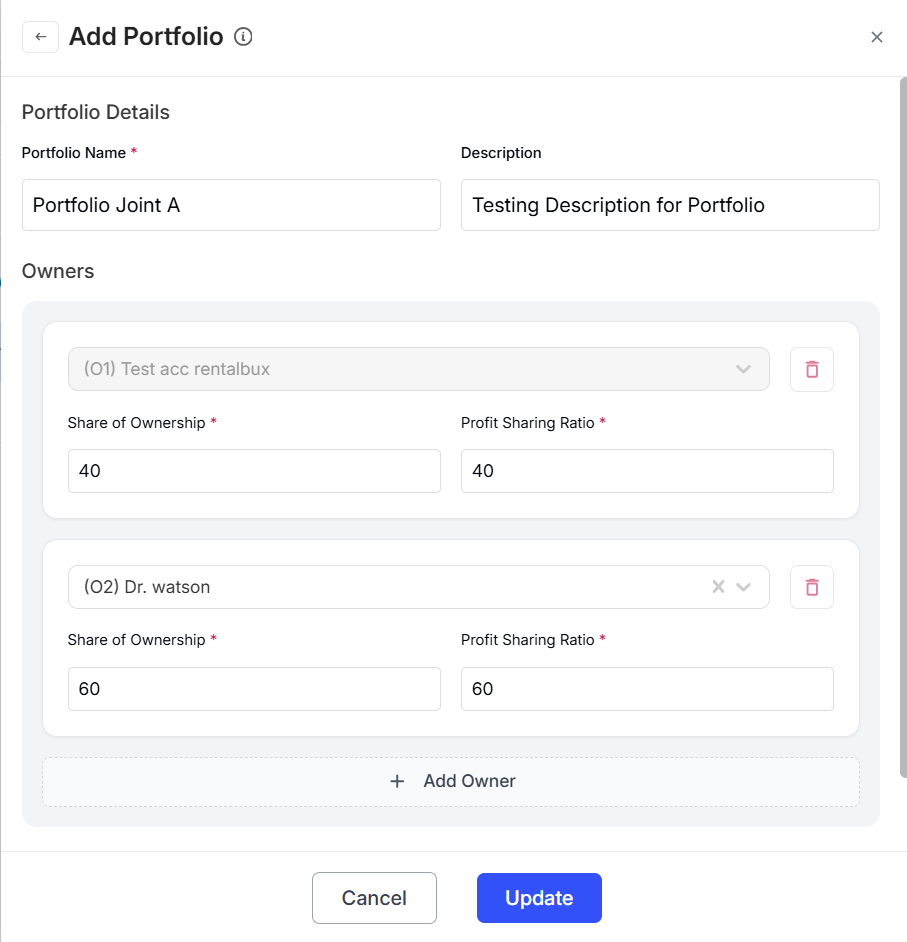
✓ Quick Tip: Use simple names you'll remember. This is just for your reference.
Add Everyone's Details
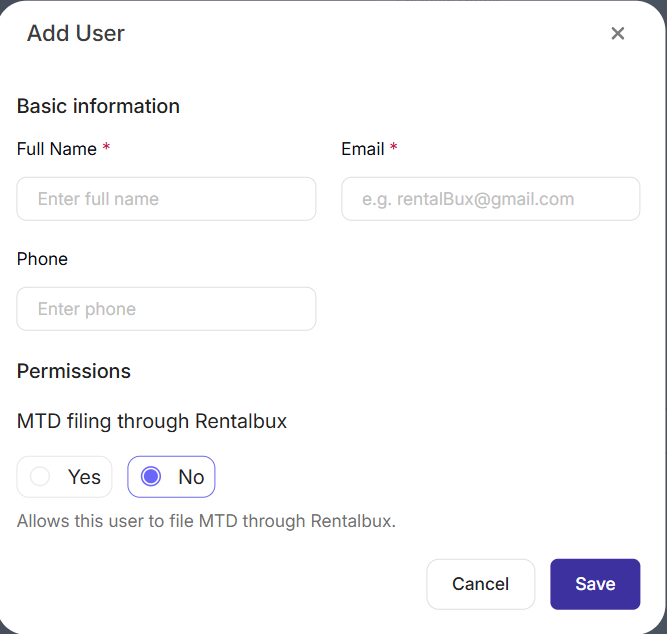
For each person who owns part of the property, add:
- Their name
- Their email address
Important Choice:
Does this person need to file their own MTD submission using RentalBux?
- Say YES if: They want to log in, see their numbers, and send their own MTD information. We'll send them an email to create a password.
- Say NO if: They just need to be listed but don't want their own login.
Click Save when you're done.
Connect Your Property
Now tell the system which property belongs to this owner group.
If You're Adding a New Property:
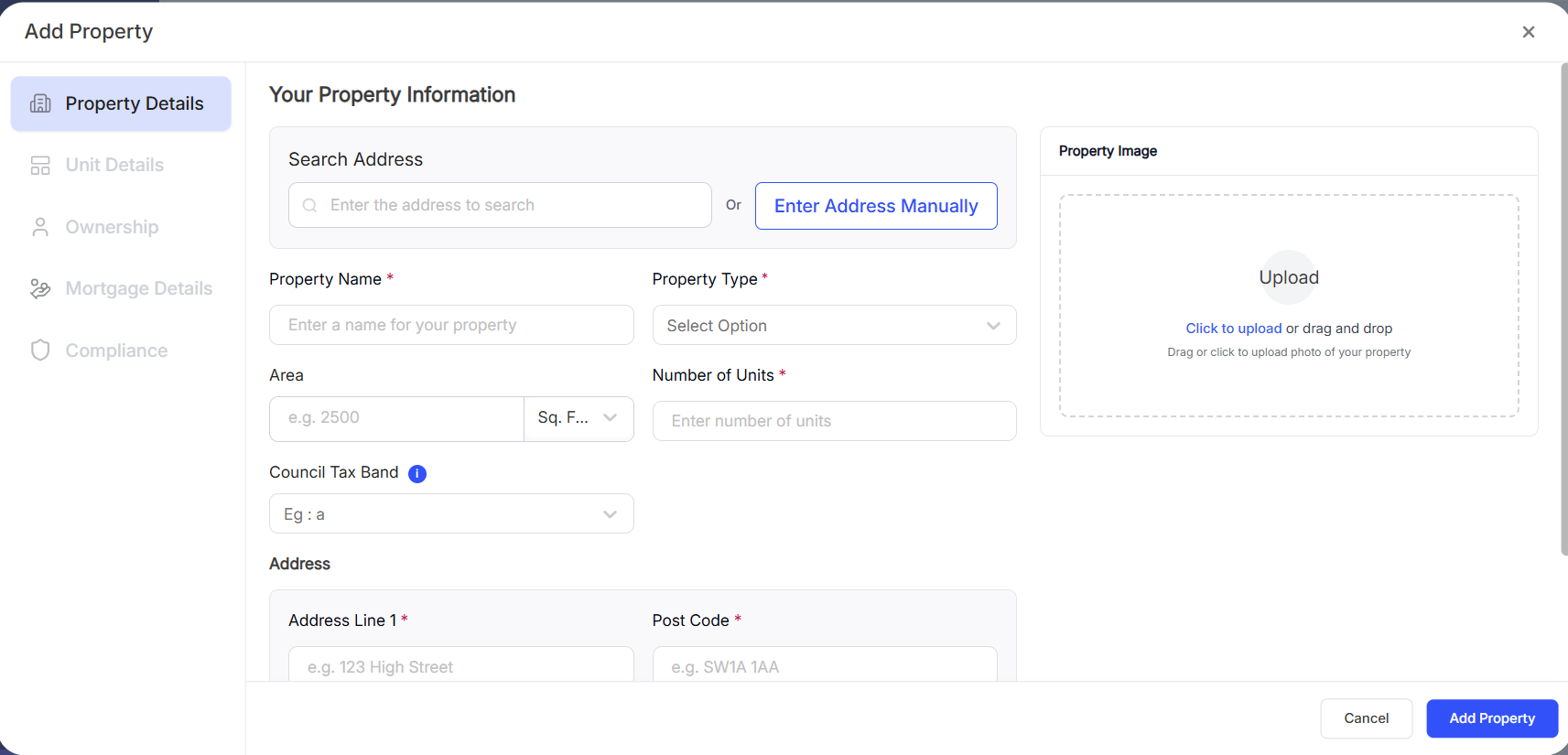
- Click Add a New Property from the My Property section
- Fill in the basics (property name, type, address, etc.)
- When you get to the Ownership tab
- Click Select Ownership
- Choose the portfolio you just made
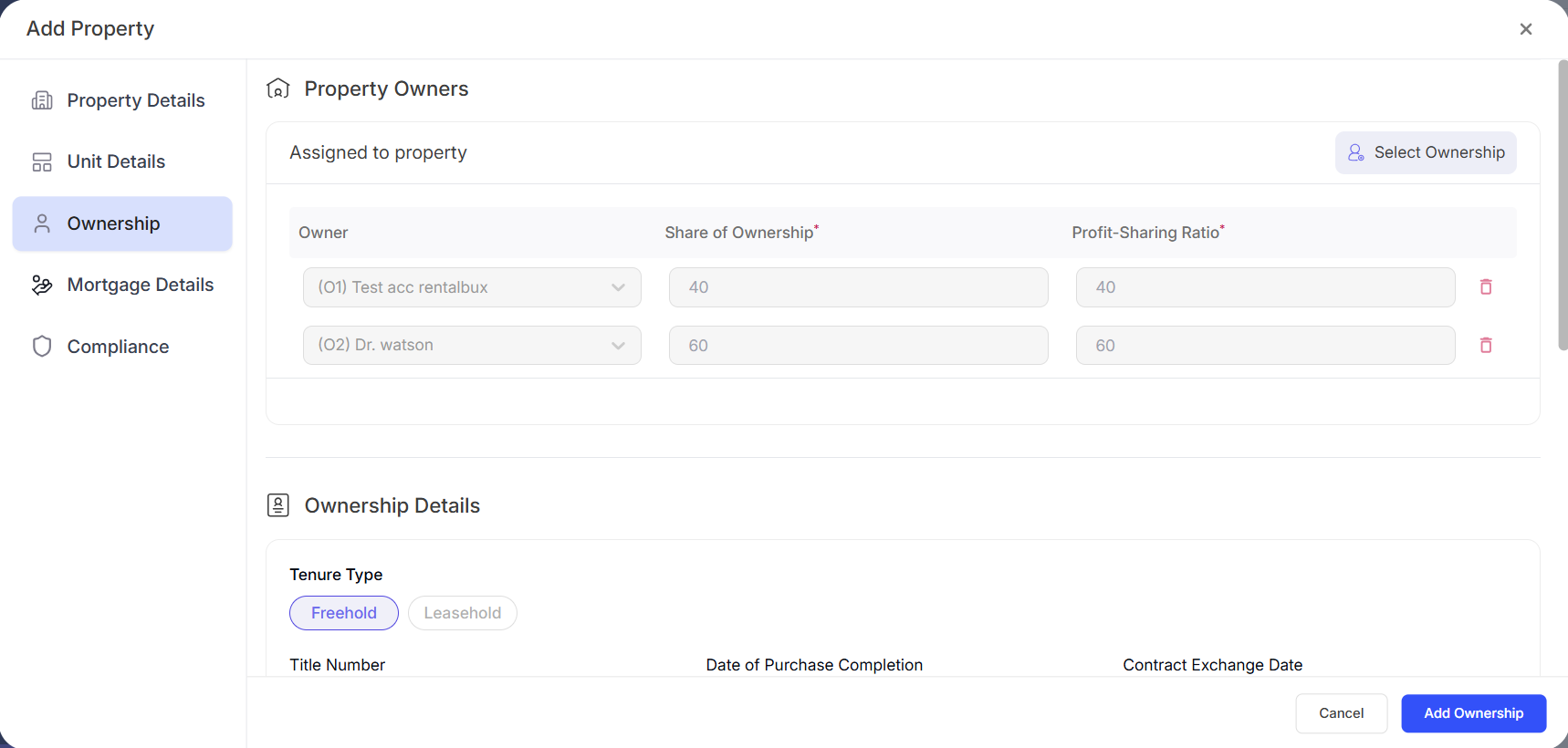
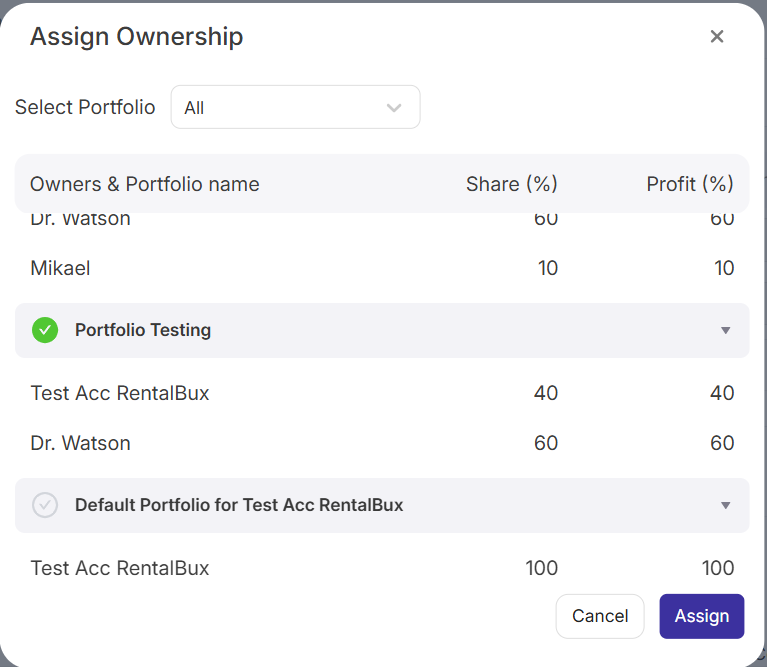
- Click Save

If the Property is Already in RentalBux:
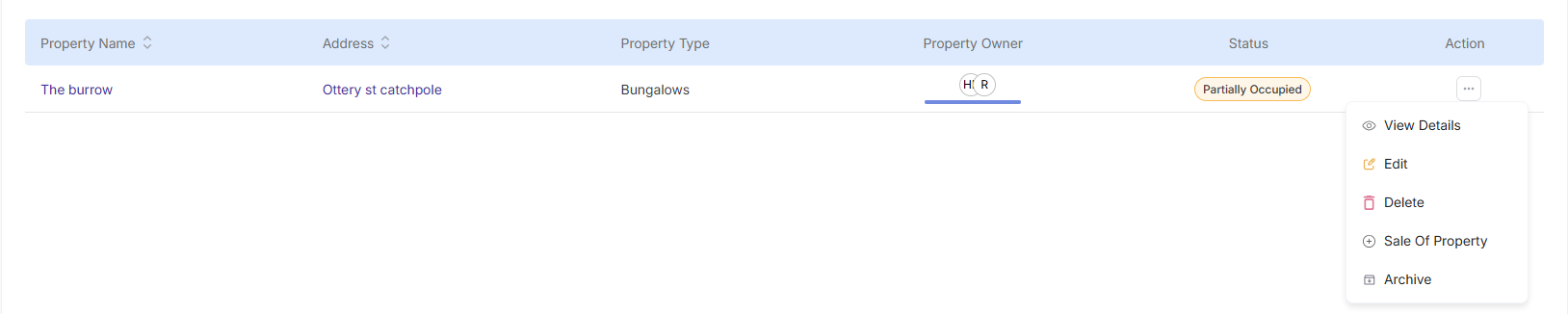
- Find the property in your list
- Click the edit button
- Go to the Ownership tab
- Click on Select Ownership
- Pick your Portfolio
- Click Save
✓ You're All Set! Everything will now be split automatically.
What Can Other Owners See?
If you gave someone their own login, they can:
- See the property details
- Check their share of the rent money coming in
- View their portion of expenses (repairs, insurance, etc.)
- See how much profit they're making
- MTD reporting access to the shared property
Privacy: Don't worry; everyone only sees their own information. Other owners can't see each other's personal details or tax information.
A Simple Example
Let's Say:
- You and your friend each own 50% of a house you rent out
- Tenants pay £1,000 in rent each month
- Your bills (repairs, insurance, etc.) are £200 per month
| What Happens | The Money |
|---|---|
| Total rent collected | £1,000 |
| Total bills paid | £200 |
| Your share of rent (50%) | £500 |
| Your share of bills (50%) | £100 |
| What you make this month | £400 |
Your friend's numbers are exactly the same: £500 rent minus £100 bills = £400 profit. You both can log in, see your £400, and get your MTD submissions ready. No calculators needed!
Benefits of Automated Joint Ownership
Once configured, RentalBux automatically:
- Splits rental income proportionally between all co-owners based on their ownership percentage
- Allocates expenses to each owner's account
- Calculates net profit for each co-owner automatically
- Generates individual MTD reports for each owner to submit to HMRC
- Provides real-time dashboards showing each owner's share of property performance
- Maintains audit trails for all transactions and calculations
Time Savings: Eliminate manual spreadsheet calculations and reduce accounting time by up to 90%.
Frequently Asked Questions About Joint Ownership
Yes, RentalBux supports any ownership split. Common examples include 60/40, 70/30, or even multi-way splits like 50/25/25. The system automatically calculates income and expense allocations based on your specified percentages.
No. When setting up co-owners, you choose whether each person needs login access. If a co-owner doesn't need to submit their own MTD reports, they can be listed without an account. You can then manually provide them with their profit-share information.
Each co-owner can generate their individual MTD-compliant tax report showing only their share of rental income and expenses. This ensures accurate reporting to HMRC and simplifies the self-assessment process for all property owners.
Absolutely. Create separate portfolios for different ownership groups. For example, you might have one portfolio with your spouse (Property A and B) and another portfolio with business partners (Property C and D). Each portfolio can have different co-owners and ownership percentages.
Yes. By default, HMRC assumes married couples split rental income 50/50. If you've completed Form 17 to declare a different split (based on actual ownership), enter the correct percentages in RentalBux. The system will calculate profit shares accordingly for accurate tax reporting.
Why This Matters for Shared Property Owners
When you own property with others, you need to:
- Report your share to the tax office: Everyone files their own tax return showing only their portion
- Keep records: The tax office might want to see your calculations later
- Send updates regularly: Usually every three months (quarterly)
- Make sure the math is right: Mistakes can cause problems with taxes
Good News: RentalBux keeps all the records, does all the calculations, and creates the reports. You just need to look at the numbers and submit them.
Ready to Get Started?
Setting this up is quick and easy:
- Log into RentalBux (or create a free account if you don't have one)
- Create your Portfolio group — Takes about 1 minute
- Add everyone's information and choose who needs a login
- Connect your property to that group
- Done! From now on, all the splitting happens between owners automatically
Need Help?
We are here if you need us:
- Click the Help button in the app
- Email our support team
- Watch our step-by-step video
- Browse our help articles
Once you set this up, you will never have to manually calculate who gets what again. No more spreadsheets, no more arguments, no more confusion at tax time. Everyone knows exactly where they stand, and filing taxes becomes simple.