


RentalBux doesn't just store your financial data — it turns it into useful reports you can act on. Whether you want to see how a specific property is performing, check your overall portfolio yield, or prepare a clean export for your accountant, the Reports module has you covered.
Generating your most-used reports
1
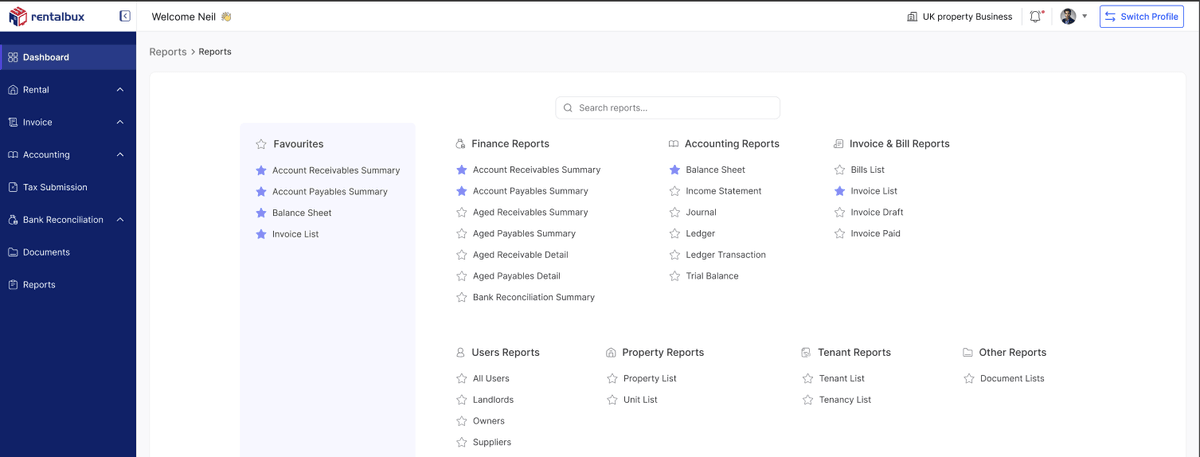
Go to Reports on the sidebar
2
Select the report you want to see
3
Choose the date range (typically the current or previous tax year)
4
The report shows your required information
5
Click Export to save as PDF or CSV or XLS
Sharing reports with your accountant
If your accountant has access to your RentalBux account, no need for you to generate and email files. If they don't have account access, export the reports yourself and share them. The standard set your accountant will want at year-end:
Income Statement for the full tax year (CSV format)
General Ledger export for the full tax year (CSV format)
Bank Reconciliation confirmation for each period
How to invite your accountant
1
Go to Settings > User Management
2
Click Add User
3
Enter your accountant's details and email address
4
Select Role and choose Accountant
5
Click Save. They'll receive an email with login instructions
Related Guides: |