
.jpg&w=64&q=75)
Right now, thousands of UK landlords are stuck in the same old routine: sifting through crumpled receipts, digging through bank statements, and piecing together a year’s worth of rental income and expenses just to meet the January Self-Assessment deadline. For many, tax reporting has been a once-a-year headache, something to endure and then forget until the next deadline looms.
But this familiar yet chaotic routine is about to change. Making Tax Digital for Income Tax (MTD ITSA) is replacing the annual Self-Assessment with a fundamentally different system for landlords and sole traders. In this guide we would go through how to prepare for making tax digital as a landlord. Landlords will now keep digital records in real time, submit quarterly updates, and finalise their tax position through a Final Declaration using government-recognised software.
Card Header
Key Preparation Steps
Check your MTD threshold to understand when compliance becomes mandatory for your situation
Select appropriate software or bridging tools that match your technical comfort level and portfolio complexity
Establish proper digital record keeping that meets HMRC's specific requirements throughout the year
Master quarterly reporting by maintaining accurate records and submitting updates on schedule
Prepare for Final Declaration by understanding year-end adjustments and ensuring complete accuracy
Why Making Tax Digital Matters for Landlords
Understanding how to prepare for Making Tax Digital as a landlord will help you avoid penalties while also protect your rental business from disruption and potential financial consequences.
First, the compliance burden increases significantly. MTD ITSA requires landlords to maintain HMRC-compliant digital records throughout the year and submit quarterly updates via MTD-compatible software. Missing deadlines or submitting inaccurate figures can lead to penalty points and fines. Unlike Self-Assessment, errors are now tracked and penalised systematically.
Second, as explained below, landlords must understand when they fall within scope and what the reporting requirements involve. Many landlords asking “do landlords need to use MTD Income Tax?” may already be in scope without realising it.
Third, technical infrastructure is essential. Digital record keeping for landlords requires MTD-compatible software, correct categorisation of every transaction, system links, and quarterly reconciliation. Paper records, even if transcribed later, don’t meet HMRC requirements. Even spreadsheets must be connected through bridging software to comply. For many landlords, the administrative foundation of their property business may need updating.
Finally, the knowledge gap is a real risk. Many landlords are unfamiliar with quarterly updates for MTD, don’t understand the Final Declaration, and aren’t aware of how digital record keeping differs from their current practices. Starting unprepared guarantees mistakes, stress, and likely penalties.
How to Prepare for MTD as a Landlord: A Step-by-Step Guide
The good news is that starting preparation now makes the MTD transition manageable. Whether you have a single rental property or a larger portfolio, following this MTD for landlord’s checklist, step by step, will ensure you’re ready when your compliance date arrives. This guide shows you how to determine your obligations, set up the right systems, and manage smooth quarterly reporting from the outset.
We break preparation into five essential stages, from checking your eligibility to understanding the Final Declaration process. Each stage builds on the last, creating a clear, practical path to full MTD compliance.
Step 1: Check If You Fall Within the MTD Threshold for Landlords
Understanding whether you fall within the MTD threshold for landlords 2026, 2027,2028 or later is your first and most crucial step. HMRC has implemented a phased rollout, meaning different landlords will be required to comply at different times based on their income levels reported in their self-assessment tax return of the previous tax return.
Understanding the MTD Income Thresholds for Landlords
The question "do landlords need to use MTD income tax 2026?" depends on your total gross income from property and self-employment combined:
From April 2026 - Landlords with gross qualifying income over £50,000 from property business and self-employment must comply with Making Tax Digital for landlords
From April 2027 - The threshold drops to £30,000, bringing significantly more landlords into the MTD regime.
From April 2028 - The threshold drops to £20,000, bringing majority of landlords into the new way of reporting rental income.
Find out instantly whether you fall within MTD ITSA for 2026, 2027 or 2028.
It's essential to understand that "gross income" means your total rental receipts plus any self-employment income before you deduct mortgage interest, repairs, letting agent fees, or any other allowable expenses. This catches many landlords by surprise who assume the threshold applies to profit rather than turnover.
Qualifying Income for MTD ITSA
For MTD ITSA landlords, qualifying income includes:
For MTD ITSA, HMRC counts three main types of qualifying income: UK property income, Foreign property income, and Self-employment income from any trade or profession.
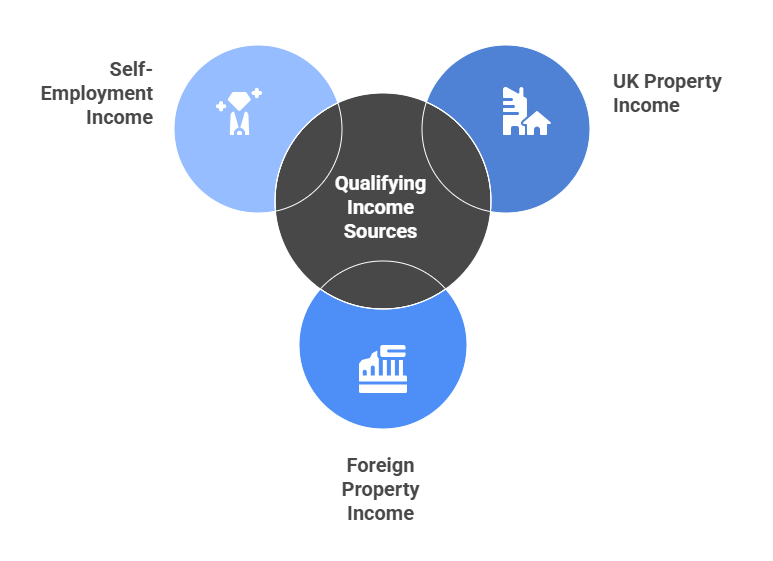
All of these are combined to assess whether you meet the £50,000 entry threshold. For example, if a landlord earns £30,000 from UK property and £25,000 from self-employment, HMRC treats this as £55,000 in total qualifying income, meaning the individual will fall within MTD ITSA from April 2026.
Caution: All these income sources are added together to determine whether you meet the MTD threshold.
Joint Ownership & Special Cases That Affect Your MTD Obligations
Several situations require careful consideration when calculating your MTD obligations:
Joint Ownership: When you own property jointly with a spouse or business partner, HMRC assesses each person based on their own share of the rental income not the income from the whole property. So, if a jointly owned portfolio generates £60,000 in annual gross rent and you each receive £30,000, neither of you will fall under MTD ITSA in April 2026 unless your combined income from all qualifying sources exceeds the £50,000 threshold.
Furnished Holiday Lets: FHL income counts toward your threshold and must be reported through Making Tax Digital for landlords, but it follows slightly different rules regarding qualifying criteria and allowable expenses. The same quarterly reporting requirements apply.
Mixed Income Portfolios: Landlords with both residential and commercial properties must include all property income in their threshold calculation. The same applies if you have a mix of UK and overseas properties, though overseas income may require additional reporting steps.
Step 2: Choose Your MTD Software or Bridging Tools as a Landlord
Once you've confirmed you need to comply with Making Tax Digital for landlords, your next decision is choosing how you'll maintain digital records and submit quarterly updates to HMRC. This choice significantly impacts your workload, costs, and compliance confidence.
What Landlords Should Look for in MTD-Compatible Software
Not all accounting software meets HMRC's requirements for Making Tax Digital for Income Tax. When evaluating the best MTD software for landlords, prioritise these essential features:
HMRC Recognition - The software must be officially MTD-compatible and able to connect directly to HMRC's systems. Check HMRC's list of recognised software providers before committing to any solution.
Property-Specific Functionality - Look for software designed for landlords rather than generic one. It should handle multiple properties, tenancy records, deposit tracking, and property-specific expense categories like repairs, maintenance, and letting agent fees.
Digital Links - HMRC requires "digital links" between different parts of your system. If you use multiple applications (for example, a property management system and accounting software), they must transfer data digitally without manual copying and pasting.
Quarterly Update Generation - The software should automatically compile your income and expenses into the format required for quarterly submissions, calculating the figures HMRC needs without manual intervention.
Reconciliation Tools - Good MTD compatible software helps you reconcile bank transactions, match tenant payments to invoices, and identify missing records before submission deadlines.
Final Adjustments - The software must handle Final Declaration adjustments including capital allowances, replacement of domestic items relief, and private-use adjustments that only apply at year-end.
User-Friendliness - If you'll be managing the software yourself, prioritise systems with intuitive interfaces and good support resources. Complex accounting software designed for professional bookkeepers may be unnecessarily difficult for landlords maintaining their own records.
Full MTD Accounting Software vs Bridging Tools for Landlords
Landlords face a fundamental choice between adopting comprehensive accounting software or using bridging software for landlords to connect spreadsheets to HMRC.
Full accounting software (like RentalBux) provides end-to-end functionality. You enter transactions directly into the software, which maintains all records, generates quarterly updates, and submits them to HMRC. These platforms typically offer mobile apps, automatic bank feeds, and comprehensive reporting tools.
Benefits include having everything in one place and professional-grade functionality. Drawbacks include steeper learning curves, higher subscription costs (typically £15-30 monthly), and potentially more features than a landlord with a simple portfolio actually needs.
Bridging software takes a different approach. It allows landlords who already maintain spreadsheets to continue doing so while still meeting MTD requirements. The bridging tool reads data from your spreadsheet and converts it into the format HMRC requires for quarterly updates.
This approach suits landlords who have spent years perfecting their Excel or Google Sheets systems and don't want to abandon familiar workflows. Bridging tools typically cost less than full accounting software and require minimal retraining.
When Landlords Should Use an Agent for MTD Compliance
Many landlords ultimately decide that managing MTD compliance themselves even with good software creates more stress than it's worth. Consider working with an accountant or property management agent if:
You Have a Complex Portfolio - Multiple properties, mixed-use buildings, furnished holiday lets alongside standard rentals, or overseas properties create complexity that's difficult to manage without professional help.
You Lack Time or Inclination - Maintaining digital records, reconciling transactions quarterly, and ensuring accuracy requires consistent attention. If property investment is passive income rather than an active business interest, you may prefer delegating MTD compliance entirely.
You're Concerned About Penalties - HMRC's penalty regime under Making Tax Digital for landlords means mistakes carry financial consequences. Professional agents reduce error risk significantly, potentially saving more in avoided penalties than their fees cost.
You Want Strategic Tax Planning - Accountants don't just ensure compliance they identify opportunities to minimise your tax liability through legitimate planning. Their advice often generates savings exceeding their fees.
You Need Support Across the Whole Process - From choosing software to setting up digital links, reconciling the first quarter's transactions, and preparing the Final Declaration, professional support smooths the entire journey.
Step 3: Prepare Your Digital Record Keeping under MTD as a Landlord
Understanding how landlords keep digital records for HMRC MTD is other fundamental to compliance. HMRC has specific requirements about what constitutes acceptable digital record keeping, and failing to meet these standards can result in rejected quarterly submissions or penalties.
What Digital Record Keeping Means for MTD ITSA Landlords
Digital record keeping under MTD ITSA require that all rental income and expenses records be created, stored, and preserved in electronic format. For MTD ITSA landlords, this means:
No Paper-Based Systems - You cannot maintain paper records as your primary bookkeeping method, even if you later type figures into software. Records must originate digitally.
Regular Updates - Records must be updated regularly (at least quarterly before each submission deadline) rather than compiled annually.
Complete Audit Trail - Your digital records should show the full trail from source documents through to submitted figures, allowing HMRC to trace any number back to its origin.
Retention Requirements - Digital records must be preserved for at least five years after the submission deadline for the relevant tax year.
Digital Record Keeping Expectations for landlords
Once you determine you fall within the MTD threshold for landlords, you must understand that compliance isn't just about software, it's about maintaining digital records that meet HMRC's specific requirements throughout the tax year. Your records must be kept digitally and updated regularly, with digital links between different parts of your bookkeeping system.
HMRC expects MTD ITSA landlords to preserve records showing the full audit trail from source documents (like rent receipts and repair invoices) through to the figures submitted in quarterly updates. This means you cannot rely on paper records, even if you later transcribe them into software.
Required Income & Expense Categories for MTD Property Records
HMRC expects MTD ITSA landlords to categorise income and expenses accurately. Your digital record keeping system must capture and classify these key items:
Property Income Fields:
| Property Expense Fields:
|
|---|---|
|
|
Each transaction must be recorded in the correct category because HMRC's quarterly update format requires specific breakdowns. Your MTD compatible software should offer property-specific categories that map to HMRC's requirements.
Step 4: Understand Your Quarterly MTD Reporting Requirements
The shift from annual Self-Assessment to quarterly updates for landlords change in how landlords interact with HMRC. Instead of gathering records once yearly, you now report regularly throughout the tax year.
What Landlords Must Include in Each MTD Quarterly Update
Each quarterly update provides HMRC with a summary of your property income and expenses for that three-month period. You're not just sending raw data the software calculates totals and presents them in the format HMRC requires.
A typical quarterly update includes:
Income Summary: Total gross property income received during the quarter
Expense Summary: Total expenses paid during the quarter
Calculated Profit/Loss: Your software automatically calculates the profit or loss for the quarter by subtracting total expenses from total income. This gives HMRC a running picture of your property business performance.
It's crucial to understand that quarterly updates are provisional. You're reporting the income and expenses you know about at that time. Final adjustments happen at year-end during the Final Declaration process, which we'll cover in Step 5.
Quarterly Reporting Deadlines for MTD ITSA Landlords
HMRC quarterly reporting operates on fixed quarters that align with the tax year (which runs from 6 April to 5 April):
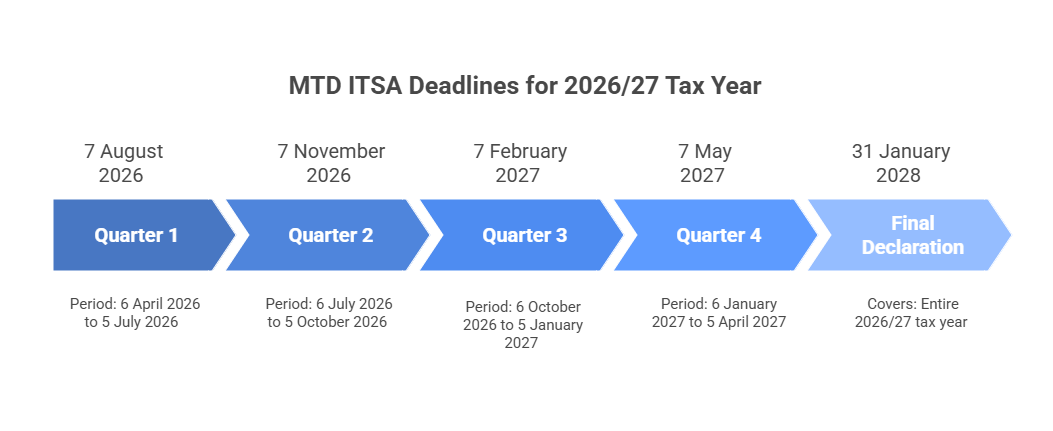
Quarters | Standard Update Period | Deadline |
|---|---|---|
Quarter 1 | 6 April to 5 July | 7 August |
Quarter 2 | 6 July to 5 October | 7 November |
Quarter 3 | 6 October to 5 January | 7 February |
Quarter 4 | 5 January to 5 April | 7 May |
Each quarterly update must be submitted by 7th of the month after the quarter ends. Miss a deadline, and you face penalties under HMRC's new points-based system (which we'll discuss in Step 5).
For most landlords, the quarterly pattern feels unnatural at first. Rental income often arrives monthly, but expenses can be lumpy. Perhaps you handle three repairs in one quarter and none in the next. This irregularity is fine; HMRC expects variation across quarters. What matters is that you report everything that occurred during each period.
How to Reconcile Your Figures for MTD Quarterly Updates
Reconciliation is perhaps the most important and most frequently neglected aspect of HMRC quarterly reporting. Your quarterly update figures must reconcile with your actual bank transactions and business records.
Bank Reconciliation Process:
Your software imports transactions from your business bank account (via bank feed or manual upload)
You categorise each transaction appropriately (rent, repairs, mortgage interest, etc.)
You ensure every bank transaction is explained and no transactions are duplicated or missing
Your software totals the categorised transactions for the quarter
These totals form the basis of your quarterly update
Card Header
Why Reconciliation Matters: If your quarterly update shows £12,000 rental income but your bank account received only £11,000, you've either recorded a transaction that didn't happen, included income not yet received (wrong under cash basis), or made a data entry error. HMRC increasingly uses sophisticated data-matching between your submissions and third-party information (like bank data), making errors more likely to be detected.
How MTD Software Automatically Compiles Reports
Modern MTD compatible software dramatically simplifies quarterly reporting. Once you've categorised transactions correctly, the software handles most of the technical work:
Automatic Calculation - The software totals income and expenses by category, calculates profit/loss, and formats everything in the structure HMRC requires. You review the figures but don't manually calculate anything.
Digital Submission - When you approve the quarterly update, the software submits it directly to HMRC through a secure API connection. You receive confirmation that HMRC has received your submission.
Running Totals - Good software shows cumulative figures for the tax year to date, helping you understand your overall tax position. After submitting Q1, you can see how Q2 compares, and so on.
Preparation for Final Declaration - Throughout the year, your software accumulates all quarterly data, which feeds into the Final Declaration at year-end. This continuity reduces year-end work significantly compared to the old Self-Assessment system.
Common Mistakes Landlords Make in Quarterly Updates
Even with good software, landlords make predictable mistakes that create problems when submitting quarterly updates:
Mixing Personal & Business Transactions - Using your personal bank account for rent receipts and property expenses makes reconciliation nightmarish. Open a dedicated landlord bank account and use it exclusively for property business transactions.
Recording Deposits Incorrectly - Tenant deposits aren't income (they're held in trust), except for any portion legitimately retained at tenancy end. Record retained deposits as income only when you have legal right to keep them.
Forgetting Cash Transactions - If a tenant pays rent in cash or you pay a handyman in cash, these transactions must still be recorded in your digital system. Cash basis accounting means you record transactions when money changes hands, not when invoices are issued.
Duplicate Entries - When bank feeds automatically import transactions, manually entering the same transaction creates duplicates. Always check whether a transaction has already been imported before manually recording it.
Missing the Connection Between Bank Reconciliation & Quarterly Accuracy - Your quarterly update figures should trace back to actual bank transactions (for cash basis) or invoices issued/received (for accrual basis). If your bank account shows £50,000 received but your software shows £55,000 income, something's wrong. Reconcile regularly monthly at minimum rather than waiting until the quarterly deadline.
Ignoring Private Use Adjustments - If you have a room in a rental property that you use personally, or if you use your car for both property business and personal travel, adjustments are needed. Track business vs. personal usage and adjust expenses accordingly.
What Happens If You Make a Mistake Under MTD ITSA
Making mistakes in quarterly updates for landlords MTD explained is common in the early years of compliance. HMRC understands the system is new and has built in some flexibility:
Correcting Errors in Later Quarters - If you discover an error in Q1's update while preparing Q2, you can usually correct it by adjusting Q2's figures. For example, if you forgot to include a £300 repair in Q1, include it in Q2. Your cumulative totals for the year will be correct, even if individual quarters are slightly off.
Tip: If you're consistently making errors, struggling with reconciliation, or receiving warnings from HMRC, consider engaging professional support. An accountant or property management agent can review your systems, identify where errors originate, and either fix the process or take over the compliance work entirely.
Step 5: Prepare for the MTD Final Declaration as a Landlord
The Final Declaration is your year-end responsibility under Making Tax Digital for landlords it confirms full tax position for the year and replaces the traditional Self-Assessment tax return.
After submitting four quarterly updates, landlords proceed directly to the Final Declaration.
Card Header
The Final Declaration confirms that:
All four quarterly updates for the tax year are complete and accurate
Any necessary year-end adjustments have been made
Your total tax liability is correctly calculated
You're declaring your other income sources not mandated under MTD and finalise your Tax position to HMRC
Year-End Adjustments Landlords Must Include in the MTD Final Declaration
Although quarterly updates cover most income and expenses, certain adjustments apply only at year-end. The Final Declaration is when you incorporate these elements:
Capital Allowances - If you've purchased equipment for your property business (furniture for furnished lets, computers, vehicles used exclusively for business), you may claim capital allowances. These allowances don't appear in quarterly updates but are included in your Final Declaration, reducing your taxable profit.
Private Use Adjustments - If you used property business assets for personal purposes, or if a property was partly occupied by you personally, adjustments are needed. Calculate the business vs. personal proportion and reduce expenses accordingly in your Final Declaration.
Disallowable Expenses - Review your annual expenses for any amounts that don't qualify as allowable. Common examples include:
o Capital improvements (vs. repairs)
o Personal use portions of mixed-use expenses
o Depreciation (not allowable, though capital allowances may apply)
o Pre-letting expenses exceeding allowable limits
Correct these in your Final Declaration to ensure your taxable profit is accurate.
Year-End Corrections - If you discovered errors in earlier quarters that you didn't correct through amended quarterly updates, adjust them in your Final Declaration. This is your last opportunity to correct the record before the tax year is finalised.
Submitting Your MTD Final Declaration Through Software
Your MTD compatible software guides you through the Final Declaration process, which typically involves:
Card Header
Reviewing the Year's Totals - The software displays cumulative income and expenses from all four quarterly updates.
Adding Year-End Adjustments - You enter capital allowances, replacement of domestic items relief, private use adjustments, and corrections.
Calculating Final Taxable Profit - The software recalculates your profit after adjustments, determining your taxable income from property.
Declaring Other Income - The Final Declaration includes all income sources, not just property. Add employment income, pension income, savings interest, dividends, and any other taxable income.
Calculating Total Tax Liability - The software calculates income tax due on all income sources combined, accounting for your personal allowance, tax bands, and any tax already deducted at source.
Reviewing & Submitting - Carefully review all figures before final submission. Once submitted, the Final Declaration is your formal tax return for the year.
Payment Deadline - Tax owed must be paid by January 31 following the tax year end
To summarise the income reporting obligations for landlords under MTD, this timeline gives what your first year of MTD compliance would look like:
Understanding HMRC’s Penalties Under Making Tax Digital for Landlords
Making Tax Digital introduces a clear penalty framework designed to encourage timely compliance while giving flexibility for genuine mistakes. Landlords need to understand three key areas: late submission penalties, late payment penalties, and record-keeping failures.
Late Submission Penalties
From April 2026, landlords mandated into MTD for Income Tax fall under HMRC’s points-based late filing regime. Each missed quarterly update or Final Declaration deadline earns a “point.” Points accumulate separately for VAT and Income Tax. Once a points threshold is reached—four points for quarterly submissions a £200 fixed penalty is charged. Further missed deadlines after the threshold incur additional fixed penalties.
Points expire after a set period if the landlord keeps up with submissions: 12 months for quarterly updates
Landlords with a reasonable excuse for missing a deadline will not incur points or penalties
There is a formal right to appeal both points and penalties
Late Payment Penalties
Penalties also apply if tax due is not paid on time:
No penalty if payment is made within 15 days of the due date
From day 16 to day 30, a 3% penalty is applied (rising from 2% before 1 April 2025)
After day 30, the penalty increases to 6% (previously 4%)
From day 31 onwards, a second late payment penalty of 10% per annum accrues daily on outstanding amounts
Penalties stop if a Time To Pay arrangement is agreed, and reasonable excuses are accepted
Record-Keeping Penalties Under MTD ITSA, digital records must be maintained in HMRC-recognised software. Failure to keep proper records or maintain required digital links can result in penalties of up to £3,000 per quarterly period.
Deliberately Withholding Information Landlords who deliberately withhold information to avoid or reduce their tax liability may face additional tax-geared penalties, subject to a £300 minimum. The exact percentage depends on whether the withholding is careless, deliberate, or concealed.
Conclusion: Taking Action on Making Tax Digital as a Landlord
Understanding how to prepare for Making Tax Digital as a landlord is one thing acting is another. The landlords who is ahead this transition most successfully are those who begin preparation early, choose appropriate systems, and establish reliable processes for ongoing compliance.
Preparation now avoids penalties later. HMRC's points-based penalty system means that late submissions, inaccurate reports, and inadequate digital records carry real financial consequences. More importantly, starting early allows you to establish good habits, become comfortable with new software, and iron out any problems while the stakes are still relatively low.
For many landlords, the administrative burden of Making Tax Digital for landlords justifies professional support. Whether that means engaging an accountant for year-end reviews, using a property manager for full-service MTD compliance, or simply getting setup assistance for your chosen software, knowing your limits and seeking appropriate help is wise planning, not weakness.


