


Excel is MTD-compatible, but only if you use it alongside a bridging software. The software creates a digital link between your spreadsheet and HMRC's systems. Then it transmits your rental income and expense data electronically at the point of submission.
Spreadsheets are how most UK landlords manage their rental records. An Ipsos study found that around 41% of sole traders and landlords in scope for Making Tax Digital were using spreadsheets for their record-keeping. This is a significant population.
Thankfully, the Making Tax Digital initiative does not ban the use of spreadsheets. However, it prohibits the manual processes that most landlords currently rely on, specifically updating figures, copying and pasting totals and filing through the Self Assessment route.
Once your rental income meets the MTD for Income Tax threshold, the compliance question is straightforward: are the figures you submit to HMRC transferred electronically through compliant software, or entered manually during filing?
Why an Excel spreadsheet alone is not MTD-compliant
Excel fulfils the digital record-keeping condition, but fails on two technical grounds:
i) the inability to submit data directly to HMRC, and
ii) transfer figures between your spreadsheet and HMRC, with no human involvement.
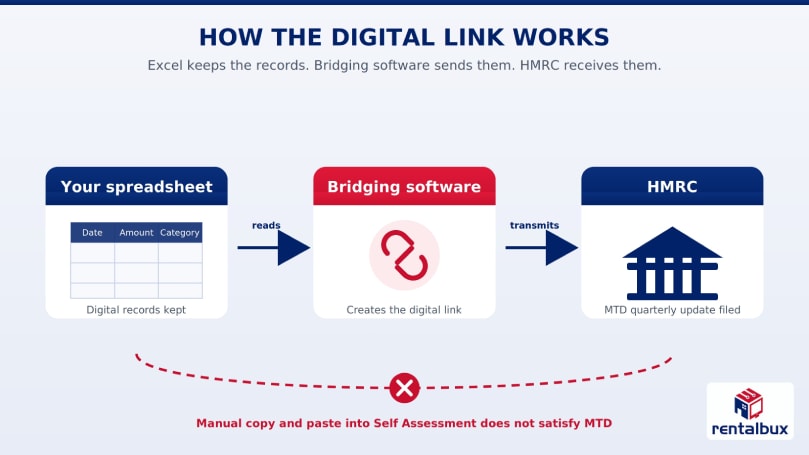
Excel cannot submit data to HMRC
Excel meets the digital record-keeping condition but has no built-in connection to HMRC's systems, so it cannot submit data on its own. It also is not on HMRC's list of compatible software.
Setting up your Excel spreadsheet for MTD compliance
Bridging software is what connects your spreadsheet to HMRC, reading your figures and submitting them through the MTD API each quarter. Whichever tool you choose, it can only read records that are structured consistently, which is where setup matters.
An MTD-compliant setup is not simply a matter of having a spreadsheet and keeping it updated. HMRC wants a specific set of records, organised in a way that bridging software can read consistently, every quarter throughout the tax year.
How to structure your spreadsheet for MTD
HMRC sets out which figures every landlord must record for each property.
Date of the income received or expense incurred
Amount of the transaction
Category, kept separate rather than combined
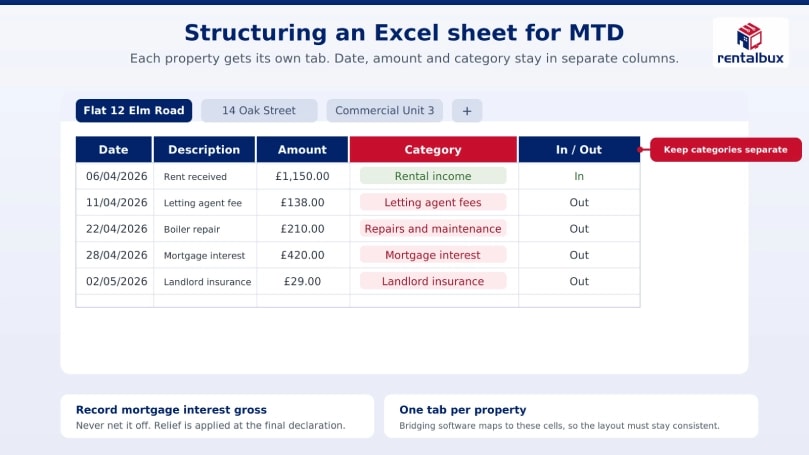
Expense categories that must stay distinct are letting agent and management fees, repairs and maintenance, landlord insurance, mortgage interest, ground rent and service charges, and professional fees.
Each property needs its own set of these columns, held either on a separate tab or as a distinct block within one master sheet.
Some additional caveats to these requirements
Mortgage Interest
Individual landlords cannot deduct residential mortgage interest as an ordinary expense. Since 6 April 2020, section 272A of ITTOIA 2005 removes finance costs from the profit calculation, and section 274A gives relief instead as a basic rate tax reducer, currently 20 per cent, applied regardless of your marginal rate. HMRC's Property Income Manual explains the mechanism at PIM2058.
This means recording the full mortgage interest figure in its own category rather than netting it off against rental income. The relief is applied at the final declaration stage, so the gross figure needs to be visible and separate throughout the year.
Joint Owners
For landlords with jointly owned properties, they need to report their share of the income and expenses individually. The spreadsheet should accurately reflect your share, not the property's total figures, and do so consistently across every quarterly submission.
Why your spreadsheet structure needs to be consistent |
|---|
HMRC does not prescribe a specific spreadsheet layout for MTD for Income Tax. Still, the Income Tax Regulations 2021 require digital records to contain accurate transaction-level information and support precise quarterly updates. In practice, this means your records need to be complete, consistently categorised, and structured so that your bridging software can extract the right figures at the right time. This is where spreadsheets become difficult to manage. A workbook looks simple at first. But as Bridging software maps to specific cells or named ranges, even small structural changes can produce incorrect figures or broken links that are not always visible until submission. The challenge is not simply maintaining running totals. Your spreadsheet needs to capture income and expenses with accurate dates and correct categories. It should also allow you to independently isolate the figures required for each quarterly update. Landlords with multiple properties or joint ownership arrangements will find that the volume and complexity of transactions increase the burden considerably. |
How to choose a Bridging software for your Excel workflow?
Once your spreadsheet is set up and your records are organised by property, the next decision is which bridging software connects your data to HMRC's MTD platform.
Two checks matter most when you are staying in Excel:
Compatibility with your version of Excel. Some bridging tools are built for Microsoft 365 or Excel Online, others for desktop Excel only, and a few support both. Confirm the tool works with the exact version you use, as a mismatch may mean it cannot read your spreadsheet accurately.
How the software maps to your spreadsheet. Bridging tools read your figures by mapping to specific cells or named ranges. If you keep separate tabs per property, or a single master sheet with properties in rows, the tool needs to accommodate that layout. You should not have to rebuild your workbook around it.
The wider checks apply to any bridging product, not just Excel-based ones: HMRC recognition, property-level submission, coverage of both quarterly updates and the Final Declaration, and pricing. Our guide on choosing MTD bridging software works through each of these in depth.
What about free bridging software options?
Some bridging tools offer a free tier. For a landlord with a single rental property and a consistent spreadsheet, a free tool can meet the basic submission requirements.
The limitations generally start showing in these areas:
1. Property caps are common, making them unsuitable for landlords managing multiple rentals
2. Support is usually minimal or absent
3. Cell mapping is typically rigid, so any change to your spreadsheet layout during the tax year risks breaking the connection to HMRC
If you want to take a look at some free options, our MTD software finder lists the current HMRC-recognised options across free and paid tiers. You can compare what is available based on your circumstances.
When to move away from Excel as a UK Landlord?
A landlord or sole trader should move away from using Excel as a standalone tool when their gross income exceeds the MTD qualifying income threshold.
What is Qualifying Income?
For MTD ITSA, Qualifying income is the total gross income you earn from self-employment and property in a tax year, before deducting any business expenses. It is the gross turnover or receipts that matters for the threshold test, not your taxable profit.
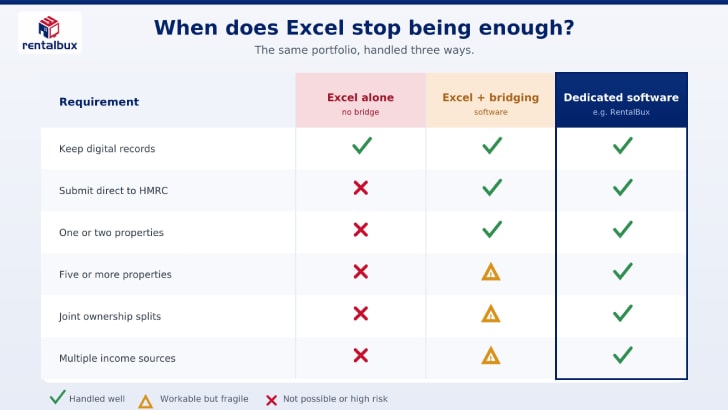
While Excel remains usable alongside bridging software, a growing property portfolio, and income from more than one source make it an impractical choice.
Research by Professor Ray Panko found that 90% of spreadsheets contain at least one mistake. The research recommended dedicated bookkeeping software over spreadsheets for established processes.
Your property portfolio has grown
HMRC requires landlords to record income and expenses at the property level, with each property maintained as a distinct set of records throughout the tax year.
In a workbook with one or two properties, that is manageable. As your portfolio grows, so does the complexity of maintaining it correctly.
Each property you add means:
A new set of cells to map within your bridging software
Additional tabs or rows to keep consistently structured
More quarterly figures to verify before each submission deadline
The bridging software mapping that worked reliably at two properties does not automatically scale to five or eight.
At a certain point, keeping every property's records correctly categorised, dated and consistent across four quarterly updates is a problem that Excel cannot solve.
Your income comes from more than one source
A sole trader with rental income alongside self-employment income must report both streams accurately and separately across each quarterly update. Under MTD for Income Tax, these are distinct income sources, but Excel treats them as numbers in adjacent cells.
In practice, managing both in a single spreadsheet means:
Keeping rental income and self-employment income in clearly separated sections that never bleed into each other
Maintaining different expense categories for each income type, since allowable deductions under property income and self-employment income are not the same
Ensuring the bridging software maps each income stream to the correct fields in HMRC's MTD API
Repeating this accurately across four quarterly submissions and a final declaration
The more income sources feed into your spreadsheet, the greater the risk that figures are miscategorised, mapped incorrectly or reported under the wrong income type at submission.
The compliance burden falls entirely on you, who is maintaining the spreadsheet. There are no automated validations and no visibility into errors until figures have already reached HMRC.
You co-own rental properties
HMRC requires each co-owner to report their individual share of rental income and expenses, not the property's total figures. When ownership is split equally, that calculation is straightforward, but where it is not, the complexity grows by the day.
A landlord who owns 40% of one property and 20% of another must maintain entirely separate calculations for each. The correct ownership proportion must be applied consistently across every income and expense entry throughout the tax year. In Excel, that means:
Maintaining separate tabs or sections for each property with the correct percentage applied at the transaction level
Ensuring the ownership split is reflected accurately in every quarterly update, not just the final declaration
Revisiting and verifying those calculations if an ownership proportion changes at any point during the year
If the percentage is applied inconsistently even once, the figures transmitted to HMRC through the bridging software will be wrong. There is no validation layer to catch it before submission.
A simpler way to meet Making Tax Digital requirements for UK Landlords
A landlord managing rental records in Excel can meet MTD requirements by moving to a HMRC-recognised software. The right platform handles property-level records, joint ownership splits and quarterly submissions across multiple income streams. It does all this without the structural constraints of a spreadsheet.
Sage and Xero are the most recognised names in MTD-compatible software, but both are built for businesses in general. This means that these general-purpose software ask landlords to fit their property income into a business accounting framework.
But there is a better solution. RentalBux, which is built around the way landlords actually own and report it.
RentalBux approaches MTD from the direction of how landlords own and report rental income in the real world. The following are some of the many flagship features of RentalBux.
Maintain Property-level records separately for every unit in your portfolio, with a single consolidated quarterly submission to HMRC
Once ownership percentages are set, income and expenses are automatically allocated to each co-owner across every quarterly update and final declaration
Rental and self-employment income managed within one platform
A landlord-specific chart of accounts covering mortgage interest, letting agent fees, repairs and maintenance, insurance and service charges
The difference is not just features. It is whether the software understands the problem it is solving.
If you want to see what that looks like against your specific portfolio and ownership structure;
Conclusion
Excel remains a legitimate option for MTD for Income Tax, provided it is used alongside HMRC-recognised bridging software. The software handles the digital link requirement by reading your spreadsheet data and transmitting it directly to HMRC's systems each quarter.
For landlords with a straightforward property portfolio and consistent records, this setup can meet the full compliance requirements without the need to change how you work.
The limitations become harder to manage as you grow. Multiple properties, joint ownership arrangements and income from more than one source increase the risk of miscategorised figures, broken cell mappings and errors that only become visible after submission.
There is no validation layer built into a spreadsheet, and the compliance burden sits entirely with you. At that point, purpose-built software, like RentalBux, is not just more convenient but a reliable way to stay compliant.


