

If you're among the millions filing a Self-Assessment tax return in the UK, understanding the process is important. This comprehensive guide answers your most pressing questions about Self-Assessment in the UK, from registration to filing, payments, and beyond. Whether you're self-employed, a landlord, or have multiple income sources, you'll find practical, step-by-step guidance to help you meet your tax obligations.
Introduction & Basics of Self-Assessment Tax Return
What is a Self-Assessment Tax Return?
Self-Assessment Tax Return is HMRC's system for collecting Income Tax from individuals whose income is not taxed at source through PAYE (Pay As You Earn). Unlike employees whose tax is deducted from their salary, you're responsible for reporting your income and calculating your tax liability annually.
The system captures income from various sources, including self-employment, rental properties, capital gains, foreign income, and investment returns. You report your earnings, claim eligible expenses and allowances, and calculate what you owe or, in some cases, discover you're due a refund.
Who must file a Self-Assessment tax return?
You must file a Self-Assessment tax return if you fall into any of these categories:
Business and employment situations:
You're self-employed as a sole trader with income exceeding £1,000 per year
You're a partner in a business partnership
You're a company director (except for non-profit organisations where you received no pay or benefits)
Income thresholds:
You have untaxed income over £2,500 (such as rental income, tips, commission, or casual earnings)
Your untaxed income from savings, investments, or dividends exceeds £10,000
You receive income from abroad that's subject to UK tax
Your total income is over £150,000
Capital gains and investments:
You've made capital gains above the annual exemption (£3,000 for 2024/25)
You're a trustee of a trust or registered pension scheme
Child Benefit situations:
You're claiming Child Benefit and either your income or your partner's exceeds £60,000
You need to pay the High-Income Child Benefit Charge
Other circumstances:
You want to claim certain tax reliefs that aren't available through PAYE
You need to make voluntary Class 2 National Insurance contributions
HMRC has sent you a notice to file
What are the exemptions from filing a tax return?
You may not need to file a Self-Assessment tax return if:
All your income is taxed through PAYE and you have no other untaxed income sources
Your total untaxed income is less than £2,500 annually
You're self-employed but your trading income is under £1,000 (the trading allowance applies automatically)
Your property income is under £1,000 (covered by the property allowance)
You've stopped self-employment and formally notified HMRC
HMRC has written confirming you don't need to file
Your only income comes from employment, pension, and taxed savings or investments below reporting thresholds
Important: If you're unsure whether you need to file, it's always safer to contact HMRC or consult with a tax professional. Missing a required return can result in penalties.
Registration Process for Self-Assessment
How can I register for Self-Assessment?
The registration process differs depending on whether you're a first-time filer or already registered with HMRC.
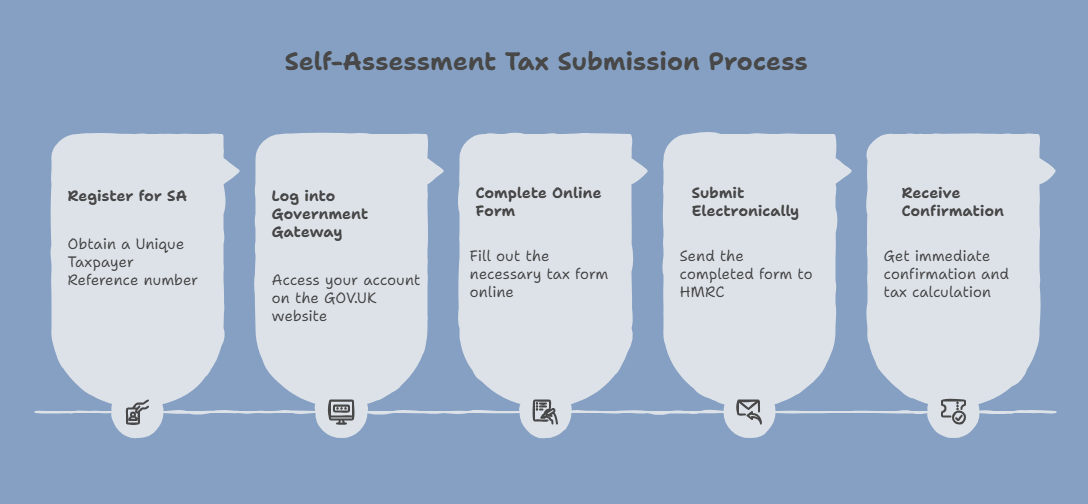
For first-time filers:
Register online at GOV.UK by 5 October, following the end of the tax year you need to file for (e.g., register by 5 October 2025 for the 2024/25 tax year)
Provide your National Insurance number during the registration process
Receive your Unique Taxpayer Reference (UTR) by post within 10 working days
Wait for your activation code, which arrives separately within 7 working days after your UTR
Create your Government Gateway account using your UTR and activation code
If you're already registered:
You'll already have a UTR and Government Gateway credentials. Simply log in to file your return. There is no need to register again.
When do I need to register with HMRC?
The registration deadline is 5 October, regardless of whether you plan to file on paper or online.
Pro tip: If you know you'll need to file, register as early as possible. Many people discover in January that they needed to register months ago, leaving them scrambling to meet the deadline.
What information do I need to register for Self-Assessment?
Gather these details before starting your registration:
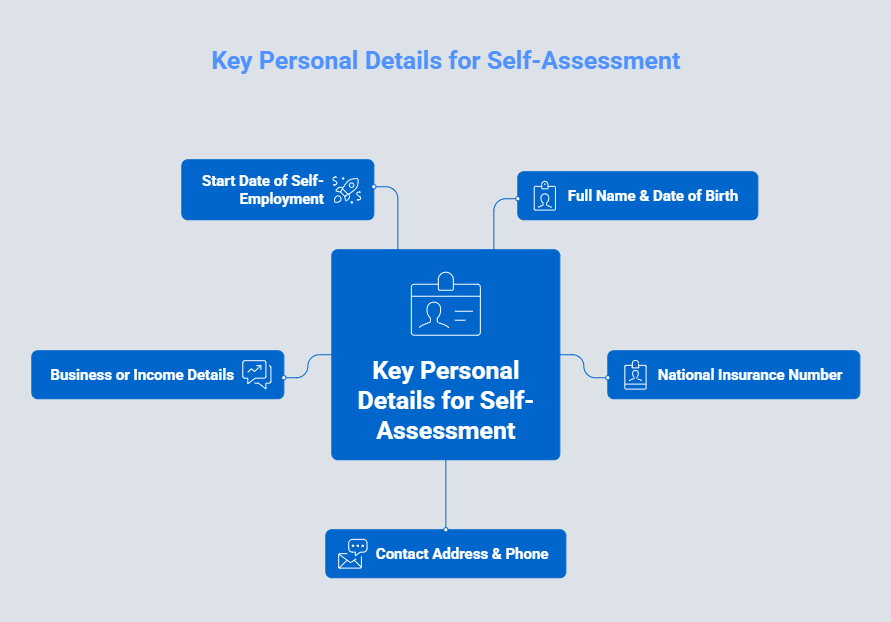
Personal information:
Full legal name as it appears on official documents
Date of birth
National Insurance number (found on your payslip, P60, or National Insurance card)
Current residential address
Contact telephone number
Email address (recommended for correspondence)
Income source details:
The reason you need to file (self-employment, rental income, capital gains, etc.)
Start date of self-employment or business activity (if applicable)
Nature of your business or trade
Your business address (if different from residential)
NOTE: Having this information ready will make the registration process smoother and reduce the chance of errors that could delay your UTR.
Filing Your Self-Assessment Tax Return
How to file your Self-Assessment tax return?
You have two main options for filing: online or on paper. The vast majority of taxpayers now file online due to its convenience and later deadline.
Online filing (recommended):
Ensure you're registered and have your UTR and Government Gateway login details
Log into your Government Gateway account at GOV.UK
Select the relevant tax year you're filing for
Complete the online form including all income sources and relevant supplementary pages
Review your entries carefully before submission
Submit electronically with a single click
Receive immediate confirmation including your submission reference and automatic calculation of tax due
Save or print your confirmation and calculation for your records
Paper filing:
Request a paper return from HMRC by calling 0300 200 3310 (you'll receive the SA100 form)
Complete all relevant sections manually, including any supplementary pages needed
Calculate your tax liability yourself or leave it blank for HMRC to calculate (this delays knowing what you owe)
Post to HMRC using the address provided with the form
Wait for HMRC to process and calculate your tax bill (if you didn't calculate it yourself)
Note: The online system guides you through each section, performs automatic calculations, and flags common errors before you submit.
Important difference: Paper returns must be filed by 31 October while online returns have until 31 January, giving you an extra three months.
What are the ways to file your Self-Assessment tax return?
You have several filing method options, each with different features:
Commercial software
Many software options like QuickBooks, Xero, FreeAgent, Sage, TaxCalc or Rentalbux offer self-assessment tax return filing.
Through an accountant or tax agent
A professional completes and files on your behalf, providing expert advice and maximising legitimate deductions. Particularly valuable for complex situations.
Paper return
Complete the SA100 form and post to HMRC, though this has an earlier deadline (31 October) and slower processing. Being phased out for most taxpayers.
HMRC online service (Free)
File directly through the government website at no cost with automatic calculations and immediate confirmation. Best for straightforward returns.
What are the different supplementary pages for filing the Self-Assessment?
Your main tax return is the SA100 form, but you'll need to complete additional supplementary pages depending on your income sources. Think of these as specialised sections that capture specific types of income in detail.
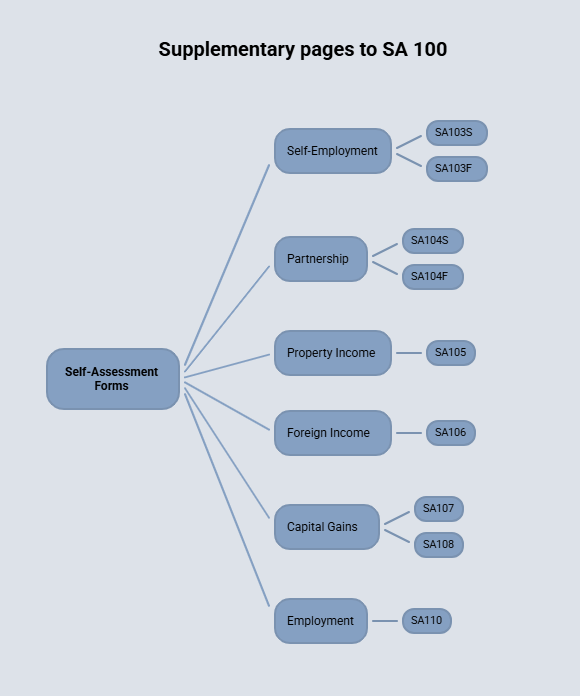
Self-employment Income:
SA103S (Short): For sole traders with turnover under £90,000 using simplified expenses
SA103F (Full): For sole traders with turnover of £90,000 or more, or those with complex expenses
Partnership Income:
SA104S (Short): For partnership income where turnover is relatively low
SA104F (Full): For larger partnerships or complex partnership arrangements
Property income:
SA105: For UK property rental income (both residential and commercial)
Foreign income:
SA106: For income and gains from foreign sources, including foreign property and employment
Capital gains:
SA107: Capital Gains Summary for reporting disposals of assets
SA108: Additional capital gains information when needed
Other circumstances:
SA109: For residency, remittance basis, and other domicile issues
SA110: For employment income that's complex or unusual
SA800: For trust and estate income
How do you know which pages you need? The online filing system automatically presents relevant pages based on your answers to initial questions. If filing on paper, carefully review the list and select all pages that apply to your situation. Missing a required page can delay processing or result in an incomplete return.
Self-Assessment Tax Return Deadlines & Important Dates
What are the deadlines for filing your tax return?
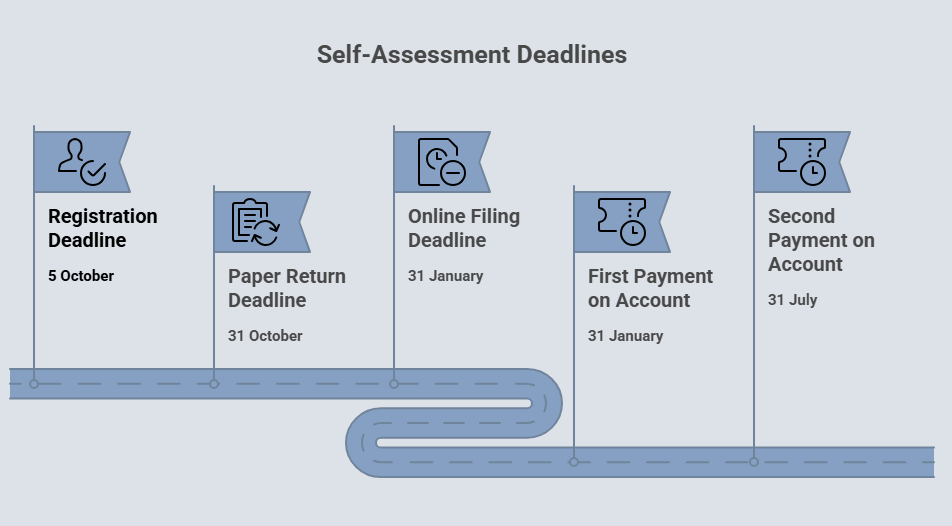
Meeting deadlines is crucial to avoid penalties. For the 2024/25 tax year (6 April 2024 to 5 April 2025), here are the key dates:
Task | Deadline |
|---|---|
Registration deadline (if new to Self-Assessment) | 5 October 2025 |
Paper return deadline | 31 October 2025 |
Online filing deadline | 31 January 2026 |
First payment on account (if applicable) | 31 January 2026 |
Second payment on account (if applicable) | 31 July 2026 |
Understanding the timeline:
The tax year runs from 6 April to 5 April (not the calendar year)
You have approximately 10 months after the tax year ends to file online
Penalties start immediately at midnight on 31 January, even being a few hours late counts as late
Payment is due the same day as the online filing deadline (31 January)
Income Reporting for Self-Assessment Tax Return
What are the incomes that need to be reported in Self-Assessment?
You must report all taxable income to HMRC, even if it's already been taxed or seems minor. Here's a comprehensive breakdown:
Employment and self-employment income:
| Capital gains:
|
Property and investment income:
| Other taxable income:
|
What are the different tax rates for different types of income reported in Self-Assessment Tax Return?
Tax rates vary depending on your income type and total earnings. Here's the current structure for 2024/25:
Tax rates (England, Wales, Northern Ireland):
Band | Taxable Income | Income Tax Rate | Dividend Tax rate |
Personal/ Dividend Allowance | Up to £12,570/ £500 | 0% | 0% |
Basic rate | £12,571 to £50,270 | 20% | 8.75% |
Higher rate | £50,271 to £125,140 | 40% | 33.75% |
Additional rate | Over £125,140 | 45% | 39.35% |
Scotland has different bands:
Band | Taxable Income | Tax Rate |
|---|---|---|
Personal Allowance | Up to £12,570 | 0% |
Starter rate | £12,571 - £14,876 | 19% |
Basic rate | £14,877 - £26,561 | 20% |
Intermediate rate | £26,562 - £43,662 | 21% |
Higher rate | £43,663 - £75,000 | 42% |
Advanced rate | £75,001 - £125,140 | 45% |
Top rate | Over £125,140 | 48% |
Dividend tax rates:
Band | Taxable Income | Dividend Tax rate |
|---|---|---|
Personal/ Dividend Allowance | Up to £500 | 0% |
Basic rate | £12,571 to £50,270 | 8.75% |
Higher rate | £50,271 to £125,140 | 33.75% |
Additional rate | Over £125,140 | 39.35% |
Capital gains tax and NIC remains same across UK.
Capital Gains Tax rates (2024/25):
Category | Rate |
|---|---|
Annual exemption | First £3,000 |
Basic rate | 18% |
Higher/Additional rate | 24% |
Business Asset Disposal Relief | 14% (on qualifying gains up to £1 million lifetime limit) |
National Insurance (Self-employed 2024/25):
Class 2: £3.50 per week (if profits are less than £6845)
Class 4: 6% on profits between £12,570 and £50,270
Class 4: 2% on profits over £50,270
Understanding how it works:
Your income is taxed in bands, meaning you only pay the higher rate on income above each threshold.
For example, if you earn £60,000, you don't pay 40% on all of it. You pay 0% on the first £12,570, 20% on the next £37,700, and 40% only on the remaining £9,730.
Allowances & Reliefs of Self-Assessment Return
What are the different allowances available while filing the Self-Assessment Return?
Allowances reduce your taxable income, meaning you pay less tax. Understanding and claiming all eligible allowances can significantly reduce your tax bill.
Allowance | For tax year 2024/25 (£) |
|---|---|
Personal Allowance | 12,570 |
Trading Allowance | 1,000 |
Property Allowance | 1000 |
Dividend Allowance | 500 |
Personal Savings Allowance Basic rate taxpayers Higher rate taxpayers Additional rate taxpayers | 1000 500 0 |
Capital Gains Annual Exemption | 3,000 |
Blind Person's Allowance | 3070 |
Marriage Allowance | 1260 |
Personal allowances:
Personal Allowance: £12570, this is the amount you can earn tax-free
Marriage Allowance: Transfer up to £1,260 of unused personal allowance to your spouse or civil partner (if you're a basic rate taxpayer)
Blind Person's Allowance: £3,070, if you're registered blind
Income-specific allowances:
Trading Allowance: £1,000 for miscellaneous self-employment income or casual trading
Property Allowance: £1,000 for property income
Dividend Allowance: First £500 of dividends are tax-free
Personal Savings Allowance: £1,000 for basic rate taxpayers, £500 for higher rate, £0 for additional rate
Capital gains:
Capital Gains Annual Exemption: £3,000, profits below this are tax-free
Employment-related allowances:
Flat Rate Expense Allowance: Varies by profession (e.g., engineers, healthcare workers)
Uniform and tools allowance: Standard amounts for specific jobs requiring uniforms or specialised tools
Professional fees and subscriptions: For membership in approved professional bodies necessary for your work
Pension and charitable reliefs:
Pension contributions: Receive tax relief at your marginal rate
Gift Aid donations: Extend your basic rate band, potentially lowering the rate on other income
Payroll giving schemes: Tax relief on charitable donations through employer
Is there any limitation on Income tax reliefs?
Yes, there's an overall cap on certain income tax reliefs to prevent excessive tax reduction.
The relief cap:
Most tax reliefs are capped at the greater of £50,000 or 25% of your adjusted total income
This prevents high earners from using unlimited reliefs to eliminate their entire tax bill
Reliefs subject to the cap: | Reliefs Not subject to the cap: |
|---|---|
Trade losses carried forward or back
|
|
Example: If your adjusted total income is £100,000, your capped reliefs cannot exceed £50,000 (since 25% of £100,000 is £25,000, and £50,000 is greater). However, you could still make unlimited pension contributions and claim full tax relief on those.
Why this matters: If you're planning significant relief claims, understanding the cap helps you structure your finances effectively. In some cases, timing your relief claims across different tax years can maximise your benefit.
Payment & Tax Calculation for Self-Assesment Tax
What are the ways to pay your tax liability for Self-Assessment to HMRC?
HMRC offers multiple payment methods to suit different preferences and urgencies:
Online payment methods (fastest and most reliable):
Online/telephone banking:
Use your bank's system with HMRC's bank details and your UTR as the payment reference (allow 5-7 working days for processing). Your bill will tell you which bank account to pay into. If you do not have a bill, or you’re not sure, you can pay into these accounts.
If your Account is in UK, pay into this account:
| If your account is overseas, pay into this account:
|
|---|
Debit or credit card online: Pay immediately through GOV.UK, funds clear instantly Direct Debit: Set up online through your Government Gateway account (must be arranged at least 5 working days before the deadline) Bank transfer (CHAPS): Same-day payment if initiated before your bank's cutoff time (usually 3pm) Faster Payments: Usually same or next day, depending on your bank Other payment methods:
Payment plans for larger bills:
|
What is payment on account?
If you're not familiar with this system, payment on account can be confusing. But it's simply HMRC's way of collecting tax gradually rather than in one large sum.
How it works:
When your last Self-Assessment tax bill exceeded £1,000 (and less than 80% was collected through PAYE), you'll make payments on account toward your next year's tax bill:
First payment: Due 31 January (during the current tax year)
Second payment: Due 31 July (after the tax year ends)
Each payment: 50% of your previous year's tax bill
Balancing payment: Any remaining tax owed (or refund due) is settled on 31 January when you file
Example timeline:
For the 2024/25 tax year:
On 31 January 2026: Pay first payment on account for 2025/26 (based on 2024/25 bill) PLUS any balance owed for 2024/25
On 31 July 2026: Pay second payment on account for 2025/26
On 31 January 2027: File 2025/26 return and pay any balance, plus first payment on account for 2026/27
When payments on account don't apply:
Your last tax bill was less than £1,000
More than 80% of your tax was deducted at source (through PAYE)
You're filing your first Self-Assessment return
How can I estimate my tax liability?
Knowing your approximate tax bill before filing helps you prepare financially:
HMRC's free tools:
HMRC online tax calculator : Enter your income and the system estimates your tax.
Online filing system: Automatically calculates as you complete your return. You can save and return to check the figure before submitting.
Commercial software: Most tax software includes built-in calculators. Many offer scenario planning tools to compare different options.
Professional help: Accountants can provide detailed tax projections and identify relief opportunities you might miss. This is particularly valuable for complex situations or tax planning
Manual calculation: Use current tax rates and allowances. Calculate income tax, National Insurance, and any other charges. Subtract allowances and reliefs. This is more time-consuming but helps you understand your tax position.
Penalties & Late Filing for Self-Assessment tax return
What are the penalties for Self-Assessment tax return?
HMRC imposes both filing penalties (for late returns) and payment penalties (for late tax payments). These accumulate quickly and can significantly increase what you owe.
Late filing penalties:
How late | Penalty |
|---|---|
1 day late | £100 fixed penalty (even if you owe no tax) |
3 months late | Additional £10 per day (up to 90 days = £900) |
6 months late | £300 or 5% of tax due (whichever is greater) |
12 months late | £300 or 5% of tax due, PLUS potential higher penalties if HMRC suspects deliberate withholding |
Important: The initial £100 penalty applies even if you have no tax to pay or your tax was deducted through PAYE. This catches many people by surprise.
Late payment penalties:
How late | Penalty |
|---|---|
30 days late | 5% of tax outstanding at that date |
6 months late | Additional 5% of tax still outstanding |
12 months late | Additional 5% of remaining tax |
Interest charges:
Interest accrues daily on unpaid tax at HMRC's current interest rate. Starts from 1 February (the day after the payment deadline) and continues until the tax is paid in full.
Example of how penalties accumulate:
If you file 4 months late owing £5,000:
Initial penalty: £100
Daily penalties: £10 × 90 days = £900
Late payment penalty (30 days): £250 (5% of £5,000)
Interest: Varies based on rate and payment date
Total additional cost: At least £1,250 plus interest
What can I appeal against Self-Assessment penalty for late filing or late payment?
You have the right to appeal penalties if you have a reasonable excuse, a valid reason why you couldn't meet your obligation despite taking reasonable care.
What may count as reasonable excuse:
Health and bereavement:
Serious illness or unexpected hospitalisation preventing you from filing
Death of a partner or close family member shortly before the deadline
Mental health crisis making it impossible to handle affairs
Technical issues:
HMRC's online system failure (but only if you tried to file in good time)
Computer or software failure at the last minute despite reasonable precautions
Documented internet/system outages affecting your ability to file
Unforeseen circumstances:
Fire, flood, or theft affecting your records or ability to file
Postal delays (but only if you posted well before the deadline)
Service issues with HMRC that prevented filing despite your attempts
Third-party issues (limited circumstances):
Your accountant or tax agent failed to file without your knowledge (you must have provided all information on time)
Bank error preventing payment despite sufficient funds
What is NOT usually accepted:
"I didn't know I had to file", ignorance isn't a reasonable excuse
"I was too busy with work", pressure of work isn't accepted
"I couldn't afford to pay", insufficient funds isn't an excuse for late filing
"My accountant didn't remind me", you're responsible for meeting deadlines
Relying on someone else without reasonable care
How to appeal:
Act quickly: Appeal within 30 days of receiving the penalty notice
Write to HMRC: Explain your reasonable excuse clearly with supporting evidence
Provide documentation: Medical certificates, death certificates, system error logs, dated correspondence, etc.
HMRC reviews: They'll make a decision and notify you in writing
Further appeal: If rejected, you can request an independent tribunal review
Even if you're appealing, file your return as soon as possible to prevent further penalties from accumulating. Appeal letters should be factual, concise, and supported by evidence.
How can I estimate the tax penalty?
HMRC provides an online penalty calculator to help you understand potential costs:
Visit GOV.UK for estimate your Self-Assessment penalty
Enter the date your return was due (usually 31 January)
Enter the date you actually filed (or estimate if you haven't filed yet)
Enter the amount of tax you owe
The calculator shows: Late filing penalties, Late payment penalties, and Estimated interest charges
Amendments & Corrections for for Self-Assessment tax return
How can I change my tax return?
Discovered an error after filing? HMRC allows amendments within specific timeframes.
Amendment window:
You can amend your return within 12 months of the filing deadline. For the 2024/25 tax year (filed by 31 January 2026), you can amend until 31 January 2027.
For online returns:
You'll receive confirmation of the amendment and any revised tax calculation. The process is straightforward and typically takes just minutes. |
For paper returns:
Paper amendments take longer for processing. |
After the 12-month window: You can still request amendments, but HMRC has discretion to accept or reject them:
Important distinction: Minor arithmetic errors are often caught and corrected by HMRC automatically. However, you should still amend significant errors promptly rather than waiting for HMRC to discover them. |
What if I discover an error after filing?
The appropriate action depends on the error's nature and severity:
Minor arithmetic errors: HMRC's system often catches simple calculation mistakes automatically. You'll receive a correction notice if they adjust your return. If you disagree with their correction, you can challenge it.
Significant errors affecting your tax bill: Amend immediately to minimise interest and potential penalties. File an amendment through your Government Gateway account. The sooner you correct it, the better. Voluntary corrections are viewed more favorably.
Errors in your favor (you paid too much): Still declare them if within the amendment window. Claim a refund for overpaid tax. You can claim back overpayments up to 4 years later. Deliberately concealing errors can lead to serious penalties.
Errors in HMRC's favor (you underpaid): Report immediately to avoid penalties for deliberate concealment. Voluntary disclosure before HMRC discovers the error significantly reduces penalties. Set up a payment arrangement if you can't pay the additional tax immediately.
What about errors you're unsure about?
If you're uncertain whether something is an error:
Consult HMRC's helpline (0300 200 3310)
Speak with an accountant
Review HMRC's guidance on the specific issue
When in doubt, it's safer to report and clarify than risk penalties
Refunds & Overpayments of Self-Assessment Tax Return
How can I claim a tax refund?
If you've overpaid tax through excessive PAYE deductions, overestimated payments on account, or claiming reliefs, you're entitled to a refund.
Automatic refunds when filing:
When you complete your Self-Assessment return, HMRC automatically calculates whether you're owed money. If so:
The refund amount appears in your tax calculation
HMRC typically processes refunds within 5 weeks of filing
No separate application needed, it's handled automatically
How you receive your refund:
Bank transfer (fastest): Provide your UK bank account details in your tax return. Refunds arrive within 5 working days
Payable order (cheque): If no bank details provided, HMRC sends a cheque by post
Offset against future tax: You can request that refunds be held to offset next year's bill
How to claim overpayments from previous years?
You can reclaim overpaid tax from up to 4 years ago:
For Self-Assessment taxpayers: Submit or amend the relevant year's return
For non-Self-Assessment taxpayers: Complete form R40
PAYE refunds: Contact HMRC or use form P50 (if you've stopped working) or P53 (for pension refunds)
What is refund fraud prevention?
HMRC has tightened security due to fraud attempts:
They may contact you to verify identity before issuing large refunds
You might need to provide additional information
Never respond to emails or text messages claiming to offer refunds. These may be scams
HMRC only contacts about refunds through official letters or your online account
Special Circumstances for Self-Assessment Tax Return
How can I file a return for someone who has died?
When someone passes away, their tax affairs must still be settled. If you're the executor or administrator of their estate, you're responsible for filing any outstanding tax returns.
Steps to follow:
Notify HMRC immediately: Call the Bereavement Service on 0300 200 3300
Inform them of the death: Provide the deceased's details and date of death
Request final tax return: HMRC will advise which years need filing
Gather financial records: Collect information on all income up to the date of death
Complete the return: Include all income and gains up to the death date
File outstanding years: Complete any years the deceased hadn't filed
Pay any tax owed: Using estate funds
Tax treatment:
Full Personal Allowance applies in the year of death (not pro-rated)
No payments on account are required for the year of death
Capital Gains Tax annual exemption applies for the full year
Different rules apply for estate income after death (handled separately)
Timeframes:
Normal filing deadlines apply unless death occurred close to the deadline
HMRC may grant extensions for bereavement cases—contact them to request this
Process the return as early as possible to settle the estate efficiently
Estate income vs. personal income:
Income earned before death: Reported on the deceased's Self-Assessment
Income earned after death: Reported separately as estate income during administration
Pro Tip: Consider professional assistance from probate specialists or accountants such as UK Property Accountants, particularly for complex estates with multiple income sources or significant assets.
Record Keeping for for Self-Assessment tax return
What are the records I need to keep for filing my Self-Assessment return?
Proper record-keeping is not just good practice, it's a legal requirement. You must retain records for at least 5 years from 31 January following the tax year. For the 2024/25 tax year, keep records until 31 January 2031.
If you're self-employed or in business:
All business receipts and invoices (sales and purchases)
Bank statements and paying-in slips
Cheque stubs and petty cash books
Sales invoices, till rolls, and order books
Purchase receipts for stock, equipment, and supplies
Mileage logs with dates, destinations, and business purposes
Expense receipts (travel, accommodation, meals, equipment)
Details of stock and work-in-progress at year-end
Employment records if you have staff
VAT records (if registered)
Business contracts and agreements
For other income sources:
Employment: P60 end-of-year certificates, P45s (if you changed jobs), P11D forms (benefits and expenses)
Investments: Dividend vouchers, share certificates, transaction records (contract notes), broker statements
Savings: Bank and building society interest statements, tax deduction certificates
Pensions: Pension statements and contribution receipts
Property: Rental income records, letting agent statements, mortgage interest statements, repair and maintenance receipts, insurance documents, safety certificate costs
Capital gains: Purchase and sale documentation, improvement cost receipts, legal fees, estate agent fees
Digital record-keeping:
HMRC fully accepts electronic records:
Scanned receipts and invoices
Digital bank statements
Photos of receipts (ensure they're clear and legible)
Accounting software records
Spreadsheets with supporting documentation
Other important records:
Gift Aid donation receipts
Pension contribution certificates
Professional subscription receipts
Charitable donation records
Foreign income documentation and foreign tax paid
Student loan statements (if applicable)
Critical requirements for digital records:
Must be backed up securely (cloud storage, external drives, or both)
Must be readable and producible if HMRC requests them
Should be organised logically (by date or category)
Keep originals of particularly important documents
Why five years? HMRC can investigate up to 4 years back (or 6 years in serious cases). The 5-year retention period ensures you're covered even if an enquiry starts near the 4-year limit.
Making Tax Digital for Income Tax Self-Assessment (MTD ITSA)
How will MTD affect Self-Assessment?
Making Tax Digital for Income Tax is a new way for sole traders and landlords to report income and expenses to HMRC.
From 6 April 2026, some sole traders and landlords must use it, based on their total annual income from self-employment and property. When you need to start using Making Tax Digital for Income Tax depends on your qualifying income for a tax year. If your qualifying income is over:
£50,000 for the 2024 to 2025 tax year, you will need to use it from 6 April 2026
£30,000 for the 2025 to 2026 tax year, you will need to use it from 6 April 2027
£20,000 for the 2026 to 2027 tax year, you will need to use it from 6 April 2028
What changes under MTD:
Quarterly submissions:
Submit income and expense summaries every quarter (four times per year)
Deadlines are typically one month after each quarter end
These are summary updates, not full tax calculations
Digital record-keeping:
Must use MTD-compatible software or bridging software
Paper records alone won't suffice
Records must be kept digitally and submitted digitally
Annual finalisation:
Complete a final annual submission by 31 January
This is similar to the current Self-Assessment process
This should include the non-mandated income sources for reporting
Your tax bill is calculated at this stage
You can claim reliefs and deductions here
Payment deadlines remain unchanged (31 January and 31 July)
What are the similarities and differences between Self-Assessment and MTD?
Understanding how MTD compares to traditional Self-Assessment helps you prepare for the transition.
Similarities between Self-Assessment and MTD
Report income (self-employment, property.)
Calculate tax using identical rates and allowances
Require the same income categorisations and allowances
Result in an annual tax calculation
Have the same payment deadlines (31 January and 31 July)
Allow you to claim the same expenses and reliefs
Are administered by HMRC
Key differences between Self-Assessment and MTD
Aspect | Self-Assessment | MTD |
Frequency | Annual submission | Quarterly updates + annual submission |
Software requirement | Optional | Mandatory (MTD-compatible) |
Updates | Once per year | Four times per year + annual finalisation |
Submission method | Digital or paper | Digital only |
Deadlines | 31 January | Quarterly (month after quarter-end) + 31 January |
Flexibility | File anytime before deadline | Must meet quarterly deadlines |
Detail level | Full annual detail at once | Summary quarterly, detail annually |
Interaction frequency | Annual | Five times per year minimum |
Are the penalties under Self-Assessment and MTD different?
Yes. Making Tax Digital applies a reformed penalty system that is intended to be more proportionate and to encourage ongoing compliance rather than one off punishment.
Late submission penalties under MTD
Individuals who are required to join MTD for Income Tax fall within the new penalty regime. Those who join voluntarily during testing and in first year of MTD, i.e. 2026/27 are also covered but only for the final declaration.
Each missed submission results in one penalty point. Points are tracked separately for VAT and Income Tax.
A £200 penalty is charged once a points threshold is reached. The threshold depends on how often returns are due.
Annual submissions reach the threshold at two points
Quarterly submissions reach the threshold at four points
Monthly submissions reach the threshold at five points
If the threshold is not reached, points automatically expire after 24 months.
Once a penalty has been triggered, all points are cleared only after the taxpayer meets all filing obligations for a set compliance period and all returns due in the previous 24 months have been submitted.
Annual filers must comply for 24 months
Quarterly filers must comply for 12 months
Monthly filers must comply for six months
If deadlines continue to be missed after the threshold is reached, a further fixed penalty is charged for each missed submission.
No points or penalties are applied where the taxpayer has a reasonable excuse.
Late payment penalties under MTD
Late payment penalties broadly follow the existing structure but with updated rates.
A first penalty applies if tax remains unpaid 30 days after the due date.
No penalty applies if payment is made within 15 days
Amounts unpaid after day 15 attract a 3 percent penalty, or 2 percent before 1 April 2025
Amounts still unpaid after day 30 increase the penalty to 6 percent, or 4 percent before 1 April 2025
From day 31, a second penalty accrues daily at an annual rate of 10 percent, or 4 percent before 1 April 2025, on the outstanding balance.
Penalties stop building up once a Time to Pay arrangement is agreed. Penalties are not charged where a reasonable excuse applies.
Taxpayers retain the right to appeal against both late submission and late payment penalties.
Recent Changes & Updates of HMRC Self-Assessment
What are the proposed changes brought by the Autumn Budget 2025 with respect to Self-Assessment tax return?
The recent measures announced in Budget 2025 introduce several significant changes that will affect taxpayers who complete a Self-Assessment (SA) tax return, particularly those with PAYE income and those subject to the Making Tax Digital (MTD) regime.
The key changes affecting Self-Assessment taxpayers are:
Shift to More Timely Payment via PAYE (Future Requirement)
The government is moving to require Self-Assessment taxpayers who have income subject to Pay As You Earn (PAYE) to pay a greater proportion of their Self-Assessment liabilities in-year via PAYE. This change will take effect from April 2029. The government will publish a consultation in early 2026 to explore how to deliver this change, as well as considering timelier tax payment for those who only have Self-Assessment income.
Digitalisation and Penalty Reform (Making Tax Digital for ITSA)
MTD for ITSA will launch on 6 April 2026 as planned.
Quarterly Update Penalties Deferred: Late submission penalties for quarterly updates will not be applied during the 2026-27 tax year for ITSA taxpayers required to join MTD.
New Penalty Regime: The new penalty regime for late submission and late payment will apply to all ITSA taxpayers not already due to join the MTD system from 6 April 2027.
Small Taxpayer Groups: One very small taxpayer group will be exempt entirely from MTD, and the start date for some other small groups will be deferred until April 2027.
Childminders: HMRC will update its guidance to confirm that childminders who are within MTD for income tax must follow MTD rules starting from April 2026.
Changes to Specific Income Streams and Reliefs
SA taxpayers, especially those with non-employment income, will be impacted by new rate structures and allowance changes:
Higher Rates for Passive Income: New, higher tax rates will apply to income reported on Self-Assessment returns:
Property Income: Separate rates are introduced from 6 April 2027: Basic Rate 22%, Higher Rate 42%, and Additional Rate 47%.
Savings Income: Rates are increased by 2 percentage points from 6 April 2027: Basic Rate 22%, Higher Rate 42%, and Additional Rate 47%.
Dividend Income: Rates are increased by 2 percentage points from 6 April 2026: Ordinary Rate 10.75%, Upper Rate 35.75%.
Ordering of Reliefs: From 6 April 2027, reliefs and allowances deductible at steps 2 and 3 of the income tax calculation will only be applied to property, savings, and dividend income after they have been applied to other sources of income.
Homeworking Relief Removed: The Income Tax deduction for non-reimbursed homeworking expenses will be removed, effective from 6 April 2026.
Capital Allowances (for self-employed businesses): For Income Tax purposes, the main rate Writing-Down Allowance (WDA) will reduce from 18% to 14% from 6 April 2026. This is coupled with a new 40% First Year Allowance (FYA) for main rate expenditure by unincorporated businesses from 1 January 2026.
Qualifying Care Relief: The relief available for foster carers and shared lives carers will be uprated by 3.8% from 6 April 2026.
In summary, Self-Assessment taxpayers face a future tax environment characterised by higher rates on passive income, a delayed but impending shift toward in-year payment, and mandatory digital compliance requirements under MTD, coupled with strengthened HMRC enforcement powers.
Getting Help & Additional Resources for Self-Assessment Tax Return
Where can I get help with Self-Assessment Tax Return?
You don't have to navigate Self-Assessment tax return alone. Multiple sources of help are available, from free government support to professional services.
HMRC support (Free):
Self-Assessment helpline: 0300 200 3310
Online services helpdesk: GOV.UK Self-Assessment section
Additional HMRC channels:
Webchat: Available on GOV.UK during business hours
YouTube: HMRC's official channel has tutorial videos on common topics
Webinars: Free live and recorded webinars throughout the year covering Self-Assessment basics
GOV.UK guidance: Comprehensive written guidance on every aspect of Self-Assessment
Payment problems helpline: 0300 200 3822
Bereavement helpline: 0300 200 3300 (for handling deceased persons' affairs)
Welsh language line: 0300 200 1900
Textphone: 0300 200 3319 (for hearing or speech impairments)
Specialist helplines:
Bereavement helpline: 0300 200 3300 (for handling deceased persons' affairs)
Welsh language line: 0300 200 1900
Textphone: 0300 200 3319 (for hearing or speech impairments)
Professional help:
Accountants: Qualified chartered (ICAEW, ICAS, CAI) or certified (ACCA) accountants. For comprehensive tax planning and compliance services, complex returns involving multiple income sources. They provide strategic advice to minimise tax legally.
Tax advisers: Members of professional bodies (ATT, CIOT). They are specialists in complex tax situations. If you require expertise in specific areas (international tax, capital gains, inheritance tax) seek their help.
Bookkeepers: The help with record-keeping and basic returns, often more affordable for straightforward situations, many offer fixed-price Self-Assessment services
Tax agents: They can file returns on your behalf, various service levels available, useful if you're time-poor or find the process overwhelming
Free support for Self-Assessment Tax Return:
Tax Help for Older People: 0845 601 3321. These are the independent charity offering free advice. They are specialists in pensioner tax issues, and are particularly helpful for those on lower incomes.
TaxAid: 0345 120 3779
Charity providing free tax advice to those on low incomes
Cannot help with tax avoidance, only compliance
Webchat and email support available
Citizens Advice:
Free, independent advice on tax matters
Local offices throughout the UK
Online resources and phone support
HMRC extra support service:
For those needing additional help due to personal circumstances
Mental health, disability, or other accessibility needs
Request via main helplines
What software can I use?
Choosing the right software makes Self-Assessment significantly easier. Options range from free basic tools to comprehensive business management suites.
HMRC's online service:
No cost, directly through GOV.UK
Suitable for straightforward returns
Automatic calculations
Guided process with help text
Immediate submission confirmation
Paid commercial software:
Popular options include: Rentalbux, QuickBooks, Xero, FreeAgent, Sage, TaxCalc,etc
Common Scenarios & Questions about Self-Assessment Tax Return
FAQ Section
Quick Reference Checklist for Self-Assessment Tax Return
Before Filing:✓ Gather all income documentation (P60s, P45s, invoices, rent statements) ✓ Collect expense receipts and organise by category ✓ Calculate any capital gains from asset sales ✓ Verify you have your UTR and Government Gateway login details ✓ Decide between online and paper filing ✓ Choose and set up software if filing online ✓ Review previous year's return for reference |
Key Information Needed:✓ National Insurance number and Unique Taxpayer Reference ✓ Details of all income sources with amounts ✓ Business expenses (if self-employed) with receipts ✓ Bank interest statements and dividend vouchers ✓ Pension contribution details and certificates ✓ Gift Aid donation records ✓ Student loan details (if applicable) ✓ Any tax already paid (through PAYE or foreign tax) |
After Filing:✓ Save your tax calculation and submission confirmation ✓ Set payment reminders for 31 January and 31 July ✓ Keep a copy of your completed return ✓ File away all supporting documents (retain for 5 years) ✓ Update your calendar for next year's deadlines ✓ Consider making budget payments throughout the year ✓ Review whether quarterly payments would help cash flow |
Important Contacts Summary
HMRC Self-Assessment Helpline: 0300 200 3310 Monday-Friday, 8am-6pm (closed bank holidays)
Online Services Helpdesk: 0300 200 3600 For technical issues with Government Gateway
Payment Problems: 0300 200 3822 Setting up Time to Pay arrangements
Bereavement Helpline: 0300 200 3300 For handling deceased persons' tax affairs
Welsh Language Line: 0300 200 1900 For Welsh-speaking taxpayers
Textphone: 0300 200 3319 For hearing or speech impairments
Tax Help for Older People: 0845 601 3321 Free charity advice for older taxpayers
TaxAid: 0345 120 3779 Free advice for those on low incomes
Final Thoughts
Self-Assessment Tax Return is a responsibility, but it doesn't have to be a burden. With proper preparation, good record-keeping, and timely filing, you can meet your obligations while minimising your tax bill through legitimate allowances and reliefs. File early, keep excellent records, and don't hesitate to seek professional help when needed.
From 2026, eligible sole traders and landlords will transition from traditional Self-Assessment to Making Tax Digital. As a result, the way income is managed and submitted is changing, with digital records and regular updates becoming an expected part of tax compliance.
The penalties for getting things wrong often outweigh the cost of getting them right. Whether you manage your tax affairs yourself or work with an adviser, using a digital solution early can make the transition far smoother. If you want to see how MTD-ready income reporting works in practice, and experience a simpler way to stay compliant as the rules evolve.


