.jpg&w=64&q=75)
.jpg)

If you own a shop with a flat above or a building with commercial space on the ground floor and residential units upstairs, you're dealing with a "mixed-use property." And when it comes to Making Tax Digital (MTD), these properties require a bit more attention than standard rentals.
Don't worry though, we're going to walk you through exactly what you need to know. In this blog post, we will explore the subject of Making Tax Digital for mixed-use properties, providing comprehensive information on the topic along with clear guidance to help you understand and manage the new reporting obligations.
What Actually Counts as a Mixed-Use Property?
A mixed-use property is simply any building or piece of land that combines residential and non-residential elements. Think:
A shop with a flat above
A building with residential apartments on upper floors and commercial premises at ground level
Fairly straightforward, right? The complexity comes when you need to report the income from these different elements.

Does MTD Apply to Your Mixed-Use Property?
Under Making Tax Digital for Income Tax Self-Assessment (MTD for ITSA), if your gross property income exceeds £50,000 per year, you must keep digital records, submit quarterly updates, and make a final declaration to HMRC.
This £50,000 threshold includes both your residential and commercial rental income combined.
Points to consider: The threshold is dropping to £30,000 from April 2027 and £20,000 from April 2028, so even if you're not caught now, you might be soon.
Why HMRC Wants You to Separate Residential and Commercial Income?
Here's something many landlords don't realise: the requirement to separate residential and commercial income for MTD isn't new. HMRC has always required this for Self-Assessment.
Why? Because each type of property follows completely different tax rules:
Residential property has its own rules on allowable expenses, mortgage interest (claimed as a tax credit), and capital gains treatment when you sell.
Commercial property follows different expense rules, can qualify for capital allowances on fixtures and equipment, and is subject to business rates instead of council tax.
For example: If you spend £5,000 on repairs to your mixed-use building, you'll need to apportion this cost between residential and commercial elements based on reasonable allocation methods.
MTD isn't creating this obligation, it's just continuing the same requirement in digital form.
Your MTD Obligations for Mixed-Use Properties
MTD doesn’t create unique obligations for mixed-use buildings; the usual digital reporting requirements apply just as they do for all landlords. Understanding these requirements helps you stay compliant while minimising administrative burden.
Keeping Digital Records (and What That Actually Means)
Under MTD, all your property income and expense records must be kept digitally using MTD-compatible software. For mixed-use properties, this means the software must be able to capture and categorise both residential and commercial transactions separately while maintaining the audit trail required by HMRC.
Your digital records should include the dates and details of all income received from both residential and commercial tenants, along with every expense associated with the property, clearly separated by category. You must also keep digital records of any assets purchased for the property, including capital items, as well as any bank or building society interest received and any other property-related transactions.
These records must be preserved within your software for at least five years after the 31 January submission deadline following the relevant tax year.
Quarterly Updates: What You're Actually Submitting
MTD requires you to submit quarterly updates to HMRC showing a summary of your mixed-use property income and expense totals for each update period.
Critical point: These updates aren't tax returns. They're summaries of your financial activity that HMRC uses to track your tax position throughout the year.
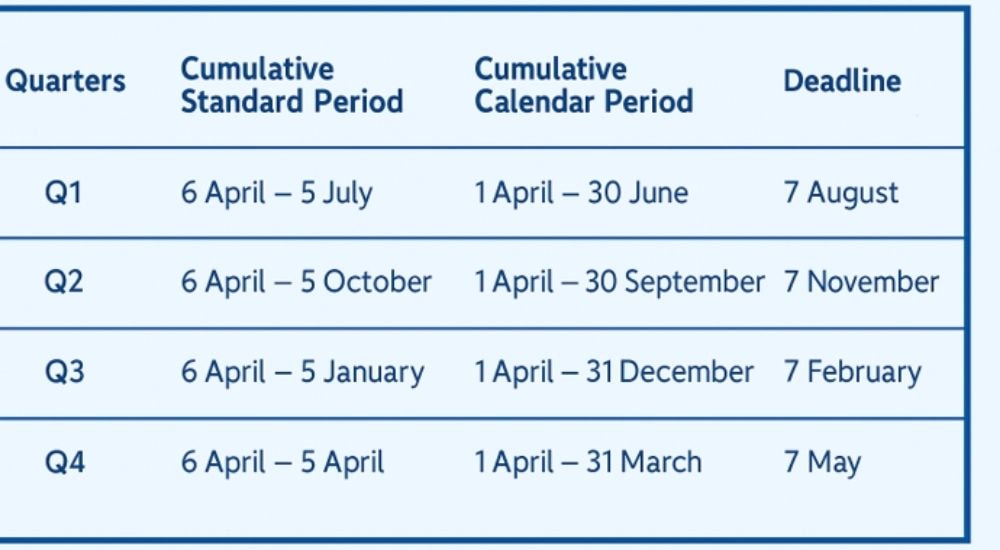
For quarterly reporting, you have got two options:
Standard quarterly periods
Calendar quarters
Whatever period you choose, the submission deadline remains the same for both periods.
Final Tax Return (Yes, You Still Need One)
Here's something that catches people out: quarterly updates are separate from your final tax return.
After the tax year ends, you'll still need to submit a final declaration through your MTD software. This crystallises your tax liability and lets you claim any reliefs and adjustments for income and expenses not included in the quarterly updates.
Choosing Software for Mixed-Use Properties That Won't Let You Down
Not all MTD software handles mixed-use properties equally well. This is crucial, pick the wrong software and you're setting yourself up for frustration and potential compliance issues.
When choosing software for your business income tax, make sure it:
Supports multiple property types within a single account
Allows separate income and expenses categorisation of residential and commercial
Provides clear reporting that distinguishes between property types
Handles expense apportionment (or allows manual allocation)
Integrates with your business bank accounts for automatic transaction capture
Generates quarterly updates and the final declaration in the correct MTD format.
Setting Up Your Software the Right Way
Proper software configuration is critical for accurate reporting. When you first set up your MTD-compatible software, you'll need to create separate property entries for the residential and commercial elements of your mixed-use building.
Most quality software allows you to add properties individually with specific category tags.
Example: For a mixed-use property, you might create two entries: "123 High Street - Commercial Unit" and "123 High Street - Residential Flat."
This separation enables you to allocate income and expenses correctly from the outset.
Property Categories: Getting Them Right
Within your software, assign each property entry to the correct category:
Commercial properties should be flagged as UK property business (non-residential)
Residential elements should be categorised as UK property income or residential lettings
This categorisation determines which sections of your MTD updates and final tax return will reflect each income stream of your mixed-use property. It also affects what expenses the software will accept for each property type and whether capital allowances are calculated automatically.
Tracking Income from Day One
Link each tenant or rental agreement to the correct property entry in your software. When rent is received, the software will automatically allocate it to the right category, ensuring your quarterly updates show residential and commercial income separately.
For mixed-use buildings where one tenant pays a single rent covering both residential and commercial space, you’ll need to apportion the income manually, although some software can automate this process for you.
Your software should allow you to split transactions, recording the percentage that relates to each use type. This apportionment should be based on a reasonable method such as floor space or independent valuations, that you can justify to HMRC if questioned.
The Tricky Part: Allocating Expenses
Expenses for mixed-use properties fall into three categories: wholly residential, wholly commercial, and shared expenses that benefit both.
Residential-only items (like safety certificates, insurance, or repairs) must be assigned to the residential side, while commercial-only expenses (such as business rates, commercial insurance, or shopfitting) go entirely to the commercial category.
The real challenge is shared expenses, things like whole-building insurance, structural repairs, central utilities, and maintenance of common areas.
These need to be split between residential and commercial elements using a consistent and reasonable basis, such as floor area or rental income proportions. Your software should support percentage allocations, and it’s important to document your method in case HMRC asks for evidence.
Spotlight on RentalBux: Built for MTD Compliance

RentalBux is built to excel at MTD compliance. Fully HMRC-approved, it’s designed to simplify the specific complexities that mixed-use property landlords face, making it one of the most reliable and landlord-friendly solutions available.
Property-Level Record Separation
RentalBux's property-centric structure allows you to create separate entries for residential and commercial elements of the same building. The software also handles complex ownership structures, tracking whether properties are owned individually, jointly, or through different arrangements.
Multiple Income Stream Management
Beyond separating residential and commercial rental income, RentalBux allows distinct recording of UK property income, foreign property income, and sole trading activities.
Integrated Property Operations
RentalBux combines tenancy management, rent collection tracking, mortgage recording, and expense categorisation with tax compliance tools. When you record rent received or log an expense during daily operations, it automatically flows into the correct category for MTD reporting.
Practical Cost Structure
The free tier for single properties (available until March 2028) allows you to test the platform's apportionment and categorisation capabilities without financial commitment. This is particularly useful for landlords with one mixed-use building who want to evaluate whether the software meets their specific needs before scaling up.
Security and Compliance
RentalBux operates on cloud infrastructure with enterprise-grade security measures and maintains compliance with UK data protection standards. The platform receives continuous updates to adapt to evolving MTD rules and HMRC system changes, ensuring your mixed-use property records remain compliant without manual intervention.
Best Practices for Digital Record-Keeping for Mixed-Use Property
Maintaining accurate digital records is the foundation of MTD compliance. For mixed-use properties, this means establishing systems that capture every transaction while preserving the residential-commercial distinction.
Receipt and Invoice Management
Every expense claim requires supporting documentation. Rather than accumulating paper receipts, use your smartphone to photograph receipts immediately after purchases and upload them to your tax software. Most MTD-compatible platforms include mobile apps that make this process seamless.
For invoices received electronically, save them directly to your software or a connected cloud storage system. Ensure each document is labelled with the date, supplier, amount, and crucially for mixed-use properties, the category it relates to (residential, commercial, or shared).
Bank Feed Integration
Most quality MTD software integrates directly with UK banks, automatically importing transactions from your business bank account. This integration eliminates manual data entry and reduces errors.
For mixed-use property landlords, bank feeds are particularly valuable because they create a complete transaction history that HMRC can audit if necessary. When transactions appear in your software via bank feed, tag them with the correct property category immediately. This immediate categorisation prevents the backlog of uncategorised transactions that often causes problems at quarter-end.

Regular Reconciliation (Your Monthly Discipline)
Set aside time monthly to reconcile your bank accounts within your tax software. Reconciliation ensures every bank transaction has been categorised correctly and that no income or expenses have been missed.
For mixed-use properties, this monthly discipline is essential because it gives you regular opportunities to review your residential-commercial allocations and ensure apportionments are being applied correctly. Catching errors monthly is far easier than discovering problems when preparing your quarterly update or, worse, during an HMRC review.
Preparing and Submitting Quarterly Updates
As your quarterly update deadline approaches, your MTD software will prompt you to review your records and submit your update to HMRC. For mixed-use properties, this process requires careful attention to ensure both income streams are reported correctly.
Reviewing Your Quarterly Data
Before submission, generate a profit and loss report from your software covering the quarter. Take time to:
Review the residential income and expenses separately from commercial income and expenses
Check that apportioned expenses have been split correctly
Verify that all bank transactions have been categorised
Confirm that the figures match your bank statements and other source documents
Most software includes a pre-submission checklist or warnings about missing information. Don't ignore these warnings but address them before submitting to avoid rejected updates or compliance issues later.
Making Adjustments
If you discover errors or omissions during your review, correct them in your software before submitting the quarterly update. Unlike paper tax returns where amendments require formal processes, MTD allows you to update your digital records right up until submission.
For mixed-use properties, common adjustments include:
Apportioning shared expenses that were initially categorised as wholly residential or commercial
Splitting mixed transactions that weren't divided correctly when first recorded
Adding missing income or expenses that didn't come through your bank feed
Submitting Through Your Software
Once you're satisfied your records are accurate, submit your quarterly update directly through your MTD software. The software communicates with HMRC's systems, transmitting your income and expense summaries in the required format.
After submission, your software will display a confirmation message and submission reference. Keep this confirmation for your records. Your software should also retain a copy of exactly what was submitted, creating a permanent audit trail.
MTD Penalties and Compliance Risks for Mixed-Use Property
Understanding HMRC's penalty system is essential for mixed-use property landlords. The complexity of managing both residential and commercial income increases your risk of non-compliance if you don't maintain proper records and meet deadlines.
Late Submission Penalty
HMRC has introduced point-based penalty system to penalise late submission of updates.
Quarterly Filing
1 point per missed update
4 points → £200 penalty
Every additional miss → £200
Reset after 12 months of perfect submissions
Annual Filing
1 point per missed update
2 points → £200 penalty
Every additional miss → £200
Reset after 24 months
Late Payment Penalties
A late payment penalty applies when a balancing payment or an amount due after an amendment/assessment is paid more than 15 days late.
Note: No late payment penalties apply to payments on account.
When the tax is paid | Penalty Applied |
|---|---|
15 days late | 3% of the outstanding tax |
15-30 days late | Additional 3% (total now 6%) |
Over 30 days late | Daily penalty accruing at 10% per year until fully paid |
Interest is charged separately from penalties and accrues daily from the day after the tax due date until the tax is fully paid, using HMRC's standard simple interest rate, even if penalties are avoided or a Time to Pay arrangement is in place.
Inaccuracy Penalties
Inaccuracy penalties do not apply to MTD income tax quarterly updates. They do apply to the annual tax return in MTD income tax in the same way that they apply to income tax self-assessment returns.
Record-Keeping Penalties
A £3,000 penalty can be charged by HMRC for failing to keep digital records or for breaking digital links within functionally compatible software.
However, HMRC does not have an automatic mechanism to apply these penalties.
Conclusion
Managing tax compliance for mixed-use properties under Making Tax Digital demands more than basic record-keeping, it requires systematic separation of income streams, careful expense apportionment, and software that handles complexity effectively.
The transition to digital tax administration represents both a challenge and an opportunity. While the initial setup requires effort, particularly for mixed-use properties with their inherent complexity, the result is better visibility of your property business performance, reduced risk of errors, and streamlined compliance with HMRC requirements.
For landlords seeking software solutions specifically designed for property tax compliance, RentalBux offers MTD-compatible features that simplify mixed-use property reporting, automate quarterly update preparation, and maintain the digital records HMRC requires. Whatever software you choose, ensure it meets your specific needs for handling both residential and commercial income within a single, coherent system.