

Making Tax Digital for Income Tax (MTD ITSA) is the digital reporting regime for sole traders and landlords whose gross qualifying income is above the relevant threshold. It requires digital records, four cumulative quarterly updates and a year-end Final Declaration, all submitted through a HMRC-recognised software for MTD such as RentalBux.
The £50,000 threshold applies to the first mandated group who came under the regime since April 2026. The threshold reduces to over £30,000 from April 2027 and over £20,000 from April 2028.
This guide explains who is in scope, what counts as qualifying income, the quarterly deadlines, the software you need, how the penalty rules work, and the practical steps to take under MTD ITSA. It is written for UK sole traders and landlords who want practical guidance.
Not sure whether MTD applies to you? Use our MTD eligibility check to confirm your start date in a few minutes.
KEY TAKEAWAYS
MTD ITSA requires four cumulative quarterly updates and a Final Declaration, all filed from HMRC-recognised software
The entry thresholds are gross qualifying income above £50,000 for the first mandated group, above £30,000 from April 2027 and above £20,000 from April 2028
Quarterly deadlines are fixed at 7 August, 7 November, 7 February and 7 May. The Final Declaration is due 31 January
Qualifying income is gross income before expenses, not profit, so you can be in scope even after a small profit or a loss
Once mandated, you remain in MTD for at least three tax years, even if your income later falls below the threshold
Penalties run on three separate tracks: late filing points, late payment charges, and a standalone digital record-keeping penalty of up to £3,000
The 2026/27 soft landing removes points for late quarterly updates only. It does not cover the Final Declaration or late payment
What Is MTD for Income Tax and How Does It Work?
MTD ITSA changes how self-employment and property income are recorded and reported. For sole traders and landlords above the threshold, it replaces the single annual Self Assessment return with digital record-keeping and regular updates to HMRC.
The aim is to give a clearer running view of your tax position and to reduce errors from reconstructing figures months later.
Under MTD ITSA you will:
Keep digital records of your business and property income and expenses in HMRC-recognised software,
Send four quarterly updates that show cumulative totals for the tax year,
Submit a Final Declaration at year-end, which replaces the Self Assessment return for those obligations.
MTD ITSA is not a single piece of law. It rests on Schedule A1 to the Taxes Management Act 1970, introduced by Finance Act 2017, together with secondary regulations and HMRC directions that set the technical detail, such as the income and expense categories used in each quarterly update.
Because that detail sits in regulations and directions, it can be changed without a new Finance Act, so parts of the regime can be amended at shorter notice than primary legislation.
What Digital Records Do I Need to Keep?
Digital record-keeping is a separate obligation from filing, and it carries its own penalty. Your income and expense records must be created and kept in HMRC-recognised software from the start.

A paper cashbook does not meet the requirement, and a standalone spreadsheet whose totals are typed into HMRC's portal by hand does not either. If you prefer spreadsheets, bridging software can link a spreadsheet to HMRC, but the link must be digital. Copying figures across by hand does not count, and there is no grace period for getting the digital link right.
Note
Records must be kept for five years from the 31 January filing deadline for the tax year. The commonly quoted six-year period comes from older rules and does not apply here. For 2026/27, with the Final Declaration due 31/01/2028, records must be kept until 31/01/2033.
Retain:
digital copies of invoices, receipts, bank statements and contracts,
evidence of the exchange rates used for any overseas income converted into sterling,
records of capital expenditure and disposals that may affect future capital gains.
Does MTD for Income Tax Apply to Me?
MTD ITSA applies to individuals with self-employment income, property income, or both, where qualifying income meets the threshold for the start year. It does not apply to companies.
Trusts and partnerships are not yet in scope. A partner's share of partnership income does not count toward their personal qualifying income, so partnership income alone does not bring you into the regime.
Property income includes UK and overseas lettings. Self-employment income includes any sole trade you carry on. In the case when you have both, the gross figures are added together for the threshold test.
What Counts as Qualifying Income, and What Does Not?
Qualifying income is your gross income, before expenses, from all your self-employment and property sources in a tax year. It is measured before any deduction, including before the £1,000 property income allowance and before the Section 24 finance cost adjustment. It is your gross receipts, not your profit.
Worked Example
A landlord with £55,000 of gross rent and £20,000 of allowable expenses has a profit of £35,000 but a qualifying income of £55,000. They fall within the £50,000 entry threshold, because the test looks at gross receipts. This is the most common reason people misjudge their start date.
Dividends, savings interest, pension income and capital gains do not count toward the threshold, although they remain part of your overall tax calculation. Rent-a-room receipts count gross, before the relief is applied.
Property income counts gross, before the £1,000 allowance. Joint property owners are required to their share of gross rent towards the threshold. Income from former Furnished Holiday Lettings also counts, because following the abolition of the FHL regime, it is treated as ordinary property income.
When Does MTD for Income Tax Apply, and What Are the Deadlines?
The rollout is phased by gross qualifying income.
HMRC measures your income two years before the start year, known as the current year minus two rule. The reason is operational. HMRC needs a filed Self Assessment return in hand before 6 April of the relevant start year to identify who to enrol.
For the first mandated group, HMRC used the 2024/25 return filed by 31 January 2026. For later cohorts, the same rule applies by reference to the relevant earlier tax return.
Delaying a return to try to fall outside the test does not work because you face late filing penalties and will still be enrolled once the return is filed.
Once You Join, You Stay in for at Least Three Years
A taxpayer who crosses the threshold stays within MTD for at least three consecutive tax years, even if qualifying income later falls below the threshold. This prevents people from moving in and out of the regime year by year.
To opt out after that, qualifying income must be at or below £20,000 for each of the three preceding years.
The only route out before the three-year period ends is total cessation, where every self-employment and property source has ended.
NOTE: The £20,000 figure here is the exit threshold, not the April 2028 mandation threshold.
MTD Quarterly Updates: What Do You Send Each Quarter?
Instead of one annual submission, you send four cumulative updates across the tax year, followed by the Final Declaration.
You can choose between two reporting period options: the standard period aligned to the tax year, or calendar quarters ending at month-end.
The filing deadlines are the same either way.
Update | Period covered | Filing deadline |
|---|---|---|
Quarter 1 | 6 April to 5 July | 7 August |
Quarter 2 | 6 April to 5 October | 7 November |
Quarter 3 | 6 April to 5 January | 7 February |
Quarter 4 | 6 April to 5 April | 7 May |
Final Declaration | Full tax year | 31 January |
You must choose your reporting period before your first update of the tax year, and most software only lets you switch at the start of a new tax year. You can submit more often than quarterly if you prefer.
Each update is cumulative, so your second update includes everything from the start of the tax year through the end of that quarter, not only that quarter's transactions. If you find a mistake in an earlier quarter, you correct it in a later update before the Final Declaration.
How Income and Expenses Are Categorised
Each quarterly update is a summary of category totals for income and expenses for each business, not a list of every transaction. Tag income and expenses by source, so each sole trade and each property business is recorded separately.
If your gross income from a business is below the VAT registration threshold, £90,000, you can report under a reduced set of categories rather than the full list.
Residential property finance costs are always reported as a separate figure, whatever categorisation you use, because of the Section 24 restriction.
For the categories and treatment specific to your situation, see our guides to MTD for sole traders and MTD for landlords.
How Does the Final Declaration Work?
After the fourth quarterly update, you submit a Final Declaration through MTD-compliant software. This confirms the year's figures, applies any year-end adjustments such as capital allowances and reliefs, and replaces the Self Assessment return for those obligations. The cumulative quarterly data carries forward into it.
There is no separate End of Period Statement. Year-end finalisation goes straight to the Final Declaration, so any software that still walks you through a separate End of Period step is using an outdated process.
You must personally confirm the Final Declaration before it is submitted. This is the legal equivalent of signing the Self Assessment return, so an accountant cannot file it on your behalf without your approval. In practice, the accountant prepares a draft, you review it, and you confirm.
The payment dates are unchanged from Self Assessment. The balancing payment is due on 31 January, with payments on account on 31 January and 31 July where they apply.
How Do I Register for MTD for Income Tax?
Signing up for MTD and authorising an agent are two separate steps, and connecting your software is a third.
You sign up on GOV.UK using your Unique Taxpayer Reference, your National Insurance number and your Government Gateway credentials.
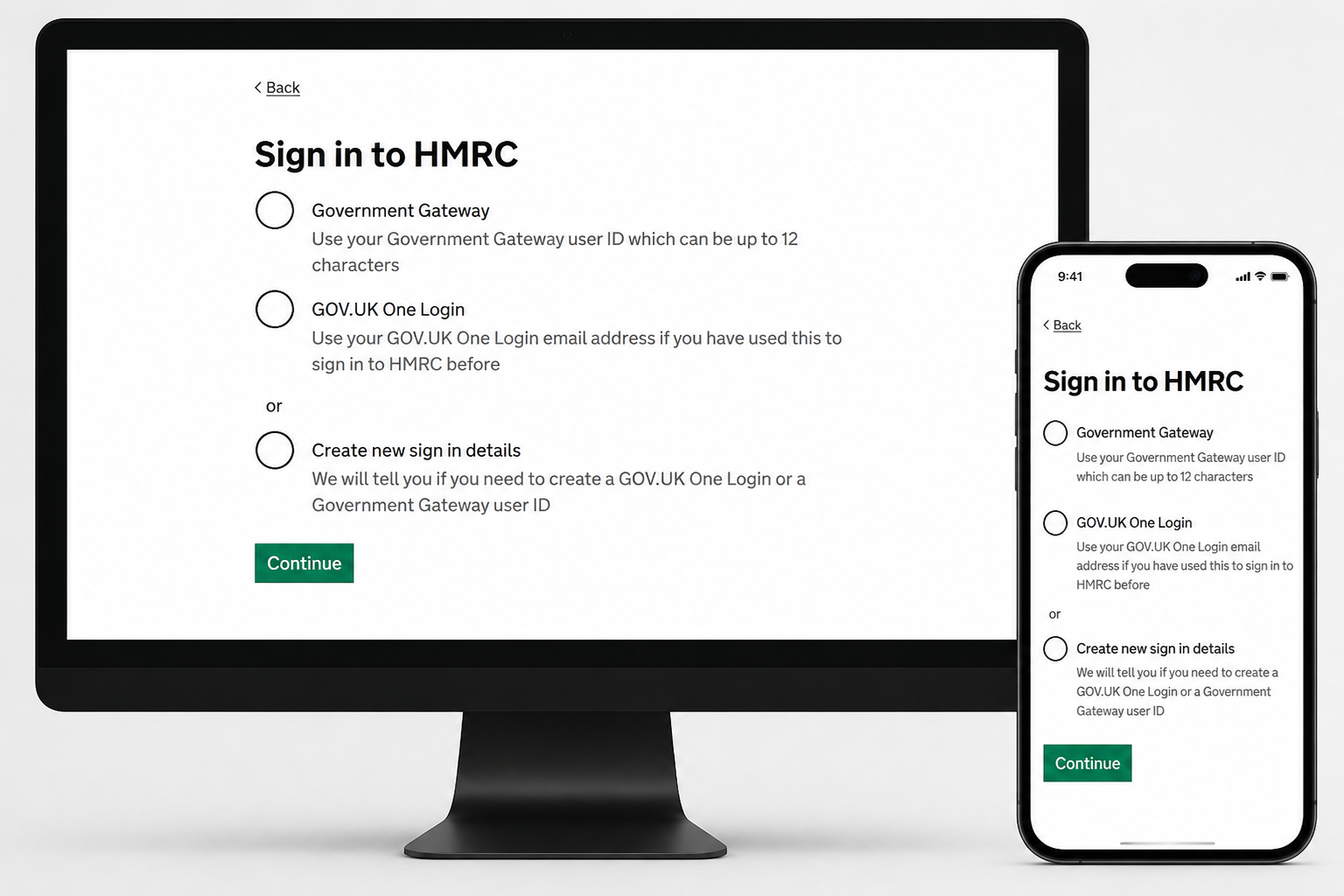
You then authorise your MTD software to connect to HMRC. If you already use MTD for VAT, you still enrol separately for Income Tax.
If an accountant acts for you, they need an Agent Services Account, and they must actively link your authorisation to it. An existing paper 64-8 authorisation does not give them access to your MTD obligations. If they do not complete this step, they cannot file your quarterly updates or the Final Declaration.
Your software's connection to HMRC expires every 18 months. If it lapses, the software cannot submit until the connection is renewed. Set a reminder before the expiry date rather than discovering the problem at a deadline.
Who Can Claim an MTD Exemption?
Not everyone must comply. You can apply for a digital exclusion exemption where it is not reasonably practicable for you to use digital tools because of age, disability, location or religious belief. There is no fixed age threshold, and HMRC applies a case-by-case test based on your actual circumstances. A preference for paper is not accepted as grounds.
If your qualifying income is below the threshold for a start year, you are outside the regime for that year, though you can still join voluntarily. You apply for an exemption directly to HMRC, and you should keep appropriate records in case of an enquiry, even where an exemption is granted.
What Are the MTD Penalties?
MTD has its own penalty framework, separate from the Self Assessment regime. It runs on three tracks that can apply at the same time: late filing, late payment, and digital record-keeping.
Late filing uses a points system. Each missed quarterly update or Final Declaration earns one point, and four points triggers a £200 penalty, with a further £200 for each later default.
A first-year soft landing removes points for late quarterly updates in a taxpayer's first mandated year, which for those mandated from April 2026 means the four updates in 2026/27.
The soft landing is narrow. It covers late quarterly update points only. It does not cover a late Final Declaration, it does not cover late payment, and it does not cover the digital record-keeping penalty. Each of those applies in full from the first year.
Late payment is a separate regime, with a penalty based on how long the tax is overdue and interest running daily from the due date. Separately, HMRC can charge up to £3,000 for failing to keep records in compatible software, under Schedule A1, paragraph 12 of the
Taxes Management Act 1970. This penalty is standalone, so it can apply even where every update and the Final Declaration were filed on time.
For the full detail, including the points thresholds and how they expire, the late payment percentages, and how inaccuracy penalties apply to the Final Declaration, see our guide to MTD penalties.
Which Software Do I Need for MTD for Income Tax?
You cannot meet your MTD obligations by typing totals into your HMRC online account. Submissions must come from HMRC-recognised software through HMRC's interface.
Recognition means the product can connect to HMRC's systems and meet the technical standard. It is granted per income type, so UK property, foreign property and self-employment are separate, and many products do not hold all three.

Check that your software is recognised for the income types you actually have, not only that it is described as MTD ready.
Recognition confirms the software can file for your particular income type. However, it does not tell you whether it has the features you need, such as multiple-property handling or a Final Declaration route at year-end.
There are three main routes in terms of choosing a software:
standalone MTD software designed for income tax reporting,
mainstream accounting packages with an MTD module, useful if you already use one for bookkeeping,
bridging software, which links a spreadsheet to HMRC if you prefer to keep a spreadsheet workflow.
When choosing, look for:
automatic bank feeds and transaction matching,
handling of multiple businesses and properties, with tagging by source,
support for both quarterly updates and the Final Declaration in one product,
the ability to export your data if you decide to switch.
Most providers offer a free trial or a free tier for small users. Paid tiers typically cost between £10 and £30 a month, depending on features.
How Much Will MTD Compliance Cost?
There are several cost elements:
software, from free tiers for small users to roughly £10 to £30 a month for fuller features,
accountancy fees, where an accountant sets up your workflow and handles the quarterly review and submissions,
your own time to digitise records, reconcile bank feeds and learn the software.
For many small taxpayers, bank feed reconciliation and automated categorisation reduce time and error costs once the setup is complete.
|
|
|
|
|
|
|
What to Do Next
Start by confirming your qualifying income and the threshold that applies to you. Choose software recognised for your income types, sign up on GOV.UK, connect your bank feeds and run the quarterly reporting process well before the filing deadline. Where your mandation date is still ahead, use the same steps before the start of that tax year.
If you would like help with MTD compliance, book a fixed-fee MTD consultation with UK Property Accountants. We will confirm your position, set up the workflow and get your quarterly reporting process running.
