
MTD Is Live. Don't Fall Behind! Start Today for Free. Register Now
All support

On this page

0%

Stuck on MTD?

Talk to a UK MTD expert — 15 min, no sales pitch.

Book a free call

Journal Entries — Recording Manual Accounting Adjustments

Written byRentalBux1-100RentalBuxRentalBux1-100RentalBuxWritten byRentalBux is the top HMRC-recognised MTD software for landlords and sole traders in the UK that keeps you compliant and also fulfils your property management needs.View profile
Updated 17 Jun 20269 min read
Journal Entries — Recording Manual Accounting Adjustments

For most day-to-day transactions, you'll never need to create a journal entry manually — invoices, bills, and bank reconciliation handle everything automatically. But occasionally, you'll need to record something that doesn't fit neatly into an invoice or bill: a depreciation adjustment, a year-end accrual, a correction your accountant has requested, or a transfer between accounts. That's what the Journal is for.

Welcome to RentalBux

What a journal entry is

A journal entry is a manual record of a financial transaction using double-entry bookkeeping: one debit to one account and one credit to another. The two sides must always balance. For example, recording a mortgage payment split between interest (expense) and capital repayment (liability reduction) might require a journal entry rather than a simple bill.

When you'd create a journal entry

  • Recording depreciation on an asset (usually at year-end with your accountant's help)

  • Adjusting an opening balance entry

  • Recording an accrual (income earned or expense incurred but not yet invoiced or billed)

  • Correcting a categorisation error that's easier to fix with a journal than by editing the original transaction

  • Recording a transfer between two of your own bank accounts (not a real expense, just a movement of money)

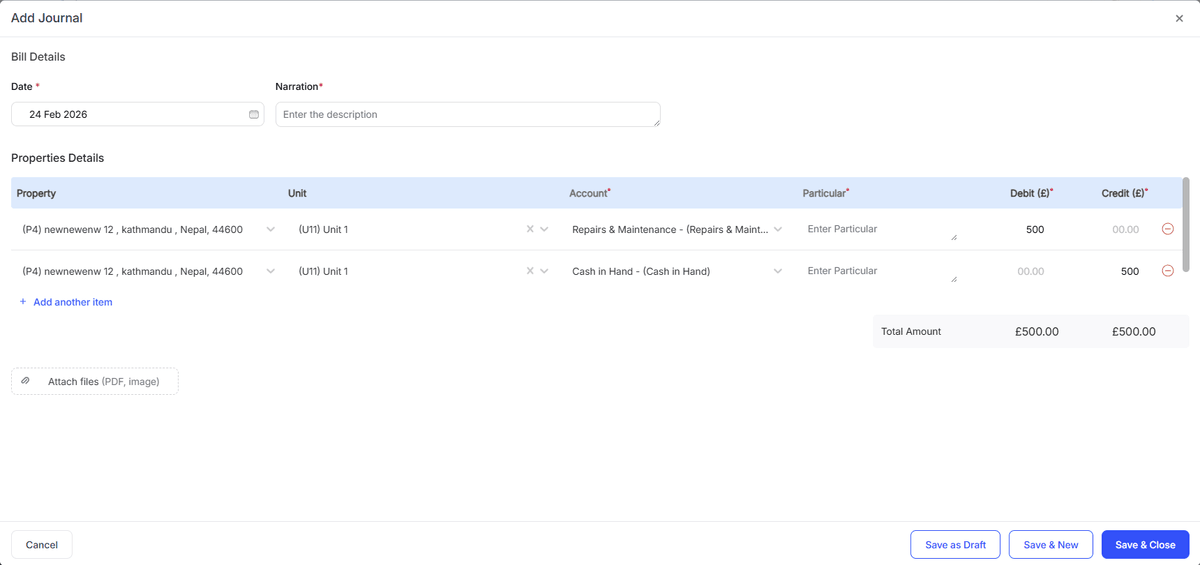
How to create a journal entry

1
Go to Accounting > Journal > Add Journal.
2
Enter a description that explains what this entry is and why it's being made
3
Enter the date the entry relates to (not necessarily today — it might be a backdated adjustment)
4
4. Add the debit line: select the account to debit and enter the amount
5
5. Add the credit line: select the account to credit and enter the same amount
6
6. Add more lines if the entry involves more than two accounts (e.g. splitting one payment across three expense accounts)
7
7. The Total Amount must be the same. If they aren’t, check your amounts
8
8. Click Save
Recording Manual Accounting AdjustmentAdd Journal

Quick Tip: If you're not sure whether something needs a journal entry, check with your accountant first. Incorrect journal entries are harder to untangle than missing invoices, because they affect account balances directly. When in doubt, use an invoice or a bill instead.

Related Guides:

Liked this article?

Leave a 30-second Trustpilot review — it keeps us writing.

Found this useful?

Share or cite this article

Copy a ready-made link or markdown snippet to share this article with others.

HTML
<a href="">Journal Entries — Recording Manual Accounting Adjustments — RentalBux</a>
Markdown
[Journal Entries — Recording Manual Accounting Adjustments — RentalBux]()

See how RentalBux handles your MTD filing end-to-end

Property, self-employment and foreign lets in one submission. No per-filing fees.

About the author