.jpg&w=64&q=75)
.jpg)

Making Tax Digital (MTD) represents one of the most significant changes to UK tax administration in recent years. For freelancers across the country, this digital transformation means adapting to new ways of recording income, managing expenses, and submitting tax information to HMRC. While the transition may seem daunting, proper preparation can make MTD compliance straightforward and even beneficial for your business operations.
This article will guide you through all the essential information freelancers need to understand and comply with MTD confidently.
What is Making Tax Digital for Freelancers?
Making Tax Digital is HMRC's initiative to modernise the tax system by requiring digital record-keeping and quarterly reporting and submitting final tax return to HMRC. For freelancers operating as sole traders, MTD for Income Tax Self-Assessment (MTD For ITSA) represents a fundamental shift from the traditional annual Self-Assessment process.
These updates provide HMRC with a more real-time view of your business activity, replacing the once-yearly snapshot of traditional Self-Assessment.
Understanding Making Tax Digital for Freelancers early gives you time to implement the necessary systems and adjust your business processes before MTD becomes mandatory for your circumstances.
Who Needs to Follow MTD Rules as Freelancers?
MTD for ITSA affects freelancers differently depending on their income levels and business structure. Currently, if you're a sole trader with a business income or a landlord with property income above £50,000 annually, you need to follow MTD rules from 6 April 2026. For those with income above £30,000, MTD becomes mandatory from 6 April 2027 and from 6 April 2028 the threshold is planning to be reduced to £20,000, meaning MTD will apply if your business or property income exceeds that amount.
Even if your income falls below these thresholds, you can voluntarily join MTD to benefit from digital record-keeping and simplified tax management. Some freelancers find that adopting MTD early helps them better understand their finances and prepare for future growth.
It's important to note that MTD for freelancers specifically applies to income from self-employment and property rental. If your income comes solely from PAYE employment or other non-qualifying sources, the MTD rules won’t apply in the same way, because HMRC only counts self-employment and property income when determining MTD obligations.
Choosing the Right MTD-Compatible Software for Freelancers
Selecting compatible software is perhaps the most crucial decision freelancers face when preparing for MTD. Your chosen platform needs to be recognised by HMRC as MTD-compatible, meaning it can connect to HMRC systems and submit quarterly updates in the required format.
When evaluating software options, consider your specific needs as a freelancer. Some platforms cater specifically to sole traders with straightforward income and expenses, whilst others offer more comprehensive features for complex business structures. Key features to look for include invoice creation, expense tracking, bank feed integration, mileage logging, and VAT management if applicable.
Popular options for freelancers include cloud-based accounting software that offers mobile apps, allowing you to manage your records on the go. Many platforms offer free trials, enabling you to test functionality before committing.
For freelancers who previously used spreadsheets or manual records, MTD bridging software exists that can make your existing systems MTD-compatible software for freelancers. However, dedicated accounting software often provides additional benefits like automated bank feeds and real-time financial insights.
RentalBux is an excellent choice for MTD freelancers, supporting both self-employed income and rental property income within a single, HMRC-recognised platform, because it simplifies record-keeping and ensures MTD compliance. Its features are tailored to make life easier:
Simplify Property Oversight: Keep all property records in one place, saving time and reducing errors
Digital Lease Storage: Upload and share signed agreements seamlessly — no more back-and-forth paperwork
Bank Sync & Automated Rent Tracking: Automatically track income and expenses, keeping financial records up to date for easy reporting
Comprehensive Reports & Copywriting: Generate detailed financial summaries for HMRC submissions or internal review
Efficient Communication: Get alerts for rent payments, renewals, and updates, ensuring nothing slips through the cracks
These features allow freelancers to maintain digital records effortlessly, track income and expenses in real time, and generate reports needed for MTD submissions — making RentalBux a practical, MTD-ready solution for Freelancers.
Ready to Simplify MTD Compliance?
How Can Freelancers Set Up an Digital Record-Keeping System for MTD?
Transitioning to digital record-keeping requires establishing robust systems for capturing all business transactions. Start by ensuring every income source and business expense is recorded digitally within your MTD-compatible software.
Create a systematic approach to logging transactions as they occur rather than retrospectively. This might mean photographing receipts immediately and uploading them to your software, or connecting your business bank account via a secure feed that automatically imports transactions.
Organise your records into appropriate categories that align with HMRC's business income categories. This includes trading income, allowable business expenses, capital allowances, and any other relevant classifications for your specific freelance work.
Get Expert Tips for Categorising Your Freelance Income and Expenses :
Understanding Quarterly Updates and Deadlines MTD Compliance for Freelancers
Unlike traditional Self-Assessment where you submit one tax return annually, MTD for freelancers requires quarterly updates to HMRC. These updates provide a cumulative summary of your business income and expenses, meaning each submission includes totals from the start of the tax year up to the end of that quarter, not just the figures for that three-month period.
You have two options for submitting your quarterly reports:
1. Standard quarter
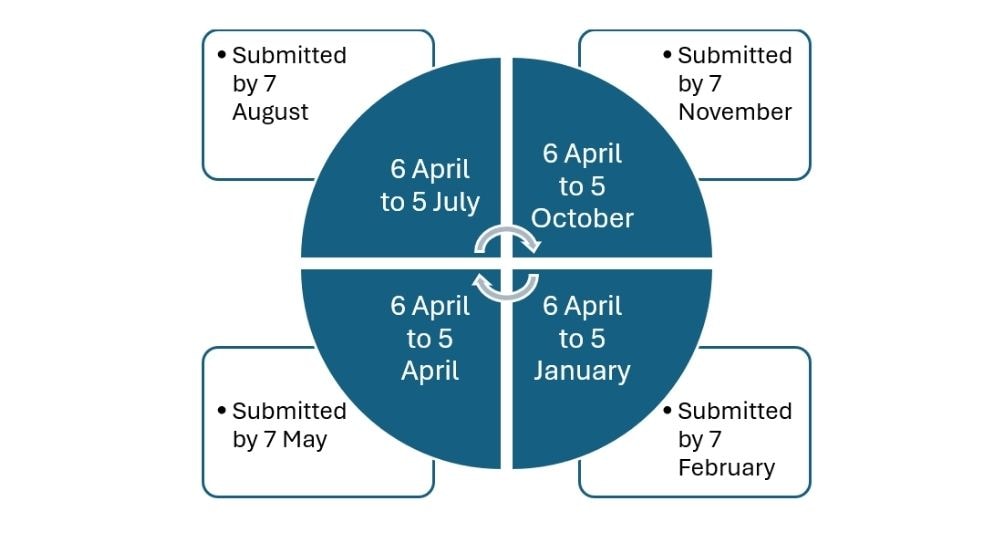
2. Calendar quarter
You can elect to use the “calendar-quarter” option — under which quarters run 1 April to 30 June, 1 April to 30 September, 1 April to 31 December and 1 April to 31 March, with the same deadlines of 7 August, 7 November, 7 February and 7 May. You can elect to use the “calendar-quarter”. Whichever you choose, the submission deadline is same.
Submitting Your Final Declaration of MTD
Even after completing quarterly updates, Making Tax Digital for freelancers still requires a final declaration. This is similar to the traditional Self-Assessment tax return and must be submitted by 31 January following the end of the tax year.
The final declaration is where you confirm your overall tax position, including all income sources, claim applicable reliefs and allowances, and calculate your final tax liability. You'll also make your formal declaration that the information is correct and complete.
Managing MTD Penalties and Compliance for Freelancers
HMRC has established a points-based penalty system for late quarterly updates and under MTD for freelancers. Understanding this system helps you avoid unnecessary penalties and maintain good compliance.
Quarterly MTD Updates
Each missed quarterly update gives the taxpayer 1 penalty point
Threshold: Accumulating 4 points triggers a £200 fixed penalty
Additional late submissions after reaching the threshold incur another £200 penalty per missed submission, even though your points do not increase further
The points apply only to quarterly submissions and are counted separately from annual filing points
Annual Final Return
Missing the annual final submission also gives 1 penalty point
Threshold: Accumulating 2 points triggers a £200 fixed penalty
Additional late annual submissions beyond the threshold incur further £200 penalties per occurrence
Points from annual returns are tracked separately from quarterly submission points
3. Reset / Compliance Period
Points expire after a period of continuous compliance:
Quarterly updates: To reset penalty points for quarterly submissions, you must submit all your quarterly updates on time for 12 consecutive month
Annual returns: To reset penalty points related to the annual final declaration, you must submit your annual return on time for 24 consecutive months
Once the points expire, you get a fresh start, rewarding improved record-keeping and timely submissions.
4. Late Payment Penalties & Interest
Late payment penalties are separate from submission points and apply even if you file on time:
Timeline | Penalty |
|---|---|
Within 15 days of due date | No penalty |
Day 16–30 late | 3% of the outstanding tax |
Day 31 onwards | Another 3% at day 30, making it 6% 10% annualised, calculated daily until payment |
Interest | Charged from original due date until full payment is made |
Paying on time is the best way to avoid additional financial costs beyond the points-based penalties.
Penalty Soft Landing
HMRC has confirmed a soft landing for the first year of MTD. During the 2026–27 tax year, there will be no late submission penalties for quarterly MTD updates, giving new users time to adjust. This applies only to those joining MTD in April 2026 and only for that one tax year.
However, this relief is limited. It does not apply to taxpayers joining MTD from April 2027 onwards, and it covers quarterly updates only. It’s also important to note that the soft landing does not apply to late payments. Penalty points will still apply if the final tax return is filed late in 2026–27.
Professional Support for MTD Compliance for Freelancers
Many freelancers benefit from professional support when transitioning to MTD, particularly during the initial setup phase. Accountants and bookkeepers experienced with MTD can guide software selection, establish your chart of accounts correctly, and ensure your systems meet compliance requirements.
Professional support doesn't necessarily mean ongoing expensive services. Many freelancers engage an accountant for initial MTD setup and annual final declaration support whilst managing quarterly updates independently. This hybrid approach balances cost-effectiveness with professional expertise.
Some software providers include support services or connect you with accounting professionals who specialise in their platform. These partnerships can provide cost-effective expertise specifically related to your chosen software.
Consider joining freelancer communities or professional networks where members share MTD experiences and recommendations. Peer support often provides practical insights into managing MTD compliance alongside the realities of freelance work.
Benefits of MTD for Freelancers
Whilst MTD requires adaptation, many freelancers discover unexpected benefits from the new system. Digital record-keeping provides real-time visibility into business performance, helping you make informed decisions about pricing, expenses, and growth opportunities.
Regular attention to income and expenses often reveals patterns, opportunities for tax planning, and areas where costs could be reduced.
MTD-compatible software typically offers features beyond basic compliance, including invoice creation, expense claims, profit tracking, and financial reporting. These tools can genuinely improve how you run your freelance business beyond simply satisfying HMRC requirements.
Common MTD Mistakes Freelancers Should Avoid
Freelancers new to MTD often make predictable mistakes that create unnecessary complications. Leaving quarterly updates until the last minute defeats the purpose of spreading compliance throughout the year and often results in rushed, error-prone submissions.
Mixing personal and business transactions complicates record-keeping considerably. Even if you've operated this way for years, MTD provides an excellent opportunity to establish clearer boundaries between personal and business finances.
Neglecting to keep supporting documentation for expenses can cause problems if HMRC queries your submissions. Digital copies of receipts, invoices, and other evidence should be maintained alongside your accounting records.
Assuming that quarterly updates are your final tax return causes confusion. Remember that MTD involves multiple stages, with your quarterly updates being just the first step toward your final declaration.
Preparing for Future Changes in MTD for Freelancers
HMRC continues developing MTD, with potential future changes including real-time reporting and expanded coverage to more taxpayers. Staying informed about these developments ensures you're never caught off guard by new requirements.
As your freelance income grows, you may cross MTD thresholds or become subject to additional requirements like VAT registration. Building good digital record-keeping habits now prepares you for these future developments.
Technology continues evolving, with artificial intelligence and automation increasingly featured in accounting software. Embracing digital systems now positions you to benefit from these innovations as they become available.
The fundamental shift MTD represents extends beyond software and quarterly submissions. It reflects HMRC's vision for a more modern, efficient tax system. Freelancers who adapt proactively rather than reactively typically find themselves better positioned for long-term success.
Conclusion
Making Tax Digital for freelancers represents a significant change in how UK sole traders manage their tax obligations. By understanding the requirements, selecting appropriate software, establishing robust digital record-keeping systems, and maintaining consistent compliance practices, freelancers can navigate MTD successfully.
Starting your preparation now, regardless of when MTD becomes mandatory for your circumstances, provides time to adapt gradually rather than rushing as deadlines approach. The transition offers opportunities to improve your business financial management whilst meeting HMRC's compliance requirements.
With proper preparation and the right systems in place, MTD for freelancers becomes a manageable aspect of running your business rather than an overwhelming burden. Taking action today positions you for confident, compliant operation under the new digital tax regime.


