

What is a Digital Link?
A digital link is an electronic transfer of data between software products without manual retyping, such as a spreadsheet formula or CSV import. The digital chain begins when a transaction is first logged in your software and ends when HMRC receives your quarterly update.
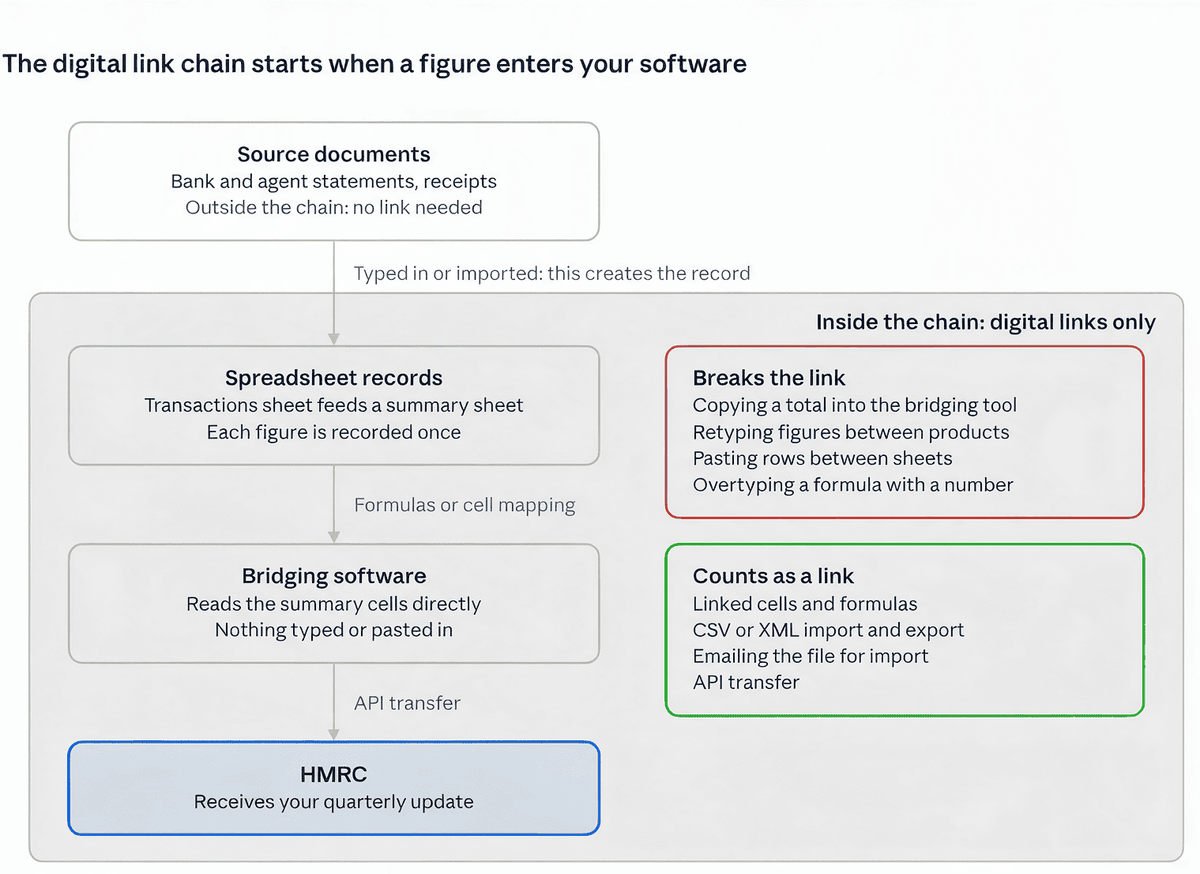
Inside the grey panel, figures may only move by formula, import or API transfer. Source documents such as bank and agent statements sit outside the MTD digital links rules.
What GOV.UK and the Regulations Say
HMRC's guidance says that if you use more than one product, you must digitally link them, and you must not use cut and paste or copy and paste to move records.
The rule itself comes from the Income Tax (Digital Obligations) Regulations 2026. Under SI 2026/336, reg 3(2), once data has been recorded in one program, using it in the others must not require "any further recording of those data by the user". Copying and pasting a figure is further recording.
Although guidance phrasing might be misconstrued as allowing copy and paste prior to your first quarterly submission, the underlying regulation contains no such grace period or time limit.
Copy and Paste Scenarios: Allowed or Not?
For MTD digital links, the test is whether you are creating a record or moving one that already exists.
SCENARIO | ALLOWED? | RECOMMENDED ACTION |
|---|---|---|
Typing rent and fees from a letting agent statement | Yes (creates initial record) | Record gross rent and fees separately, not net payments |
Pasting quarterly totals into bridging software | No (breaks digital link) | Map bridging software directly to summary cells |
Copying a transaction from online banking | Yes (creates initial record) | Import a bank CSV file to eliminate typing errors |
Copying rows from your rent sheet into summary sheet | No (breaks digital link) | Build the summary with formulas such as SUMIFS |
A formula splitting a joint property's rent by your share | Yes (valid formula link) | Keep the share percentage in a labelled input cell |
Overtyping a formula cell with a fixed figure | No (breaks digital link) | Correct underlying transactions causing differences |
Emailing a spreadsheet to an accountant who imports it | Yes (valid file transfer link) | Send the spreadsheet file rather than a typed list |
MTD Digital Links: What Counts and What Doesn’t
HMRC’s Income Tax guidance lists six acceptable MTD digital links. Formulas that apportion income and expenses also count, as HMRC has confirmed to the ATT.
Digital link | How it works |
|---|---|
Linked spreadsheet cells | Formulas pull figures from one cell, sheet or workbook into another |
Emailed spreadsheets | The file is emailed so an agent or another product can import it |
Portable storage | The file is saved to a USB drive or memory stick and imported directly |
File import and export | Data moves in XML or CSV files, including downloads and uploads |
Automated data transfer | Data passes electronically between connected software without manual steps |
API transfer | Software exchanges data directly with other software or with HMRC’s systems |
Apportionment formulas | Formulas split income and expenses, such as your share of a jointly owned property |
Any step where a person carries a figure across by hand breaks the link.
Action | Why it breaks the link |
|---|---|
Retyping figures | Data that already exists in your records is entered a second time |
Rewriting data manually | A second, unlinked copy is created in another cell or sheet |
Copy and paste | Records are moved by hand, which HMRC’s guidance prohibits |
When Do You Need a Digital Link?
You need MTD digital links whenever your records are maintained across or transferred between more than one software product or spreadsheet. If a single MTD-compatible software product maintains your records and submits your updates directly to HMRC, no separate digital links are required.
One Product vs More Than One
A spreadsheet paired with separate bridging software counts as two products, so digital link rules apply. Similarly, multiple workbooks feeding into a summary sheet are treated as separate software components, requiring digital links between them.
Set up your digital link when configuring your software, or at the latest before submitting a quarterly update. Under statutory rules (SI 2026/336, reg 15(3)), each digital record must be created before submitting the quarterly update that includes it.
Records That Don't Need a Link
Three things sit outside the link rules:
Non-business income: Income outside self-employment or property (such as dividends, savings interest, or employment income) does not require MTD digital records or links.
Upstream operational systems: Tools used before the official digital record is created (such as tills or booking systems) do not require digital links to your main accounting software.
Final tax submission tools: Software used solely to submit your end-of-year tax return that fetches pre-populated data directly from HMRC does not require separate digital links for that information.
Joint Landlords
MTD digital links are not required between your records and a co-owner's records; you only need to record your individual share. HMRC's digital record-keeping direction permits joint landlords to record one total entry per income category each quarter, one per expense category annually, or defer adding joint property expenses until preparing the end-of-year tax return.
Foreign Property
You must maintain separate digital records for each foreign property, though your software aggregates them into a single quarterly update. The £90,000 turnover threshold for simplified category reporting does not apply to foreign property income.
Spreadsheets and Bridging Software: Keeping the Link
Spreadsheets remain permitted as digital record-keeping tools under MTD for Income Tax. Bridging software is required to transmit figures to HMRC via API, and every step between transaction records and the bridging tool must use MTD digital links, such as cell formulas or file imports.
WORKED EXAMPLE
Priya owns two flats outright and a third 50:50 with her brother, all managed by an agent charging 10%. She uses a spreadsheet paired with bridging software. In her second quarter of 2026/27, her gross rent is £9,600, agent fees are £960, a boiler repair costs £680 and mortgage interest is £1,260. Her UK property turnover is under £90,000, so she uses simpler categories.
Item | Done right | Done wrong |
|---|---|---|
Agent statements entry | Gross rent and fee typed in as separate rows per flat | Net payment from the agent recorded as income |
Joint property calculation | Gross figures multiplied by 50% share cell using a formula | Share calculated on an external calculator and typed in |
Quarterly income | £9,600 (Gross rent) | £8,640 (Net rent after agent fees) |
Expenses (excluding finance costs) | £1,640 (£960 fee + £680 repair) | £1,940 (£680 repair + £1,260 mortgage interest) |
Residential finance costs | £1,260 (Recorded and reported separately) | Not separated (Bundled into general expenses) |
Bridging Software Transfer | Summary cells read via SUMIFS formulas | Summary total retyped manually into bridging software |
Digital link intact? | Yes | No |
Key Takeaways:
The incorrect approach breaks the digital link twice (manual calculator entry and manual retyping into bridging software) and misstates two key figures.
Residential property finance costs cannot be deducted from rental profits (ITTOIA 2005, s272A). Instead, they qualify for a tax reduction at the property basic rate, currently 20% (ITTOIA 2005, ss274A–274AA). Deducting a full year’s mortgage interest of £5,040 as an expense would therefore understate a higher-rate taxpayer’s bill by approximately £1,008.
Landlords with turnover under £90,000: Using simpler categorisation still requires residential finance costs, such as mortgage interest, to be recorded and reported separately in every quarterly update.
These figures are illustrative. Your own position depends on your specific income and expenses.
Where Spreadsheet Links Break
MTD digital links in spreadsheets commonly break due to SUM ranges that omit new rows, "paste values" overwriting formulas with hardcoded numbers, renamed worksheets triggering #REF! errors, or inserted columns shifting cell mappings for bridging software. Before sending each quarterly update, check every cell mapped to your bridging software to verify it contains an active formula rather than a hardcoded figure.
Bridging vs Single MTD Software
Feature | Spreadsheet plus bridging software | Single MTD software |
|---|---|---|
Digital links to maintain | Cell formulas and links between transaction sheets and summary cells | None required between products |
Joint property split | Customized formulas referencing a labelled share percentage cell | Built-in share allocation features (where supported) |
Foreign property | Custom record sets built per individual property | Native multi-property setup (where supported) |
Residential finance costs | Separate custom category created by you | Standard pre-configured expense category |
Best suited for | Landlords with established spreadsheets who prefer custom setups | Users who prefer an all-in-one solution without managing formulas |
Bridging software is a legitimate and cost-effective option if your spreadsheet is properly structured. However, if maintaining formulas and digital links is a concern, RentalBux manages your records, splits joint-ownership income by share, handles both UK and foreign property, and submits quarterly updates directly from one platform, eliminating inter-software digital links entirely.
How to Correct a Figure Without Breaking the Link
To keep your MTD digital links intact, always correct an error where it was first recorded, in your record-keeping software, and never directly in your bridging software.
Correct the transaction in your spreadsheet.
Check your formulas so the summary cells recalculate automatically.
Refresh the link so your bridging software reads the updated figures.
Submit the correction. If the error is found during the tax year, it is included in your next quarterly update, because updates are cumulative. If it is found after your fourth update, either resend that update or adjust the category totals in your software before you submit your tax return.
Statutory regulations (SI 2026/336, reg 17) requires errors in digital records to be corrected as soon as possible.
What Happens If Your Digital Links Break?
A broken digital link will not prevent your quarterly update from being submitted, nor does it trigger an automatic penalty. The compliance risk arises later if HMRC inspects your digital records or if a corrupted summary figure leads to an inaccurate tax return.
No 2026/27 Easement for Digital Links
HMRC's 2026/27 penalty easement covers late quarterly update submissions only. No soft landing or transition period has been announced for digital links under MTD for Income Tax, so digital link rules apply from the start date of your mandate.
Record-Keeping Penalties
The general statutory penalty for failing to keep adequate records, including required MTD digital records, is up to £3,000 per tax year under Section 12B(5) of the Taxes Management Act 1970. Additionally, if a broken digital link causes an incorrect figure to enter your final return and understates your tax liability, HMRC can apply inaccuracy penalties under Schedule 24 to the Finance Act 2007.
Common MTD Digital Link Mistakes
COMMON MISTAKES | RECOMMENDATION |
|---|---|
Recording net agent payments instead of gross | Request a gross breakdown from your agent. Log rental income and agent fees as separate entries rather than logging the net payout. |
Copying or retyping totals into bridging software | Map the bridging software directly to your summary cells once so it reads the totals automatically every quarter. |
Overtyping formula cells with fixed numbers | Fix the underlying transaction entry in your spreadsheet to resolve differences instead of hardcoding figures. |
Relying on outdated VAT-era guidance | Verify that any rules you follow are written specifically for MTD for Income Tax under 2026 regulations. |
With the second quarterly update due by 7 November 2026, spending time now to audit your digital links prevents costly reconciliations later.
What Landlords and Sole Traders Should Do Now
Conclusion
Under the MTD digital links rules, copy and paste is not a compliant digital link. Once a figure is in your records, it can only move between products by formula, file import or API. Entering figures from bank or agent statements is permitted, because that creates the record. If you use a spreadsheet with bridging software, check every link before your next quarterly update. If maintaining those links is a burden, a single MTD product removes them entirely.