.jpg)

A landlord with a handful of properties can easily see 50 or more repeat transactions a quarter: rent from each tenant, a mortgage payment per property, council tax during void periods, insurance, letting agent fees and the odd utility bill. Under MTD, every one of those needs a category in your digital records, and you need to be consistent from one quarter to the next.
If you want to auto categorise bank transactions as a landlord, bank rules take the repetitive part off your hands. You tell your software once how to recognise a transaction, and it sorts every future match for you to approve in a batch. This guide explains how bank rules work, which landlord transactions suit them, where they can go wrong, and how to set them up in RentalBux.
What Are Bank Rules in Rental Accounting?
A bank rule is an instruction with two halves: a condition and an action.
The condition describes what the transaction looks like. For example, money going out, with "SHIELD LANDLORD" somewhere in the description.
The action says what to do with it. For example, sort it as Insurance for Willow Cottage.
When a transaction from your bank feed or an imported statement meets the condition, the software applies the action. Good landlord software treats this as a suggestion rather than a final posting, so you can catch the occasional transaction that looks familiar but is not what you expect.
Bank rules are a common way to handle transaction categorisation in landlord software, but they are a bookkeeping tool, not a legal requirement. The law requires accurate, categorised digital records. Rules are simply one efficient way to produce them.
Why Auto-Categorisation Matters for MTD Digital Records
Making Tax Digital (MTD) for Income Tax requires affected landlords to maintain digital records of their rental income and expenses and submit quarterly updates to HMRC using compatible software. Each record must include the transaction amount, date and appropriate income or expense category.
For landlords dealing with regular rent payments, mortgage interest, insurance, council tax and utility bills, categorising every transaction manually can be time-consuming and increases the risk of mistakes.
Auto-categorisation makes this process easier by applying consistent categories to recurring transactions. For example, a bank rule can recognise monthly payments to an electricity supplier and suggest the appropriate utility expense category without the landlord having to select it each time.
This helps landlords in several ways:
Saves time: Reduces repetitive manual categorisation of rental income and expenses.
Improves consistency: Helps ensure similar transactions are recorded under the same category throughout the tax year.
Reduces errors: Limits the risk of selecting incorrect categories when entering transactions manually.
Simplifies quarterly updates: Helps keep digital records organised and ready for MTD reporting.
However, auto-categorisation does not automatically make records MTD-compliant. Some transactions, such as mortgage payments containing both interest and capital, require additional checks.
Which Landlord Transactions Suit a Bank Rule?
Bank rules work best for transactions that repeat, come from the same payee, and always belong in the same category. For most landlords that includes:
Council tax you pay during void periods, or on any property where you are the person liable for it
Water, gas and electricity where you, rather than the tenant, pay the bills
Landlord insurance, such as buildings, contents or public liability cover
Letting agent and management fees paid by direct debit or invoice
Service charges and ground rent on leasehold flats
How RentalBux Bank Rules Work
You will find bank rules in RentalBux under Banking: open a bank account to reconcile, then choose the Bank Rules tab.
Building a Rule
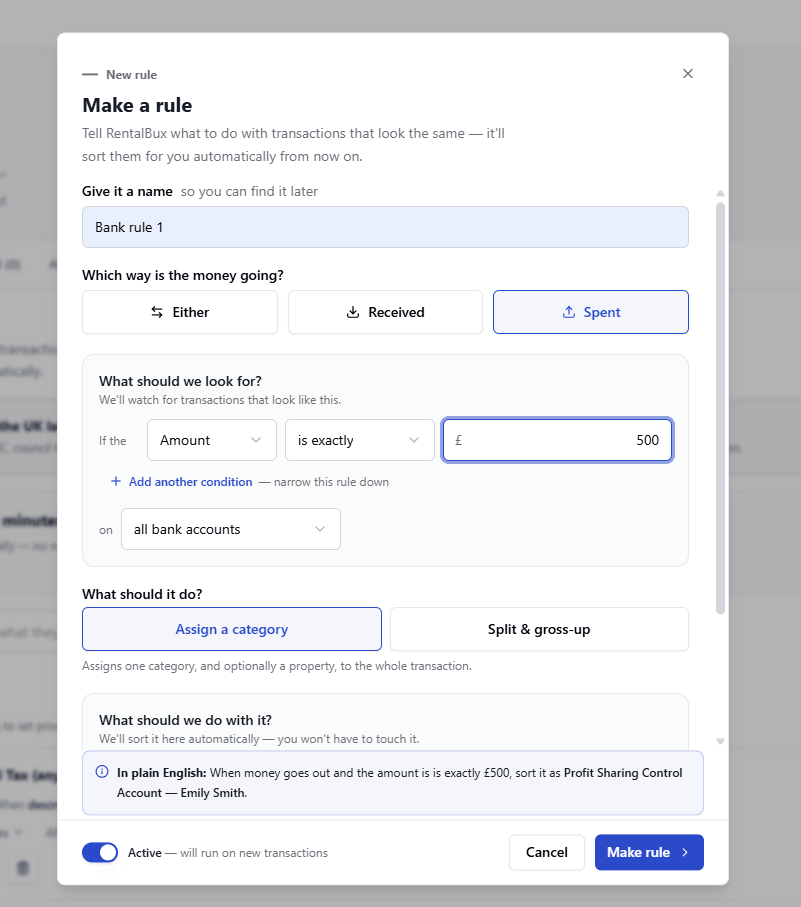
Click New rule and work through four short steps:
Name the rule so you can find it later, for example "Shield insurance, Willow Cottage".
Choose the direction: Received, Spent or Either.
Set the conditions. Match on the description ("has the words" or "is exactly") or on the amount (is exactly, less than, more than, or between). You can add further conditions and combine them with AND or OR. Description matching is not case-sensitive, and a rule can watch all your bank accounts or just one.
Choose what it should do. Pick Assign a category to sort the whole transaction into one category and, if you wish, one property. For a letting agent's net rent payment, pick Split & gross-up instead (see below).
As you build the rule, RentalBux shows a plain English summary such as "When money goes out and description has the words 'SHIELD LANDLORD', sort it as Insurance for Willow Cottage", so you can check the logic before you save.
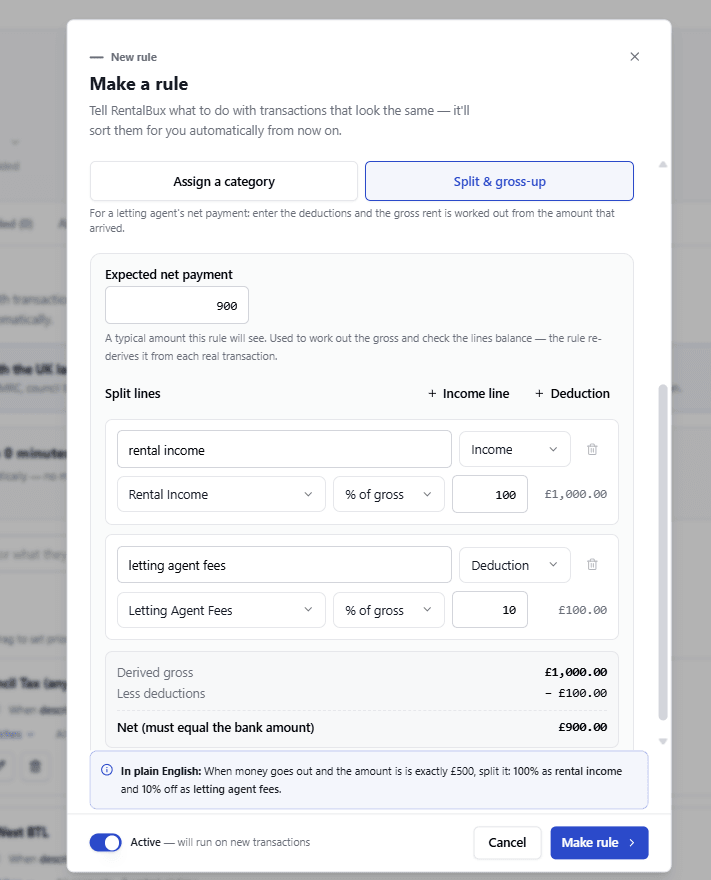
Splitting Letting Agent Payments With Split & Gross-Up |
|---|
If a letting agent collects your rent, they usually keep their commission and send you the rest. Say the rent is £10,000 and the agent keeps 10% (£1,000). Only £9,000 reaches your bank account, but your records should show:
Recording only the £9,000 that arrived would understate both your rent and your allowable expenses by £1,000, and those totals feed into your MTD quarterly updates. Split & gross-up is designed to work out both figures from the net amount automatically. |
Reviewing and Confirming
Rules do not post anything on their own. When a rule matches transactions in your To reconcile list, RentalBux shows a banner telling you how many were sorted by your bank rules, and each matched line carries a Rule tag.
Click Review & confirm to see the matched transactions in one grid, with the suggested category and property already filled in. You can untick any line, change the category or property, or split a line across categories. Nothing is reconciled until you click Reconcile.
Priority, Preview and Control
Priority. Rules run from top to bottom. If two rules match the same transaction, the higher rule wins.
View matches. Each rule shows how many transactions it currently matches, and you can open the list before you rely on it.
On and off. Every rule has a toggle. Turning a rule off removes its suggestions, and you can filter your rules by On or Off.
Search, edit and delete. You can search rules by name or by what they match. Deleting a rule stops future matching but leaves past results as they are.
The UK Landlord Rule Pack
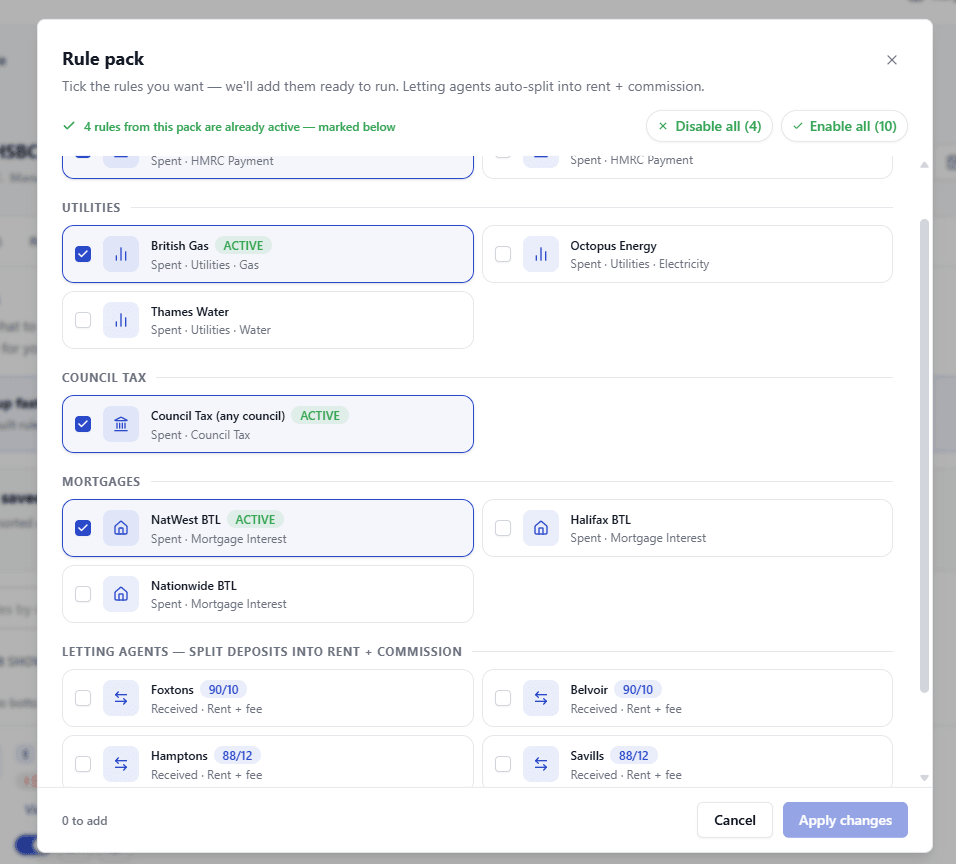
To save setting everything up from scratch, RentalBux includes a UK landlord rule pack with ready-made rules for common UK payees, including HMRC, British Gas, Octopus Energy, Thames Water, council tax, and buy-to-let lenders such as NatWest, Halifax and Nationwide. It also includes Split & gross-up rules for major letting agents, which divide a net deposit into rent and commission: Foxtons and Belvoir (90/10), Hamptons and Savills (88/12) and OpenRent (95/5). Tick the rules you want and click Apply changes. Rules already in use are marked Active when you return to the pack.
Common Bank Rule Mistakes Landlords Make
Using keywords that are too broad: A rule using only "NATWEST" might categorise different payments, such as mortgage payments, credit card bills or personal loans, under the same category. Use a more specific payment reference or amount to avoid mistakes.
Using keywords that are too specific: A council tax payment might appear as "BOROUGH COUNCIL" on your bank statement rather than "COUNCIL TAX". If your rule only looks for "COUNCIL TAX", it may miss the payment. Check your bank statement and use the actual transaction description.
Recording the full mortgage payment as interest: Mortgage payments may include both interest and capital repayments. Only the interest is treated as a finance cost. Recording the full payment as interest will make your finance costs appear higher than they actually are.
Recording only the net rent received from letting agents: Letting agents may deduct their fees before sending rent to landlords. For example, if the rent is £1,000 and the agent deducts £100, you receive £900. You should generally record £1,000 as rental income and £100 as letting agent fees, rather than recording only £900 as income.
Accepting suggested categories without checking: Bank rules can suggest categories, but they may not always be correct. Review the suggested transactions before confirming them to ensure your rental records are accurate.
Ignoring the order of bank rules: Sometimes, more than one rule may match the same transaction. In RentalBux, the rule placed higher in the list takes priority. Keep more specific rules above general rules to help transactions get the correct category.
Conclusion
Bank rules are one of the simplest ways to cut the time you spend on bookkeeping and to keep your categories consistent across MTD quarters. Keep each rule specific, use the wording from real bank transactions, and put your most specific rules at the top. For letting agent payments, use Split & gross-up so your records show gross rent and commission rather than the net amount, and check the split on the review screen every time.
Review every batch before you confirm it, and take particular care with mortgage payments, letting agent splits, tax payments, and anything you have already invoiced or billed. Automation makes accurate records easier to keep, but the responsibility for those records stays with you.