

Making Tax Digital (MTD) is a government initiative aimed at transforming the UK’s tax system into a more streamlined, efficient, and digitally accessible platform. For sole traders, this means moving away from paper-based record keeping and embracing digital tools to manage income tax submissions. With MTD, tax reporting will be done through compatible software, simplifying the process and reducing human errors. The goal is to make tax filing easier and more accurate while increasing transparency and reducing the burden on HMRC.
The total number of self-employed individuals in the UK is 4,063,000. Of this group, 2,040,000 will need to comply with Making Tax Digital (MTD) for income tax by 2028. This means that nearly 50% of all self-employed individuals in the UK are required to adopt the MTD system in the coming years.
Card Header
Key Highlights & Summary
MTD for Income Tax is a government initiative to transition from paper-based to digital tax reporting for sole traders.
4,063,000 self-employed individuals in the UK, with 2,040,000 required to comply with MTD by 2028.
Sole traders must use MTD-compatible software for digital record-keeping, quarterly updates and final declaration submission to HMRC.
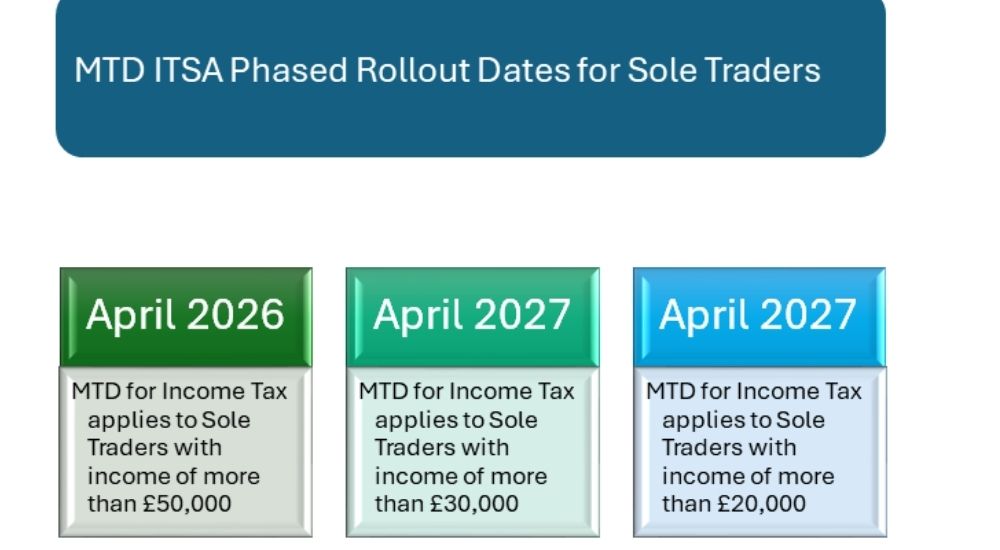
MTD applies for sole traders earning £50,000 (April 2026), £30,000 (April 2027), and £20,000 (April 2028).
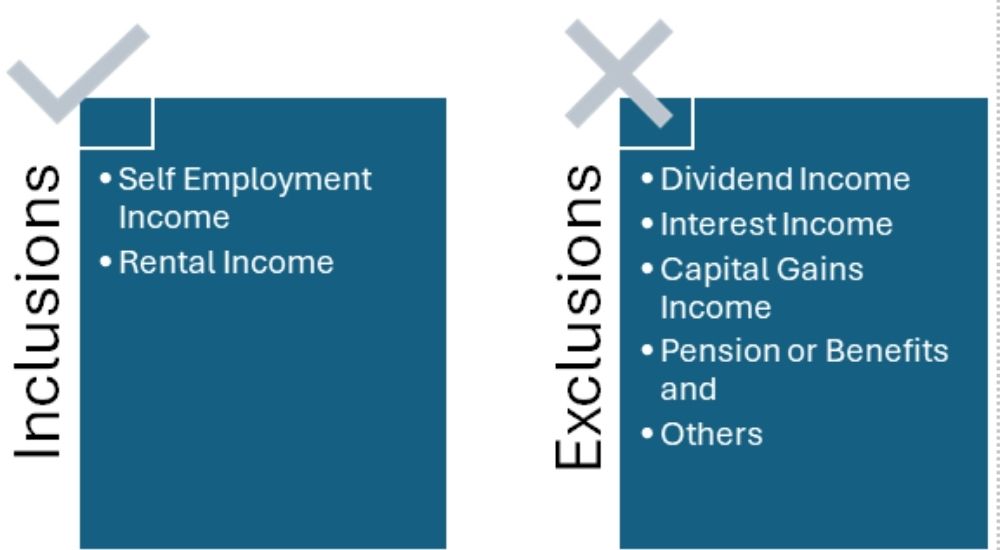
Qualifying Income includes self-employment and property rental income, but excludes dividends, interest, and pensions.
Sole traders must register for MTD with HMRC, link their business details, and receive an MTD reference number.
Sole traders who need to comply with MTD requires HMRC recognised software to record income, expenses, generate invoices, and submit quarterly tax updates automatically.
Sole traders earning below £20,000 are exempt from MTD unless the threshold changes. Those with income from pensions, interest, dividends, or capital gains may also be exempt. Additionally, sole traders with age, health issues, or limited internet access can claim exemptions.
Penalties for non-compliance are based on a points system for late submissions, with fines after accumulating points.
What is Making Tax Digital for Sole Traders?
Making Tax Digital (MTD) is a UK government initiative that aims to transform the way tax is managed and reported. For sole traders, MTD means transitioning from paper-based records to digital systems for managing income tax. Instead of filing a single annual tax return, sole traders will be required to submit their tax information quarterly via compatible software, making the process timelier and more accurate.
Card Header
Key Features:
Digital Tax Records: Sole traders will be required to maintain their financial records digitally, capturing income, expenses, and other relevant data automatically through accounting software.
Quarterly Submissions: Instead of annual tax returns, sole traders must submit updates to HMRC every quarter, reporting earnings and tax information in real time.
Real-Time Reporting: The new system allows for more accurate and up-to-date reporting, reducing errors and providing both the taxpayer and HMRC with a clearer view of tax obligations throughout the year.
Why it Matters:
MTD simplifies the tax process by eliminating the need for manual record-keeping, reducing the chances of human error, and ensuring tax compliance is up-to-date and accurate. This shift to digital also makes it easier for sole traders to stay on top of their finances, avoiding any last-minute rushes to file tax returns.
By streamlining the process, MTD helps reduce administrative burdens and penalties associated with late or incorrect filings. Ultimately, MTD ensures more efficient, transparent, and accurate reporting, which benefits both the taxpayer and HMRC.
Do Making Tax Digital (MTD) for income tax applies to sole traders?
MTD applies to self-employed individuals, sole traders, and certain businesses that meet specific criteria, such as annual turnover and the type of income they receive. The initiative is designed to simplify tax filing, improve accuracy, and ensure that businesses are up to date with their tax obligations.
Sole Traders and MTD
As a sole trader, you will need to comply with MTD if you meet these conditions:
Turnover Threshold: If your annual income is above the £50,000 threshold from self-employment or property rental income, you will need to comply with MTD starting April 2026. The threshold drops to £30,000 by April 2027 and £20,000 by April 2028.
Types of Income: Sole traders with income from self-employment or property must report their earnings through an MTD-compatible software, breaking down their income and expenses digitally for quarterly updates.
Required Actions: You'll need to use HMRC-approved software to maintain your records digitally, file quarterly updates, and make final tax submissions at the end of the year.
What Counts as Qualifying Income for MTD for Sole Traders?
For sole traders, qualifying income under Making Tax Digital (MTD) includes various sources of self-employed and business-related earnings. Some of the key income streams that count towards MTD compliance are:
Self-Employment Income: Income earned from running your own business or working as a freelancer. This includes fees from clients, sales, and commissions earned by providing services or goods.
Rental Income: If you’re a landlord, income earned from renting properties counts as qualifying income for MTD. This includes rent paid by tenants and income generated from property management.
Exclusions
Certain types of income do not count towards the qualifying income threshold for MTD compliance:
Dividend Income: Earnings from dividends paid on shares in a company, which are considered investment income and do not fall under MTD rules.
Interest Income: Money earned through interest on savings or investments also does not count as qualifying income for MTD.
Capital Gains: Profits from the sale of assets, such as property (excluding rental income) or investments, are also excluded.
Pension or Benefits: Income from pensions, state benefits, or other non-business-related sources is not considered qualifying income for MTD.
When Does MTD for Income Tax for Sole Trader Start?
The rollout of Making Tax Digital (MTD) for Income Tax for sole traders will occur in three stages, based on their qualifying income. Sole traders will need to comply with MTD from specific dates, depending on how much they earn annually. The first mandatory compliance date is April 2026 for sole traders earning more than £50,000.
What Sole Traders Need to Know:
If your annual income exceeds the specified threshold, you will be required to submit your income tax details quarterly through MTD-compatible software.
It’s crucial to start preparing now to ensure you can meet the requirements when your compliance date arrives.
Even if you’re not affected immediately, consider adopting digital record-keeping to stay ahead of the changes.
In summary, MTD for Income Tax will begin in April 2026 for those with higher income and gradually roll out for others, with full compliance required by April 2028.
Are Sole Traders Exempt from MTD for Income Tax?
Certain sole traders may be exempt from Making Tax Digital (MTD) for Income Tax. Generally, those with low turnover or income from certain types of sources may not need to comply with the new digital reporting requirements. Some common exemptions include:
Sole traders with turnover below £20,000: If your business income is below the £20,000 threshold, you are not required to comply with MTD even after April 2028 unless the government reduces the threshold criteria.
Certain types of income: Even if you're a sole trader with minimal income and a significant portion of your total income comes from pensions, interest, dividends, or capital gains, which do not count towards the qualifying income for MTD, you may be exempt from MTD requirements.
Age or disability-related exemptions: Sole traders with certain conditions, like age, health issues, or lack of reliable internet access that make it difficult to use digital tools, may also be exempt from MTD compliance.
How to Claim an Exemption:
If you believe you are eligible for an exemption from MTD, you need to:
Check Eligibility: Review the criteria provided by HMRC to ensure you qualify for an exemption. The HMRC Website provides detailed information on who can apply for an exemption.
Apply Through HMRC: To apply for an exemption, you must contact HMRC with your National Insurance number, your reason for exclusion, and other relevant details. While HMRC typically responds within 28 days, it's important to prepare for MTD in case your exemption isn't approved. If your circumstances change, you must inform HMRC.
Keep Records: Even if you are exempt, it’s important to maintain clear records of your income and business activities, as HMRC may request documentation to support your exemption claim.
What are the compliance requirements for sole traders under MTD for income tax?
There are three key requirements under MTD i.e. Using compatible software, maintaining digital records and making the tax submissions.
Use MTD Compatible Software
MTD-compatible software is essential for meeting the compliance requirements:
The software must allow you to digitally record income and expenses, generate invoices, and automatically track your business finances.
It must be able to send quarterly updates and final year-end summaries to HMRC without the need for manual input.
MTD-compatible software helps automate and simplify the compliance process, reducing human error and ensuring that all submissions meet the necessary requirements set by HMRC.
Digital Record-Keeping
Under Making Tax Digital for Income Tax, sole traders must maintain digital records for all business-related transactions. This includes:
Receipts: Keeping digital copies of receipts for expenses and income.
Invoices: Storing invoices issued to clients or customers in a digital format.
Financial Statements: Maintaining digital records of your financial statements, such as profit and loss, balance sheets, and other key documents.
These records must be accurate, up-to-date, and stored digitally to ensure smooth quarterly updates and end-of-year tax submissions.
Tax Submissions
Sole traders will be required to submit their income tax details digitally, following a quarterly reporting system:
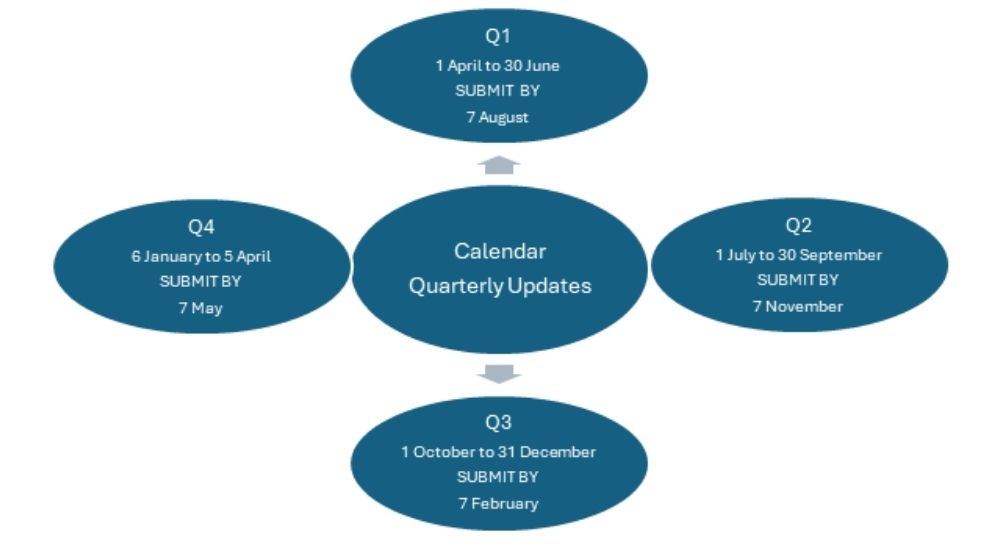
Quarterly Updates: Every quarter, you must submit updates to HMRC showing your income, expenses, and estimated tax liability. This replaces the traditional annual tax return. The default schedule for MTD ITSA updates is based on the tax year, running from 6 April to 5 April.
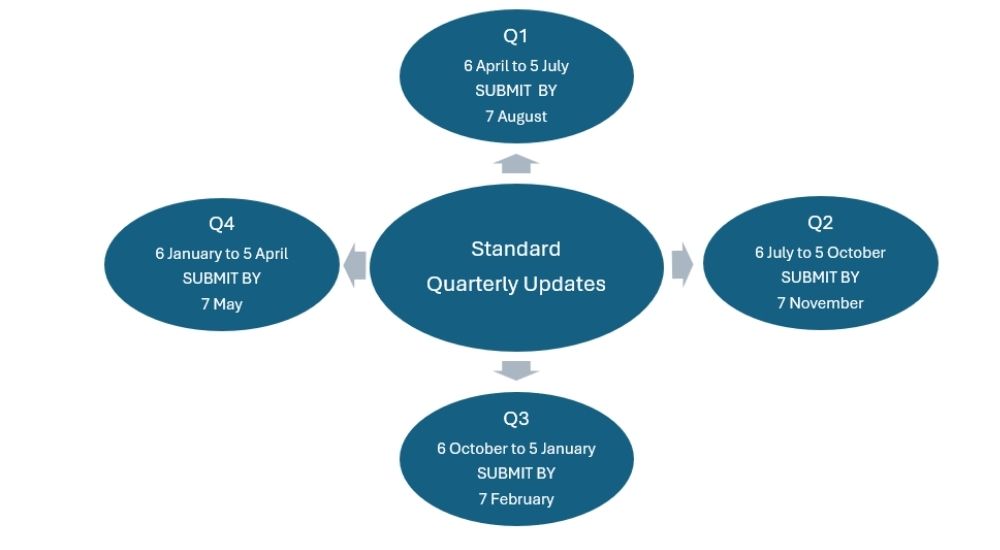
Alternatively, you can apply to use standard calendar quarters. This option aligns with the financial year for many businesses.
End-of-Year Submissions: At the end of the tax year, you will submit a final summary to HMRC. This confirms your earnings and ensures that any discrepancies from the quarterly updates are corrected. Both quarterly updates and the final end-of-year submission must be done electronically using MTD-compatible software.
What MTD-compatible software do sole traders need for income tax compliance?
To comply with Making Tax Digital (MTD) for Income Tax, sole traders must use HMRC-approved software that enables digital record-keeping and facilitates quarterly updates and end-of-year submissions. This transition is mandatory for those with qualifying income, starting from April 2026.
When selecting MTD-compatible software, consider the following features:
Ease of Use: User-friendly interfaces that simplify the transition to digital record-keeping.
Automation: Automated categorisation of income and expenses to reduce manual data entry.
HMRC Integration: Direct submission capabilities for quarterly updates and end-of-year declarations.
Multi-Income Support: Ability to manage various income streams, including self-employment and property income.
Cost: Free options are available but assess whether premium features justify the cost based on your business needs.
Note: RentalBux is tailored for landlords and sole traders, offering features like automated income and expense categorisation, bank reconciliation, and one-click quarterly submissions. It ticks all the features mentioned above. It supports UK property income, self-employment, and foreign property income. It is also free for one property or self-employment income unit until April 2028.
What Should I Do if I Qualify for MTD?
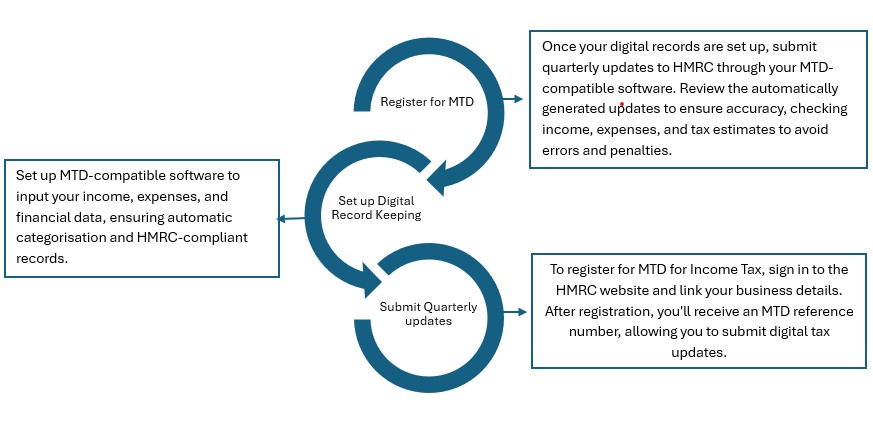
Once you confirm that you qualify for Making Tax Digital (MTD), you need to undertake the below steps:
Register for MTD
The first step is to register with HMRC.
Visit the HMRC website to create your account or sign in if you already have one.
You will need to register for MTD for Income Tax and link your business details to your HMRC account.
After registering, HMRC will send you an MTD reference number that confirms your enrolment in the system. This will allow you to start submitting digital updates for your tax information.
Set Up Digital Record-Keeping
Setting up an MTD-compatible software system is crucial for complying with MTD requirements.
Choose a software solution that integrates with HMRC (such as RentalBux).
Input your business income, expenses, and relevant financial data into the software.
The system should automatically categorise your income and expenses, generate invoices, and keep digital records that meet HMRC standards.
Ensure that your software also allows you to maintain and update records quarterly to avoid missing any deadlines.
Submit Quarterly Updates
Once your digital records are set up, you will need to submit quarterly updates to HMRC.
The software will generate these updates automatically, but you will need to review them to ensure all information is correct before submission.
Each quarter, submit your updates on your business income, expenses, and tax estimates to HMRC via the MTD-compatible software.
Ensure your quarterly submissions are error-free by double-checking income figures and deductions. This will help avoid penalties and ensure that your tax obligations are accurate and timely.
Compliance under MTD
Submit Your Final Declaration:
After submitting all four quarterly updates for the tax year, you will need to make a Final Declaration.
• Final declaration confirms your total income for the year across all sources, including self-employment, property, and any other income streams outside the scope of MTD.
• You can make final adjustments, add any reliefs or allowances, and ensure your figures are accurate before submitting.
• The submission and payment deadline remains the same as Self-Assessment, 31 January following the end of the tax year.
What Are the Costs of Compliance with MTD for Sole Traders?
Sole traders need to incur software costs, additional costs for accountants and tax agents and some hidden costs of learning the system and processes. They are explained in detail as under:
Software Costs
The primary cost of complying with Making Tax Digital (MTD) is the software used for digital record-keeping and submitting updates to HMRC. The costs for MTD-compatible software can vary depending on the platform and the features offered:
Free Software: Some solutions for landlords and self-employed sole traders, offer free versions for basic MTD compliance.
Paid Software: More comprehensive software options typically charge monthly or annual subscription fees, ranging from £10 to £30 per month or more, depending on the complexity of your business needs. These platforms usually offer additional features such as advanced reporting, multi-income tracking, and integration with bank accounts.
Additional Costs
Beyond software, there may be additional costs for professional support:
Accountants or Tax Agents: If you prefer not to manage your tax filings on your own, you might need to hire an accountant or tax agent to help with your MTD compliance. The costs of hiring an accountant can vary widely, typically ranging from £100 to £300 per hour or more, depending on the complexity of your business and the services required. Some accountants may offer fixed fees for MTD compliance.
Specialists for Complex Cases: If you have complex tax situations, such as multiple income streams, international income, or VAT obligations, you might require specialist advice, which could incur additional costs.
Hidden Costs
While the upfront and recurring costs are easier to identify, there are also indirect costs associated with transitioning to MTD compliance:
Time Spent Learning the System: If you're new to digital tools, there will be an investment of time in learning how to use the software. This could take several hours or days, especially if you’re managing your own records and submissions.
Updating Internal Processes: You may need to adjust your internal record-keeping practices to align with MTD. This could include training employees, creating new workflows, and ensuring your business operations are compatible with the new digital requirements.
Ongoing Time Commitments: Even with automated software, you’ll need to allocate time each quarter to review and submit your updates to HMRC. This regular commitment might also result in additional business hours dedicated to tax compliance.
Card Header
Did you know:
HMRC estimates that individuals within the £30,000 to £50,000 income bracket may face an average transitional cost of £350, with an additional annual cost of £110. Those earning above £50,000 could incur an average transitional cost of £285, along with an average annual additional cost of £115.
What Are the Penalties for Non-Compliance with MTD?
Failing to comply with Making Tax Digital (MTD) can result in fines and penalties from HMRC. These can include penalties for late submissions, inaccurate or incomplete records, and failure to use MTD-compatible software.
The penalty system for MTD for Income Tax Self-Assessment (MTD ITSA) now operates on a points-based system. Instead of automatic fines for late submissions, sole traders accumulate points for each late submission of their quarterly updates or final tax return.
For every missed deadline, points are added to your record.
Once a certain number of points is reached, a financial penalty will be applied.
For quarterly updates sole traders will receive one point for each late quarterly update submission whereas for the final annual submission (end-of-year tax return) if submitted late, an additional point is added.
The penalty system operates within rolling 24-month windows for the points-based system. This means that penalties are not automatically applied in the first year of compliance, but accumulate over time, allowing traders to have a clean slate if they maintain compliance going forward.
Common Mistakes Sole Trader Makes that Attracts Penalties
Some of the common reasons why sole traders fail to comply with MTD include:
Late Submissions
Missing quarterly deadlines for submitting income and tax updates.
Incomplete or Incorrect Records
Failing to keep accurate and complete digital records, leading to inaccurate submissions.
Avoiding Penalties
To avoid penalties, sole traders should:
Stay on top of deadlines: Ensure quarterly updates are submitted on time to avoid late submission fees.
Use MTD-Compatible Software: Adopt approved software that automates record-keeping and submissions, reducing the risk of errors.
Double-check your records: Review income, expenses, and tax estimates before submitting to ensure accuracy and completeness.
Where Can I Find More Support and Resources for MTD?
For official guidance on Making Tax Digital (MTD), visit the HMRC MTD website, which provides detailed instructions on compliance, registration, and reporting. HMRC also offers official documents and FAQs to help sole traders understand their obligations.
Card Header
You can find more resources on our website on RentalBux.
How Can Rentalbux Help with MTD Compliance for sole Traders?
RentalBux for MTD offers a comprehensive, MTD-compatible solution specifically designed to help sole traders stay compliant with Making Tax Digital. The software is tailored for both landlords and sole traders, streamlining income and expense management, while ensuring all financial records meet HMRC’s requirements. RentalBux helps sole traders stay organised and compliant by automating key processes, including tax submissions and record-keeping.
Automated Submissions
One of the standout features of RentalBux is its ability to automate quarterly submissions and year-end reports. The software automatically calculates and prepares the necessary tax updates for HMRC, ensuring that sole traders never miss a deadline. By automating these processes, RentalBux reduces the risk of errors, saves valuable time, and ensures that all submissions are accurate and compliant with MTD requirements.
Support for Sole Traders
RentalBux provides invaluable support for sole traders, eliminating the need for an accountant by simplifying tax management. The software automatically categorises income and expenses, generates invoices, and keeps digital records, all of which are essential for MTD compliance.
Additionally, RentalBux offers easy-to-understand reports and insights, making it simple for sole traders to stay on top of their tax obligations and ensuring they can manage their finances confidently without professional help.
Conclusion:
Ensuring MTD compliance for sole traders involves several key steps: registering with HMRC, setting up MTD-compatible software for accurate digital record-keeping, and submitting quarterly updates and year-end reports through the software. By staying on top of these requirements, sole traders can avoid penalties and simplify their tax management.
Don’t wait until the last minute, act now to ensure you are prepared for MTD and avoid costly fines. It’s essential to adopt the right tools and practices early on.
Explore more about MTD and how Rental Bux can help streamline your compliance process, making it easier for you to stay on top of your tax obligations without the need for an accountant. Start today and ensure smooth, hassle-free compliance.


