


Accounting Module
Learn how the Accounting Module serves as RentalBux's financial backbone, enabling you to manage, record, and report all financial transactions with accuracy and efficiency.
The Accounting Module in RentalBux serves as the platform's financial backbone, enabling users to manage, record, and report all financial transactions with accuracy and efficiency. It provides a structured environment for maintaining general ledger entries, reconciling transactions, and generating financial statements. This module is essential for ensuring compliance with accounting standards, supporting audit readiness, and providing transparency into the business's financial health.
Designed for landlords, property managers, and accounting teams, the module promotes collaboration by offering real-time access to financial records. It facilitates informed decision-making by delivering detailed reports and transaction histories while minimizing the risk of error through systematized processes.
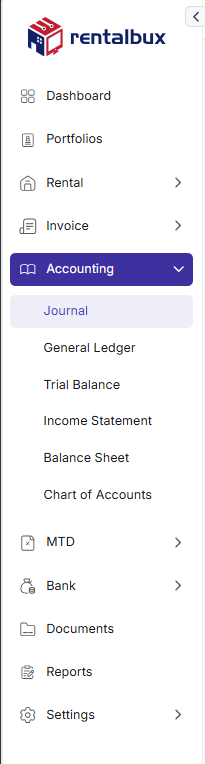
The module includes the following sub-modules:
Journal
Allows users to record financial transactions manually in the form of journal entries. Users can enter descriptions, select accounts from the chart of accounts, and include reference information for auditing or future verification. It forms the basis for all subsequent accounting reports.
General Ledger
Provides a detailed and categorized view of all financial transactions recorded across different accounts. Users can track the flow of money into and out of each account, helping them understand financial patterns, verify entries, and prepare accurate reports. The ledger is automatically updated based on journal entries, invoices, and bills.
Trial Balance
Summarizes the balances of all ledger accounts at a given point in time. It helps ensure that total debits equal total credits, a critical step in verifying the integrity of accounting records before finalizing financial statements. It is useful for accountants and business managers to identify discrepancies or missing entries early in the process.
Income Statement
Displays the company's revenues, costs, and expenses over a selected period. It helps users evaluate the profitability of the business, track income trends, and make informed financial decisions. It pulls data automatically from revenue and expense accounts for accuracy.
Balance Sheet
Displays the company's financial position at a specific date by listing assets, liabilities, and equity. It enables users to assess overall financial health, track changes in financial structure, and ensure compliance with financial reporting standards. It provides information for stakeholder reporting and strategic planning.
Chart of Accounts
Acts as the financial backbone of the system, defining all categories used for tracking business transactions. Users can customize, add, or disable account categories such as income, expenses, assets, and liabilities. Each transaction recorded in the system refers to an account from this chart to ensure consistency and structure in financial reporting.